
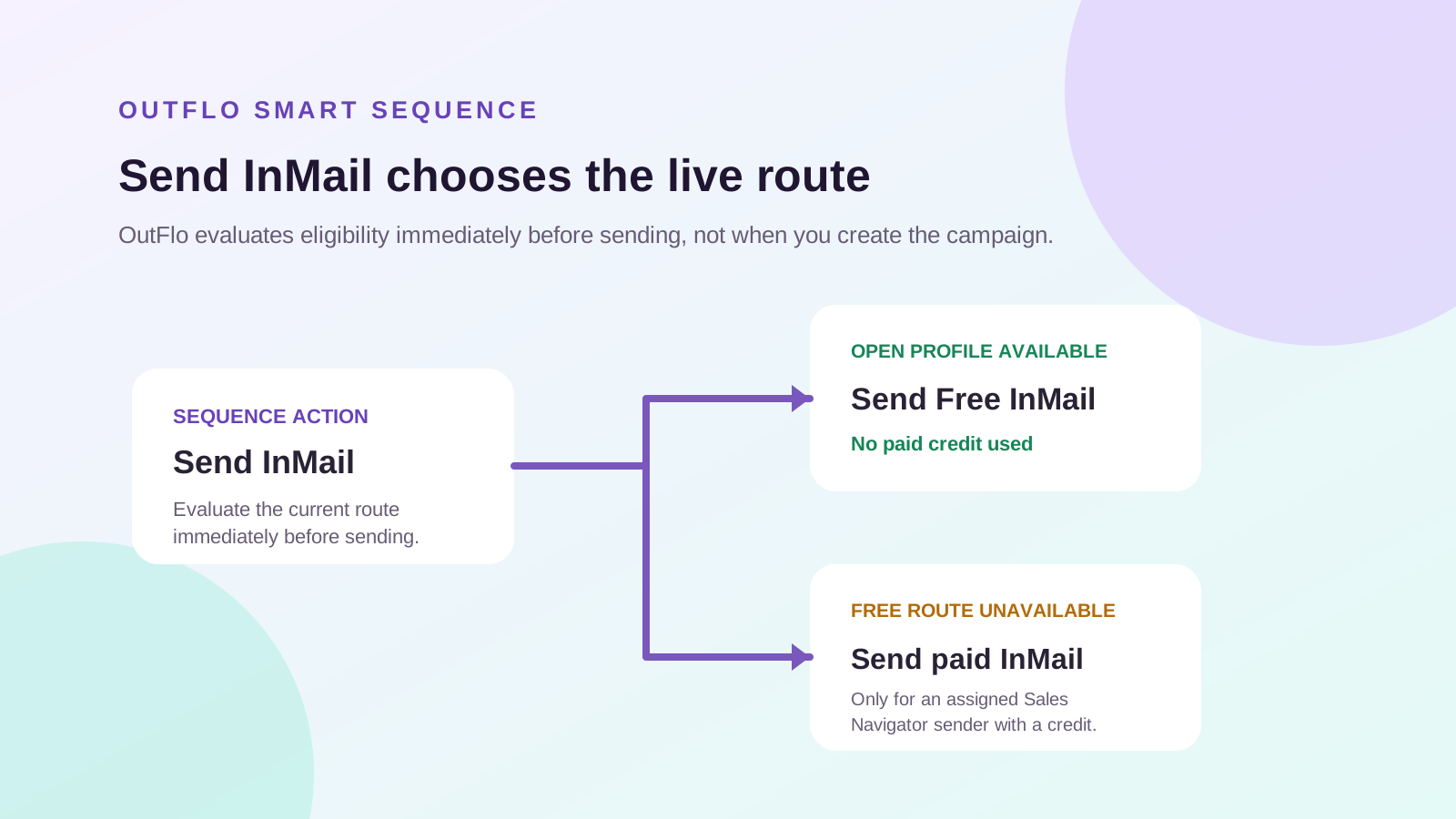
OutFlo does not claim to know which bulk leads are Open Profile when you create a campaign. That answer is not stable enough to be honest. Instead, OutFlo evaluates the message route immediately before the InMail action runs, when the result can still be used.
Use Send InMail to message a lead when possible. If LinkedIn offers a free Open Profile route at that moment, OutFlo sends a free InMail and does not use a paid credit. If the free route is unavailable, the same action can send a paid InMail only for a lead assigned to an eligible Sales Navigator sender with a credit.
If you need the LinkedIn definitions first, read LinkedIn InMail explained: free, paid, Open Profile and Sales Navigator.
The OutFlo message-routing map
- Lead condition at send time
- Already connected
- OutFlo action
- Send a normal LinkedIn message
- Paid credit used?
- None
- Lead condition at send time
- Not connected; free route available immediately before send
- OutFlo action
- Send InMail routes to free InMail automatically
- Paid credit used?
- None
- Lead condition at send time
- Not connected; free route unavailable immediately before send
- OutFlo action
- Send InMail uses paid InMail only for an assigned Sales Navigator sender with a credit
- Paid credit used?
- One credit
- Lead condition at send time
- You want to send only where the free route is available
- OutFlo action
- Use the dedicated Send Free InMail action
- Paid credit used?
- None
- Lead condition at send time
- Lead replies at any point
- OutFlo action
- Stop automation and hand over the conversation
- Paid credit used?
- None
| Lead condition at send time | OutFlo action | Paid credit used? |
|---|---|---|
| Already connected | Send a normal LinkedIn message | None |
| Not connected; free route available immediately before send | Send InMail routes to free InMail automatically | None |
| Not connected; free route unavailable immediately before send | Send InMail uses paid InMail only for an assigned Sales Navigator sender with a credit | One credit |
| You want to send only where the free route is available | Use the dedicated Send Free InMail action | None |
| Lead replies at any point | Stop automation and hand over the conversation | None |
There is no standalone bulk Check Open Profile action in the sequence builder. “Open Profile” is not a static column imported with your lead list. It is live eligibility evaluated for the specific sender at the point an InMail action is about to run.
Before you build the flow
You need:
- An active LinkedIn sender connected to the OutFlo workspace.
- A lead list and campaign.
- A short, relevant free InMail message.
- A decision on whether paid InMail is allowed at all.
You do not need Sales Navigator to use the free Open Profile route. Sales Navigator matters only when a particular sender may use OutFlo's paid Send InMail route, or when you want to import a Sales Navigator search.
How the two InMail actions work in a Smart Sequence
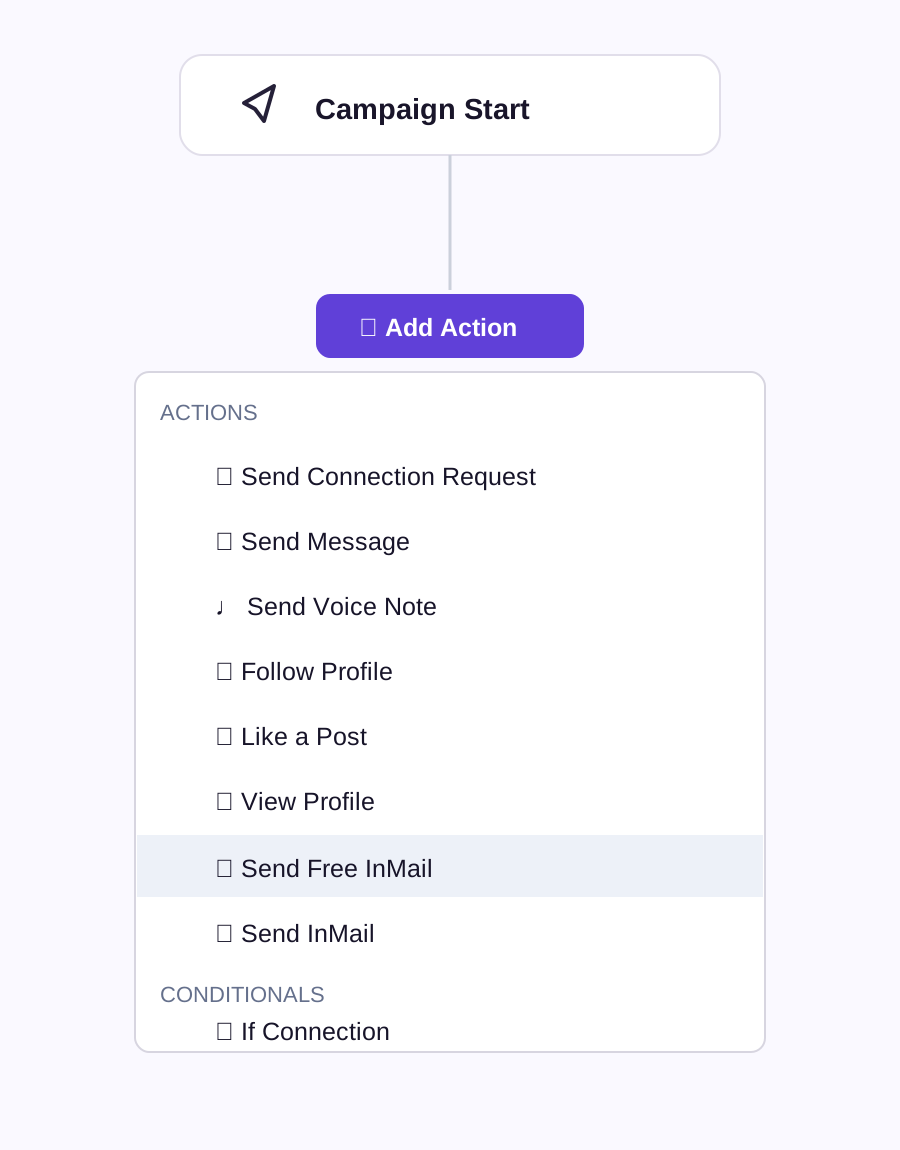
The action menu has Send Free InMail and Send InMail. They serve different campaign intent:
- Action
- Send Free InMail
- Use it when
- You never want to spend a paid credit
- What happens at send time
- The action sends only when LinkedIn offers the free Open Profile route. It does not fall back to paid InMail.
- Action
- Send InMail
- Use it when
- You want to reach both Open Profile and non-Open Profile leads
- What happens at send time
- OutFlo evaluates the route immediately before sending. Open Profile leads receive free InMail; other eligible leads use a paid credit only when assigned to a Sales Navigator sender with credits.
| Action | Use it when | What happens at send time |
|---|---|---|
| Send Free InMail | You never want to spend a paid credit | The action sends only when LinkedIn offers the free Open Profile route. It does not fall back to paid InMail. |
| Send InMail | You want to reach both Open Profile and non-Open Profile leads | OutFlo evaluates the route immediately before sending. Open Profile leads receive free InMail; other eligible leads use a paid credit only when assigned to a Sales Navigator sender with credits. |
1. Start with connection-aware logic
At the point where you would otherwise send a cold message, first check whether the prospect is already connected to the sender.
- Connected: use a normal LinkedIn message. It is free and usually the simplest conversation route.
- Not connected: choose the InMail action that matches your campaign intent.
This prevents a campaign from using an InMail-format action unnecessarily when the lead is already reachable by normal messaging.
2. Why OutFlo cannot provide an instant bulk Open Profile result
An Open Profile result is not a permanent fact about a lead. A profile that appears open today may not be open two days later. OutFlo therefore does not show a campaign-creation field that claims every imported lead is “Open Profile” or “not Open Profile.”
- Factor that can change the route
- Recipient's Open Profile setting
- Why a bulk result becomes stale
- The recipient can turn it on or off at any time.
- Factor that can change the route
- Recipient's Premium eligibility
- Why a bulk result becomes stale
- Open Profile requires Premium, so a subscription or eligibility change can remove the free route.
- Factor that can change the route
- Recipient's message preferences
- Why a bulk result becomes stale
- A recipient can restrict who can contact them or opt out of InMail.
- Factor that can change the route
- LinkedIn's sender-side message availability
- Why a bulk result becomes stale
- LinkedIn limits Open Profile messages over a period and can make the free route unavailable to one sender.
- Factor that can change the route
- Sender account state and recent activity
- Why a bulk result becomes stale
- Account maturity, health, and recent usage affect what can be attempted, but LinkedIn does not publish an exact formula.
- Factor that can change the route
- Time between campaign creation and the action
- Why a bulk result becomes stale
- Any snapshot becomes less useful the longer the lead waits in a sequence.
| Factor that can change the route | Why a bulk result becomes stale |
|---|---|
| Recipient's Open Profile setting | The recipient can turn it on or off at any time. |
| Recipient's Premium eligibility | Open Profile requires Premium, so a subscription or eligibility change can remove the free route. |
| Recipient's message preferences | A recipient can restrict who can contact them or opt out of InMail. |
| LinkedIn's sender-side message availability | LinkedIn limits Open Profile messages over a period and can make the free route unavailable to one sender. |
| Sender account state and recent activity | Account maturity, health, and recent usage affect what can be attempted, but LinkedIn does not publish an exact formula. |
| Time between campaign creation and the action | Any snapshot becomes less useful the longer the lead waits in a sequence. |
That is why a product claiming to provide a definitive, bulk, future-proof Open Profile list is overselling what the data can prove. It can only be a snapshot, not a sending guarantee.
3. What OutFlo actually provides: a live route evaluation at send time
OutFlo evaluates the route immediately before the InMail action performs. It does not present this as instant campaign-creation data and it does not store a bulk result as a permanent lead property.
- With Send Free InMail, OutFlo sends only when the free route is available at that moment.
- With Send InMail, OutFlo first uses the free route when it is available. Only when it is unavailable can it use a paid credit, and only for a lead assigned to an eligible Sales Navigator sender.
Can you check Open Profile outside OutFlo?
You can only check manually, one lead at a time, and it is still only a moment-in-time result. Sign in as the same LinkedIn sender that would message the lead, open the recipient's profile, and click Message. If you are only auditing the route, close the composer without sending.
- Method
- Manual LinkedIn profile check
- Useful for
- Auditing one high-priority lead immediately before outreach
- Limitation
- Not a reliable bulk list and not a future guarantee.
- Method
- OutFlo InMail action
- Useful for
- Evaluating the route at the moment a sequence is ready to message the lead
- Limitation
- Does not show an instant Open Profile field for every imported lead.
| Method | Useful for | Limitation |
|---|---|---|
| Manual LinkedIn profile check | Auditing one high-priority lead immediately before outreach | Not a reliable bulk list and not a future guarantee. |
| OutFlo InMail action | Evaluating the route at the moment a sequence is ready to message the lead | Does not show an instant Open Profile field for every imported lead. |
LinkedIn's manual Open Profile steps explain the individual profile flow. They do not provide a bulk, durable Open Profile lookup.
4. Stop when the prospect replies
Place a reply-aware stop condition after any outreach action. A reply is the point to move the conversation to a human or to your inbox workflow, not an excuse to keep a campaign running.
OutFlo's Smart Sequences are designed for behavior-based routing: different next steps for connected, not-connected, and replied leads instead of one fixed checklist.
A ready-to-build sequence map
Use this as a starting layout:
- 1.Check connection status.
- 2.If connected: send a regular message, then stop or wait for a reply.
- 3.If not connected and you want free-only outreach: use Send Free InMail.
- 4.If not connected and you want free plus paid fallback: use Send InMail.
- 5.At send time: Send InMail uses the free route for Open Profiles; otherwise it uses a paid credit only if the assigned sender is eligible.
- 6.If the lead replies at any point: stop automated actions and work the conversation in the inbox.
How to make sure you do not burn paid InMail credits
There are two controls: the InMail action you choose and the sender limit.
- Control
- Smart Sequence
- Set it this way when paid credits are off-limits
- Use Send Free InMail. It sends only on the free route and has no paid fallback.
- Control
- Send InMail action
- Set it this way when paid credits are off-limits
- Do not add it when paid credits are completely off-limits.
- Control
- Sender limits
- Set it this way when paid credits are off-limits
- Set a paid InMail limit of zero or leave paid InMail disabled for the sender, according to your workspace controls.
- Control
- Campaign review
- Set it this way when paid credits are off-limits
- Confirm the final visual flow has no paid InMail node before launch.
| Control | Set it this way when paid credits are off-limits |
|---|---|
| Smart Sequence | Use Send Free InMail. It sends only on the free route and has no paid fallback. |
| Send InMail action | Do not add it when paid credits are completely off-limits. |
| Sender limits | Set a paid InMail limit of zero or leave paid InMail disabled for the sender, according to your workspace controls. |
| Campaign review | Confirm the final visual flow has no paid InMail node before launch. |
OutFlo's sender-limit guide lists separate operating limits for paid InMail and free InMail, so teams can pace each action type independently. The exact safe ceiling should be configured for the maturity and health of each account rather than treated as a volume target.
The paid-InMail safety test before launch
Use this quick test in the campaign builder:
- Question
- Does any branch contain Send InMail?
- Safe answer when paid credits must not be spent
- No. Remove it when paid credits are completely off-limits.
- Question
- Does the campaign use Send Free InMail?
- Safe answer when paid credits must not be spent
- Yes. This action sends only through the free route.
- Question
- Does the sender's Paid InMail limit allow attempts?
- Safe answer when paid credits must not be spent
- 0, or keep the paid action disabled.
- Question
- Is a credit balance visible in LinkedIn?
- Safe answer when paid credits must not be spent
- It is irrelevant until you intentionally add a paid fallback.
| Question | Safe answer when paid credits must not be spent |
|---|---|
| Does any branch contain Send InMail? | No. Remove it when paid credits are completely off-limits. |
| Does the campaign use Send Free InMail? | Yes. This action sends only through the free route. |
| Does the sender's Paid InMail limit allow attempts? | 0, or keep the paid action disabled. |
| Is a credit balance visible in LinkedIn? | It is irrelevant until you intentionally add a paid fallback. |
This makes the campaign intent inspectable: a non-eligible lead cannot accidentally become a paid message just because a sender has credits left.
OutFlo InMail limits: free, paid, and live route evaluations
OutFlo keeps separate operating caps for each InMail-related action. Think of them as campaign pacing controls, not as LinkedIn account limits or credit balances. They apply per connected sender and are shared by that sender's campaigns over a rolling 24-hour window.
The 800 free InMail change: what it means in OutFlo
The old expectation was that a Sales Navigator sender could send up to around 800 free InMails a month to Open Profile recipients. That figure described observed free Open Profile volume, not 800 paid credits. Recent LinkedIn enforcement is stricter. Many senders now see roughly 5 free InMails a day or around 100 a month, and some accounts see lower availability.
LinkedIn has not published one fixed current Open Profile quota. OutFlo therefore does not promise 100 free InMails per month, and it does not design a campaign around the historical 800-message expectation. It checks the live route immediately before sending. If LinkedIn offers the free route, OutFlo sends a free InMail. If it does not, Send Free InMail skips the lead and Send InMail can use a paid fallback only when you have intentionally allowed it.
The paid-credit rule remains separate: Sales Navigator currently provides 50 paid InMail credits per month, with up to 150 accumulated credits. Free messages to connections or eligible Open Profiles do not consume those credits, and a qualifying reply can return a paid credit.
The current OutFlo sender-limit guidance distinguishes these InMail-related controls:
- Action type
- Free InMails to Open Profiles
- Current documented OutFlo safety ceiling
- Up to 30/day
- Practical meaning
- Campaign pacing rather than burst sending.
- Action type
- Paid InMails
- Current documented OutFlo safety ceiling
- Up to 30/day
- Practical meaning
- This is a pacing boundary; LinkedIn credit availability still governs whether the action can happen.
- Action type
- Live Open Profile evaluations
- Current documented OutFlo safety ceiling
- Up to 40/day
- Practical meaning
- An evaluation that happens close to the InMail action, not a standalone bulk check or an instant campaign-creation field.
| Action type | Current documented OutFlo safety ceiling | Practical meaning |
|---|---|---|
| Free InMails to Open Profiles | Up to 30/day | Campaign pacing rather than burst sending. |
| Paid InMails | Up to 30/day | This is a pacing boundary; LinkedIn credit availability still governs whether the action can happen. |
| Live Open Profile evaluations | Up to 40/day | An evaluation that happens close to the InMail action, not a standalone bulk check or an instant campaign-creation field. |
These are OutFlo operating ceilings, not a promise that LinkedIn will grant every sender 30 free messages, around 100 free messages a month, or 30 paid credits each day. LinkedIn's Open Profile availability and your subscription credit balance remain the ultimate constraints.
For new or lower-activity accounts, start lower and use Smart Auto-Increase rather than jumping to the ceiling. You can read more about that approach in How variable daily limits protect your LinkedIn account.
Where to check your paid InMail balance
LinkedIn is the source of truth for paid-credit balance. Check it before you add a paid fallback to a campaign:
- Account type
- Sales Navigator sender
- Where to check
- Open Sales Navigator -> Settings -> InMail.
- Account type
- Classic LinkedIn Premium sender
- Where to check
- Open My Premium on LinkedIn.
- Account type
- OutFlo campaign operator
- Where to check
- Use Account Details -> Sender Limits to control the maximum paid action rate; do not treat that rate cap as a credit balance.
| Account type | Where to check |
|---|---|
| Sales Navigator sender | Open Sales Navigator -> Settings -> InMail. |
| Classic LinkedIn Premium sender | Open My Premium on LinkedIn. |
| OutFlo campaign operator | Use Account Details -> Sender Limits to control the maximum paid action rate; do not treat that rate cap as a credit balance. |
This distinction avoids a common mistake: a sender limit tells OutFlo how much it is permitted to attempt. It does not create or transfer LinkedIn credits.
Do all campaign senders need Sales Navigator?
No. Not for free InMail, standard campaign actions, or Sales Navigator search sourcing. Separate the jobs:
- What you want to do
- Send a free message to an eligible Open Profile
- Does every sender need Sales Navigator?
- No
- The real requirement
- A connected sender and a free route available when the InMail action runs.
- What you want to do
- Run connection requests, normal messages, and reply-aware branches
- Does every sender need Sales Navigator?
- No
- The real requirement
- A connected LinkedIn sender.
- What you want to do
- Import a Sales Navigator search
- Does every sender need Sales Navigator?
- No
- The real requirement
- The account used to create the search needs Sales Navigator; other connected senders can work the imported list.
- What you want to do
- Use OutFlo's paid Send InMail branch
- Does every sender need Sales Navigator?
- Only for senders that may take that branch
- The real requirement
- Each of those senders needs Sales Navigator and its own current credit balance.
| What you want to do | Does every sender need Sales Navigator? | The real requirement |
|---|---|---|
| Send a free message to an eligible Open Profile | No | A connected sender and a free route available when the InMail action runs. |
| Run connection requests, normal messages, and reply-aware branches | No | A connected LinkedIn sender. |
| Import a Sales Navigator search | No | The account used to create the search needs Sales Navigator; other connected senders can work the imported list. |
| Use OutFlo's paid Send InMail branch | Only for senders that may take that branch | Each of those senders needs Sales Navigator and its own current credit balance. |
“At least one Sales Navigator account” is not a campaign-wide unlock
One Sales Navigator account can help source a search and can send its own paid InMails. It cannot lend credits or OutFlo paid-InMail eligibility to every sender in a multi-account campaign.
- Campaign setup
- Several standard senders + one Sales Navigator sender; free-InMail-only sequence
- What happens
- All senders can use the free route when eligible. No sender needs Sales Navigator for that route.
- Campaign setup
- Classic LinkedIn senders + Sales Navigator senders; paid fallback exists
- What happens
- The paid action works only for leads assigned to a Sales Navigator sender. A lead assigned to a classic LinkedIn sender cannot use that paid action.
- Campaign setup
- Every sender may send an OutFlo paid InMail
- What happens
- Every potential paid sender needs its own Sales Navigator account and its own credit balance.
| Campaign setup | What happens |
|---|---|
| Several standard senders + one Sales Navigator sender; free-InMail-only sequence | All senders can use the free route when eligible. No sender needs Sales Navigator for that route. |
| Classic LinkedIn senders + Sales Navigator senders; paid fallback exists | The paid action works only for leads assigned to a Sales Navigator sender. A lead assigned to a classic LinkedIn sender cannot use that paid action. |
| Every sender may send an OutFlo paid InMail | Every potential paid sender needs its own Sales Navigator account and its own credit balance. |
Build this explicitly in OutFlo rather than relying on a campaign-level assumption. The paid action belongs only on a branch and sender set you are prepared to spend from.
The important correction: credits do not decide Open Profile status
It is tempting to think that a lead is “free” when a Sales Navigator account has credits left and “not free” when it does not. That is backwards.
- Question
- Is this lead eligible for a free message?
- What actually decides it?
- The recipient's current Open Profile eligibility and the sender's current availability, evaluated immediately before the action runs.
- Question
- Can this sender send OutFlo's paid InMail if the free route is unavailable?
- What actually decides it?
- That lead must be assigned to a Sales Navigator sender with its own available credit and message permissions.
- Question
- Should this campaign spend a paid credit?
- What actually decides it?
- Your Smart Sequence branch and sender-limit choice.
| Question | What actually decides it? |
|---|---|
| Is this lead eligible for a free message? | The recipient's current Open Profile eligibility and the sender's current availability, evaluated immediately before the action runs. |
| Can this sender send OutFlo's paid InMail if the free route is unavailable? | That lead must be assigned to a Sales Navigator sender with its own available credit and message permissions. |
| Should this campaign spend a paid credit? | Your Smart Sequence branch and sender-limit choice. |
When a paid balance is empty, the campaign should simply not take a paid fallback. It does not change the recipient into an Open Profile or change the nature of a free InMail.
Message and measurement checklist
Before launching:
- Choose Send Free InMail when paid credits must never be used.
- Choose Send InMail when paid fallback is intentional and Open Profiles should still be messaged free.
- Confirm every potential paid lead is assigned to a Sales Navigator sender with credits.
- Check each paid sender's LinkedIn credit balance separately.
- Set a conservative, per-sender daily cap.
- Make the InMail message short, relevant, and specific to the lead.
- Stop automation when the lead replies and route the conversation to a human.
- Review results separately for free-route and paid-credit messages.
The goal is not to maximize InMail volume. It is to make each sender use the correct LinkedIn route, protect paid credits for the prospects that justify them, and avoid continuing automation after a real person replies.
Start an OutFlo trial to build this as a visual Smart Sequence across your connected LinkedIn accounts.
