
LinkedIn InMail is the way to message someone outside your 1st-degree network. That message can take a free route or a paid-credit route. The difference is not your copy; it is the relationship, the recipient's Open Profile setting, and the sending account's current ability to use that route.
Here is the fast answer:
- If the recipient is...
- Already a 1st-degree connection
- LinkedIn message route
- Normal LinkedIn message
- Credit used?
- None
- What to do
- Send a regular message.
- If the recipient is...
- A non-connection with Open Profile enabled
- LinkedIn message route
- Free InMail / Open Profile message
- Credit used?
- None
- What to do
- Send while the free route is available.
- If the recipient is...
- A non-connection without Open Profile
- LinkedIn message route
- Paid InMail
- Credit used?
- One credit
- What to do
- Use an eligible Premium or Sales Navigator credit.
| If the recipient is... | LinkedIn message route | Credit used? | What to do |
|---|---|---|---|
| Already a 1st-degree connection | Normal LinkedIn message | None | Send a regular message. |
| A non-connection with Open Profile enabled | Free InMail / Open Profile message | None | Send while the free route is available. |
| A non-connection without Open Profile | Paid InMail | One credit | Use an eligible Premium or Sales Navigator credit. |
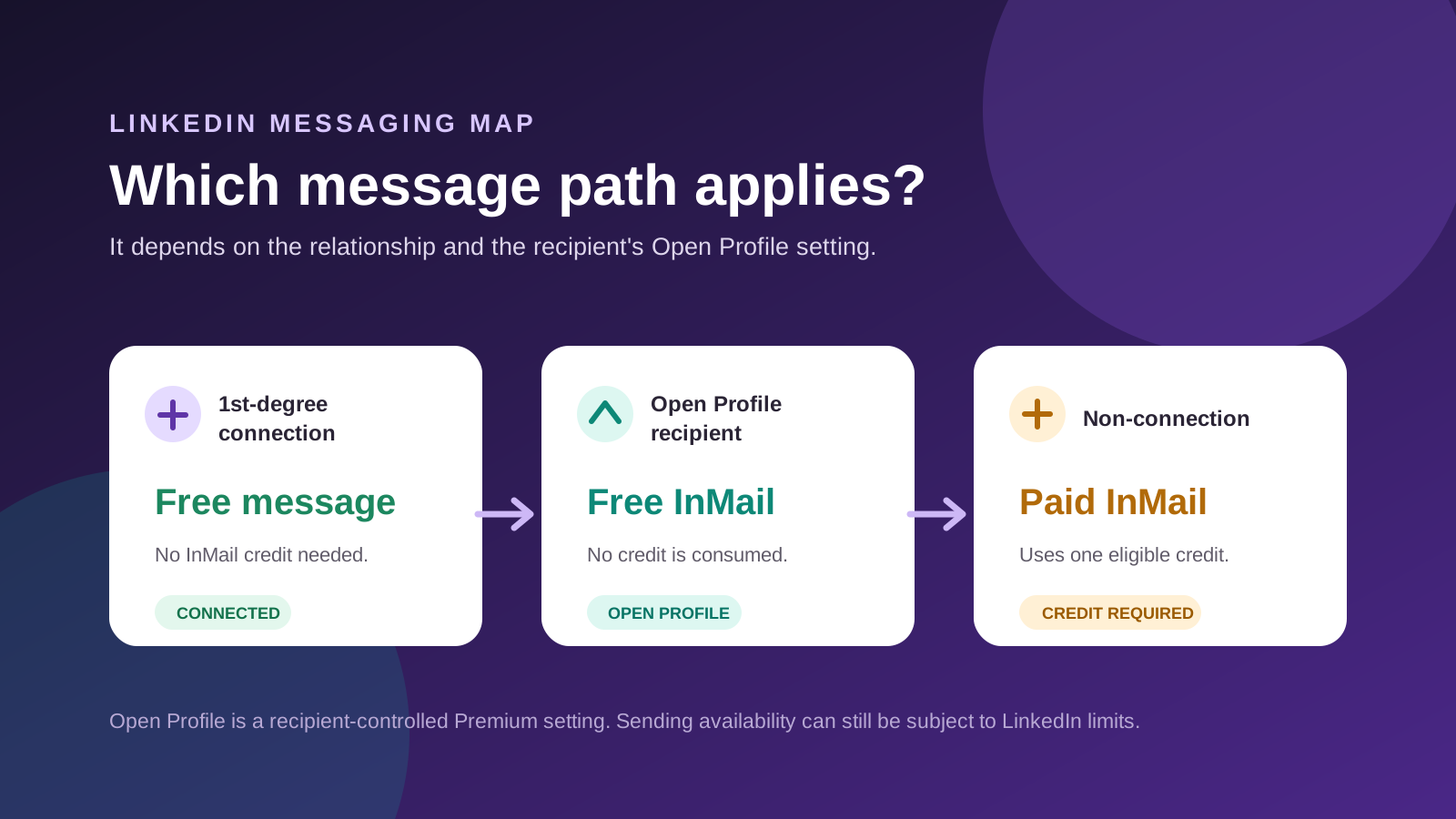
This guide explains the LinkedIn rules and the practical decision behind them. If you want to build the routes into an outreach campaign, go to LinkedIn InMail in OutFlo: free and paid routes, limits, and Smart Sequences.
What is LinkedIn InMail?
InMail is LinkedIn's direct-message format for contacting someone who is not your 1st-degree connection. A paid InMail needs an eligible Premium or Sales Navigator sending account and one available credit. A Basic account cannot normally use a paid credit to contact a closed, non-connected profile.
LinkedIn documents a subject limit of up to 200 characters. Its current help pages show a 2,000-character body limit for the general InMail composer and a 1,900-character body limit for the Sales Navigator composer, so follow the live counter in the composer you are using. A recipient can also opt out of receiving InMail, which removes the paid route entirely. That is the explanation you need day to day; LinkedIn's InMail help and Sales Navigator's sending guide are here only if you want to verify the product rule.
What people mean by free InMail
“Free InMail” is LinkedIn's Sales Navigator label for a no-credit message route. It does not mean a paid InMail made free by a promotion, and it does not mean unlimited cold messages.
- Route
- 1st-degree connection
- What LinkedIn calls it
- Normal LinkedIn message; “free InMail” in Sales Navigator
- Who can receive it
- Someone already connected to the sender
- Credit result
- No credit used
- Route
- Open Profile recipient
- What LinkedIn calls it
- Free InMail / Open Profile message
- Who can receive it
- A Premium recipient who has Open Profile enabled and is currently available to the sender
- Credit result
- No credit used
- Route
- Closed, non-connected recipient
- What LinkedIn calls it
- Paid InMail
- Who can receive it
- Someone who accepts InMail and is not available through the free route
- Credit result
- One sender-owned credit used
| Route | What LinkedIn calls it | Who can receive it | Credit result |
|---|---|---|---|
| 1st-degree connection | Normal LinkedIn message; “free InMail” in Sales Navigator | Someone already connected to the sender | No credit used |
| Open Profile recipient | Free InMail / Open Profile message | A Premium recipient who has Open Profile enabled and is currently available to the sender | No credit used |
| Closed, non-connected recipient | Paid InMail | Someone who accepts InMail and is not available through the free route | One sender-owned credit used |
The useful definition is therefore: free InMail = a message LinkedIn sends without deducting an InMail credit. It is a route, not a separate balance that you buy.
Free InMail vs paid InMail: the visual map
Think of the decision in this order:
- 1.Are you already connected? Send a regular free message.
- 2.If not, is the recipient currently eligible for Open Profile messaging? Send a free Open Profile message.
- 3.If neither applies, do you want to spend a paid credit? Send a paid InMail if the recipient accepts InMail and your sending account has an eligible credit.
This order matters. If LinkedIn recognizes the recipient as Open Profile at the point of sending, it uses the free route rather than deducting a paid credit. In Sales Navigator, LinkedIn calls both connection messages and Open Profile messages “free InMails.” That explanation is already in the guide; LinkedIn's Sales Navigator message-type page is the optional source.
What is an Open Profile?
Open Profile is a LinkedIn Premium setting the recipient can turn on. When it is enabled, LinkedIn allows people outside that recipient's network to contact them for free rather than through the paid-credit route.
The recipient can show their Premium badge without enabling Open Profile. So a Premium badge is not proof that a free message is available. The Open Profile setting is separate. LinkedIn's Open Profile overview is the optional source for that distinction.
- Term
- Premium membership
- Who controls it?
- Recipient
- What it changes
- Gives the recipient access to Premium features.
- Term
- Open Profile
- Who controls it?
- Premium recipient
- What it changes
- Makes a no-credit message route possible for people outside their network.
- Term
- InMail credit balance
- Who controls it?
- Sender's plan and usage
- What it changes
- Determines whether the sender can use the paid fallback.
| Term | Who controls it? | What it changes |
|---|---|---|
| Premium membership | Recipient | Gives the recipient access to Premium features. |
| Open Profile | Premium recipient | Makes a no-credit message route possible for people outside their network. |
| InMail credit balance | Sender's plan and usage | Determines whether the sender can use the paid fallback. |
How many free InMails can I send?
LinkedIn does not publish one universal “5 a day” or “100 a month” allowance for Open Profile messages. Its published wording is simply that it limits Open Profile messages over a given period to keep the platform safe and professional.
The 800 free InMail expectation, and what changed
For a long time, Sales Navigator users and automation tools reported being able to send up to around 800 free InMails a month to Open Profile recipients. That was an observed free-message ceiling, not an allocation of 800 paid InMail credits.
Recent reports from Sales Navigator users indicate that LinkedIn has made Open Profile enforcement stricter. Many senders now report getting roughly 5 free InMails a day or around 100 a month, with some accounts receiving less. LinkedIn has not published a changelog, a universal 100-message entitlement, or a formula that says exactly which sender gets which limit. Treat 100 as a practical current expectation, not a guarantee.
The paid-credit rule is separate: Sales Navigator currently provides 50 paid InMail credits per month, with a maximum balance of 150. Paid credits are for the closed-profile route. They do not create the free Open Profile route and they are not the former 800-message volume.
- Number you may hear
- Up to 800 free InMails a month on Sales Navigator
- Can you plan around it?
- No, this is no longer a safe planning number
- What it actually means
- A historically observed Open Profile ceiling. It was never an official paid-credit allocation.
- Number you may hear
- 5 free InMails a day
- Can you plan around it?
- Use as an approximate current expectation only
- What it actually means
- A community-reported result of stricter Open Profile enforcement, not a public LinkedIn allowance.
- Number you may hear
- Around 100 free InMails a month
- Can you plan around it?
- Use as an approximate current expectation only
- What it actually means
- A common current observation, not a universal account entitlement. Some senders can receive less.
- Number you may hear
- 50 paid InMails a month on Sales Navigator
- Can you plan around it?
- Yes, for paid-credit planning
- What it actually means
- LinkedIn's current Sales Navigator credit allocation. It is separate from free Open Profile volume.
- Number you may hear
- A limit over a period
- Can you plan around it?
- Yes, as a constraint
- What it actually means
- The only rule LinkedIn currently publishes for Open Profile messages.
| Number you may hear | Can you plan around it? | What it actually means |
|---|---|---|
| Up to 800 free InMails a month on Sales Navigator | No, this is no longer a safe planning number | A historically observed Open Profile ceiling. It was never an official paid-credit allocation. |
| 5 free InMails a day | Use as an approximate current expectation only | A community-reported result of stricter Open Profile enforcement, not a public LinkedIn allowance. |
| Around 100 free InMails a month | Use as an approximate current expectation only | A common current observation, not a universal account entitlement. Some senders can receive less. |
| 50 paid InMails a month on Sales Navigator | Yes, for paid-credit planning | LinkedIn's current Sales Navigator credit allocation. It is separate from free Open Profile volume. |
| A limit over a period | Yes, as a constraint | The only rule LinkedIn currently publishes for Open Profile messages. |
That means:
- Do not plan a campaign around the old 800-message expectation.
- Treat 5/day or around 100/month as a current operating estimate, then monitor the actual result for every sender.
- Do not promise any fixed free-InMail number to a team or client. LinkedIn can change enforcement and availability without making a universal quota public.
- Basic (free) senders are explicitly limited to a number of Open Profile messages each month, but LinkedIn does not publish that number.
- Check the message route immediately before sending. A free route that was available last week may not be available when a campaign reaches that lead.
In short: free InMail has a LinkedIn limit, but LinkedIn has not published the number. Its Open Profile message page is available if you need to validate that policy.
Why check Open Profile at send time
The recipient's Open Profile setting is the starting point. But in an outreach workflow, the relevant question is still:
Can this specific sender send this specific lead a free message right now?
The route can change over time because the recipient can turn Open Profile off, change message preferences, or lose Premium eligibility. Separately, LinkedIn limits the number of Open Profile messages a sender can send over a period. LinkedIn does not publish an individual eligibility formula, so treat the route as a current sending outcome rather than a permanent lead attribute.
- Same recipient
- Open Profile currently enabled
- What LinkedIn documents
- LinkedIn limits the number of Open Profile messages a sender can send over a period. It does not publish a sender-by-sender availability formula.
- What you should do
- Check the route from the sender that will act, close to the message.
- What to conclude
- The lead is not universally free; treat eligibility as a current sending outcome.
| Same recipient | What LinkedIn documents | What you should do | What to conclude |
|---|---|---|---|
| Open Profile currently enabled | LinkedIn limits the number of Open Profile messages a sender can send over a period. It does not publish a sender-by-sender availability formula. | Check the route from the sender that will act, close to the message. | The lead is not universally free; treat eligibility as a current sending outcome. |
LinkedIn does not publish a formula that maps account maturity, account health, or recent activity to Open Profile availability. Treat claims about exact maturity-based free-InMail limits as observations, not documented policy.
So an Open Profile result should be stored and used as live routing information, not static enrichment. Check again when you are ready to act. This is especially important when an agency rotates multiple client-owned sender accounts through one lead list.
Paid InMails: how credits work
If the recipient is not a connection and not currently eligible for Open Profile messaging, LinkedIn uses a paid InMail credit. The credit belongs to the individual sending account and subscription. It is not a shared pool across your whole sales team.
LinkedIn's Sales Navigator help says InMail messages cannot be sent in bulk to multiple leads. Treat each InMail as an individual, personalized message. A monthly credit allowance is not a bulk-send entitlement. Read LinkedIn's Sales Navigator sending rule if you need the official wording.
Does an Open Profile message automatically stay free?
Yes. When LinkedIn offers the Open Profile route at the moment you send, it sends as free InMail and does not deduct a paid InMail credit. You do not choose “free” by selecting a different credit balance, and you should not add a paid fallback merely because one is available.
- At send time
- Recipient is a 1st-degree connection
- What LinkedIn does
- Sends a normal message / free InMail in Sales Navigator
- Paid credit result
- No credit used
- At send time
- Recipient is eligible through Open Profile
- What LinkedIn does
- Sends free InMail / Open Profile message
- Paid credit result
- No credit used
- At send time
- Recipient is not eligible through either free route
- What LinkedIn does
- Requires paid InMail if the recipient accepts InMail and the sender has a credit
- Paid credit result
- One credit used
| At send time | What LinkedIn does | Paid credit result |
|---|---|---|
| Recipient is a 1st-degree connection | Sends a normal message / free InMail in Sales Navigator | No credit used |
| Recipient is eligible through Open Profile | Sends free InMail / Open Profile message | No credit used |
| Recipient is not eligible through either free route | Requires paid InMail if the recipient accepts InMail and the sender has a credit | One credit used |
The caveat is timing: a prior profile check is not a reservation. Re-check close to the action because recipient settings and sender-side availability can change.
Do Sales Navigator credits decide whether a message is free?
No. This is the most common mix-up. Sales Navigator gives a sender more paid-InMail capacity; it does not turn a closed profile into Open Profile and it does not decide whether a free message is available.
- Question
- Can this lead receive a free message now?
- Decided by
- Recipient's current Open Profile eligibility and the sender's current free-message availability
- Not decided by
- How many paid credits the sender has left
- Question
- Can this sender take the paid fallback?
- Decided by
- The sender's own Premium or Sales Navigator subscription, credit balance, and recipient's InMail permissions
- Not decided by
- The recipient being Premium or Open Profile
- Question
- What happens when paid credits reach zero?
- Decided by
- The paid fallback cannot send
- Not decided by
- Open Profile status does not change
| Question | Decided by | Not decided by |
|---|---|---|
| Can this lead receive a free message now? | Recipient's current Open Profile eligibility and the sender's current free-message availability | How many paid credits the sender has left |
| Can this sender take the paid fallback? | The sender's own Premium or Sales Navigator subscription, credit balance, and recipient's InMail permissions | The recipient being Premium or Open Profile |
| What happens when paid credits reach zero? | The paid fallback cannot send | Open Profile status does not change |
So the claim that “with Sales Navigator, free InMail is mostly based on credits left” is backwards. Credits only matter after the free route is unavailable.
Paid InMail credits: allocations, refunds and accrual
- Subscription
- Premium Career
- Monthly paid InMail credits
- 5
- Maximum balance LinkedIn lists
- 15
- Subscription
- Premium Business
- Monthly paid InMail credits
- 15
- Maximum balance LinkedIn lists
- 45
- Subscription
- Sales Navigator Core
- Monthly paid InMail credits
- 50
- Maximum balance LinkedIn lists
- 150
- Subscription
- Sales Navigator Advanced
- Monthly paid InMail credits
- 50
- Maximum balance LinkedIn lists
- 150
- Subscription
- Sales Navigator Advanced Plus
- Monthly paid InMail credits
- 50
- Maximum balance LinkedIn lists
- 150
| Subscription | Monthly paid InMail credits | Maximum balance LinkedIn lists |
|---|---|---|
| Premium Career | 5 | 15 |
| Premium Business | 15 | 45 |
| Sales Navigator Core | 50 | 150 |
| Sales Navigator Advanced | 50 | 150 |
| Sales Navigator Advanced Plus | 50 | 150 |
Here is the practical version: Premium Career gets 5 credits each billing cycle (up to 15 saved); Premium Business gets 15 (up to 45); and every current Sales Navigator tier gets 50 per calendar month (up to 150). Credits are personal to the LinkedIn sender and do not move between Premium, Sales Navigator, Recruiter, or another teammate's account. If your own balance differs, use the figure shown in My Premium or Sales Navigator Settings. LinkedIn's credit page and Sales Navigator's credit guide are there for verification, not as a substitute for this explanation.
When do you get a credit back?
Paid credits are designed to reward messages that create a response. LinkedIn says it returns a paid InMail credit when the recipient accepts, declines, or responds directly within 90 days. That includes qualifying quick replies, such as “Interested,” “Maybe later,” or “Not interested.”
- Result after sending a paid InMail
- Recipient responds within 90 days
- What happens to the credit?
- Returned to the sender's account.
- Result after sending a paid InMail
- Recipient does not respond
- What happens to the credit?
- Not returned.
- Result after sending a paid InMail
- You try to send another InMail before they respond
- What happens to the credit?
- In Sales Navigator, LinkedIn says another credit is used. Its general InMail help says a further InMail cannot be sent until the recipient responds. Follow the composer you are using.
- Result after sending a paid InMail
- You cancel or change the qualifying subscription
- What happens to the credit?
- Credits do not transfer to the new plan.
| Result after sending a paid InMail | What happens to the credit? |
|---|---|
| Recipient responds within 90 days | Returned to the sender's account. |
| Recipient does not respond | Not returned. |
| You try to send another InMail before they respond | In Sales Navigator, LinkedIn says another credit is used. Its general InMail help says a further InMail cannot be sent until the recipient responds. Follow the composer you are using. |
| You cancel or change the qualifying subscription | Credits do not transfer to the new plan. |
Here is the simple timing rule: Sales Navigator adds 50 credits on the first day of each month (UTC), not on your licence anniversary. Unused credits can roll forward until the balance reaches 150, but each unused Sales Navigator credit must be used within 90 days. Premium credits renew on the first day of that account's billing cycle, rather than on the calendar-month rule. LinkedIn does not currently sell extra Sales Navigator credit packs.
Sales Navigator vs classic LinkedIn Premium
Both products can give you a way to send paid InMail, but they are not the same pool.
- Question
- Main purpose
- LinkedIn Premium
- Professional networking; job search; business features
- Sales Navigator
- Sales prospecting; account research; lead workflows
- Question
- Paid InMail allowance
- LinkedIn Premium
- Career: 5/month; Business: 15/month
- Sales Navigator
- 50/month across Core, Advanced, and Advanced Plus
- Question
- Credit renewal
- LinkedIn Premium
- First day of that account's billing cycle
- Sales Navigator
- First day of each calendar month (UTC)
- Question
- Maximum saved balance
- LinkedIn Premium
- Career: 15; Business: 45
- Sales Navigator
- 150; unused credits expire after 90 days
- Question
- Can credits be used interchangeably?
- LinkedIn Premium
- No
- Sales Navigator
- No - Sales Navigator has its own balance
- Question
- Do you need it for an Open Profile message?
- LinkedIn Premium
- Not required
- Sales Navigator
- Not required
- Question
- Does it make more leads Open Profile?
- LinkedIn Premium
- No
- Sales Navigator
- No
- Question
- Best reason to buy it
- LinkedIn Premium
- The Premium feature set fits your role
- Sales Navigator
- Sales search filters, saved leads, and a larger paid-InMail allowance
| Question | LinkedIn Premium | Sales Navigator |
|---|---|---|
| Main purpose | Professional networking; job search; business features | Sales prospecting; account research; lead workflows |
| Paid InMail allowance | Career: 5/month; Business: 15/month | 50/month across Core, Advanced, and Advanced Plus |
| Credit renewal | First day of that account's billing cycle | First day of each calendar month (UTC) |
| Maximum saved balance | Career: 15; Business: 45 | 150; unused credits expire after 90 days |
| Can credits be used interchangeably? | No | No - Sales Navigator has its own balance |
| Do you need it for an Open Profile message? | Not required | Not required |
| Does it make more leads Open Profile? | No | No |
| Best reason to buy it | The Premium feature set fits your role | Sales search filters, saved leads, and a larger paid-InMail allowance |
One useful distinction: Sales Navigator can make finding and organizing prospects much better, but it does not turn every non-connection into a free message. Open Profile remains a recipient-controlled free route. Credits cover the people who do not qualify for that route.
How to protect paid credits
Use paid InMail deliberately. A simple, low-waste process is:
- 1.Send a connection request first when the prospect and use case support it.
- 2.If the person does not connect, check whether the recipient is currently eligible for an Open Profile message.
- 3.Use the free route for high-priority Open Profiles.
- 4.Use paid InMail only for prospects valuable enough to justify a credit and who cannot be reached through the free route.
- 5.Keep the paid message specific and short enough to invite a reply, because a qualifying reply returns the credit.
For an automated version of this routing logic, see our OutFlo free InMail guide. It shows how to branch on connection and Open Profile status before a campaign sends anything.
Quick answers
- Question
- Do I need Sales Navigator to send a free InMail?
- Answer
- No. Free Open Profile messaging does not need a Sales Navigator credit.
- Question
- Will a message to an Open Profile consume a paid credit?
- Answer
- No, if LinkedIn recognizes it as an eligible Open Profile message at send time.
- Question
- Does 50 Sales Navigator credits mean 50 free InMails?
- Answer
- No. Those are paid InMail credits; free Open Profile messages do not consume them.
- Question
- Is an Open Profile flag permanent?
- Answer
- No. Treat it as a current eligibility check from the sender that will act.
- Question
- Can I use one sender's credits for another sender?
- Answer
- No. Credits belong to the account and subscription that sends the message.
| Question | Answer |
|---|---|
| Do I need Sales Navigator to send a free InMail? | No. Free Open Profile messaging does not need a Sales Navigator credit. |
| Will a message to an Open Profile consume a paid credit? | No, if LinkedIn recognizes it as an eligible Open Profile message at send time. |
| Does 50 Sales Navigator credits mean 50 free InMails? | No. Those are paid InMail credits; free Open Profile messages do not consume them. |
| Is an Open Profile flag permanent? | No. Treat it as a current eligibility check from the sender that will act. |
| Can I use one sender's credits for another sender? | No. Credits belong to the account and subscription that sends the message. |
Turn the decision into a campaign, not a manual check
The useful workflow is not “send more InMails.” It is “use the lowest-cost valid route for the right prospect, then stop when they reply.” OutFlo's Smart Sequences can check the condition and route the lead accordingly across connected senders.
See how to send free InMails in OutFlo, or start an OutFlo trial when you are ready to build the workflow.
