Everything HeyReach does, plus a few things

    HeyReach vs OutFlo: which is right for your agency?

    This HeyReach vs OutFlo comparison is straightforward: HeyReach is a solid tool. We will not pretend otherwise.

    If you are looking for a HeyReach alternative, OutFlo does everything HeyReach does, plus a few things. The differences show up after launch: whether accounts stay connected, replies arrive while they are warm, campaigns hold the limits you set, and something helps answer the inbox.

    8-day free trialOne-minute setupNo credit card

    Where should you start?

    Choose your workflow to jump to the section that matters most.

    You run accounts for clients who notice when a campaign sends nothing on Wednesday.

    Reliability starts at connection

    Most client onboarding dies at “send me your LinkedIn login.”

    You generate a link and send it to the person who owns the profile. They click it and connect from their own machine, without handing over a password or being added to a workspace.

    The same flow works for a new account and for one that disconnected this morning. Agencies replace a credentials conversation with one instruction: click this.

    Accounts disconnect rarely on OutFlo. When one does, it is the same link and the same three steps.

    Underneath the link, the owner chooses direct session sync through the OutFlo extension or the secure cloud agent.

    Generate invite linkStep 1 of 3
    1. 1

      Send the link

      The owner opens it on their device.

    2. 2

      Choose a sync method

      Use the extension or secure cloud agent.

    3. 3

      Connect in under a minute

      OutFlo assigns the account infrastructure.

    Every account gets its own residential IP, and we handle it.

    Each LinkedIn account gets a dedicated residential IP geolocated to its owner. A profile in Berlin runs from Berlin: one account, one IP and one stable location.

    The address is not shared with other senders. This isolates each profile’s infrastructure instead of allowing one account’s pattern to become a pattern across several.

    OutFlo manages the proxy relationship, configuration and location. Teams with their own proxy infrastructure can use it instead.

    Compare proxy responsibilities and cost

    HeyReach’s pricing page says Starter includes a dedicated residential proxy per sender, while Agency and Unlimited customers bring their own proxy infrastructure.

    Independent pricing breakdowns place that added cost around $5–$25 per account per month. At 100 accounts, it becomes both a separate bill and another system to run. OutFlo includes it at every tier.

    Read HeyReach’s pricing page
    SJSarah J.
    New York, US
    168.192.44.102
    MKMarcus K.
    London, UK
    82.165.19.88
    ERElena R.
    Berlin, DE
    185.220.101.5

    Real-time inbox and webhooks

    A reply at 10:14 should reach you at 10:14.

    A lead who hears from you at 10:16 is having a different conversation than one who hears from you at 10:52. Unibox brings every connected account into one stream and syncs without a refresh cycle.

    Webhooks fire immediately, so an agent, CRM or downstream workflow can react when the lead responds rather than hours later.

    Replies are tagged Interested, Not Interested or Generic and can be corrected manually. Every thread records the sending persona, receiving account and campaign.

    Filters include Needs My Reply, I Messaged Last, Starred, Drafts and Archived, then narrow to one sender or campaign. Drafts save automatically and remain visible to the team.

    Unified Smart InboxReal-time
    Needs My ReplyDraftsStarred
    Sarah JenkinsInterested

    “Saw your message about multi-account campaigns. Can we talk tomorrow?”

    Sent By: Alex · Tech VP Outreach

    Just now
    Alex RivieraGeneric

    “Can you send over the API documentation and pricing?”

    Sent By: Marcus · API Enterprise

    2m ago
    Elena RostovaNot Interested

    “Not right now, but check back next quarter.”

    Sent By: Sarah · Founder Outreach

    6m ago

    Predictability

    Limits mean limits.

    OutFlo shows where sender capacity is going and holds the daily slices you assign. A new campaign does not quietly shrink an older one.

    HeyReach sending-limit documentation

    One sender, multiple campaigns

    Compare how 40 daily connection requests are distributed.

    Campaign A
    20/day
    Campaign B
    12/day
    Campaign C
    8/day

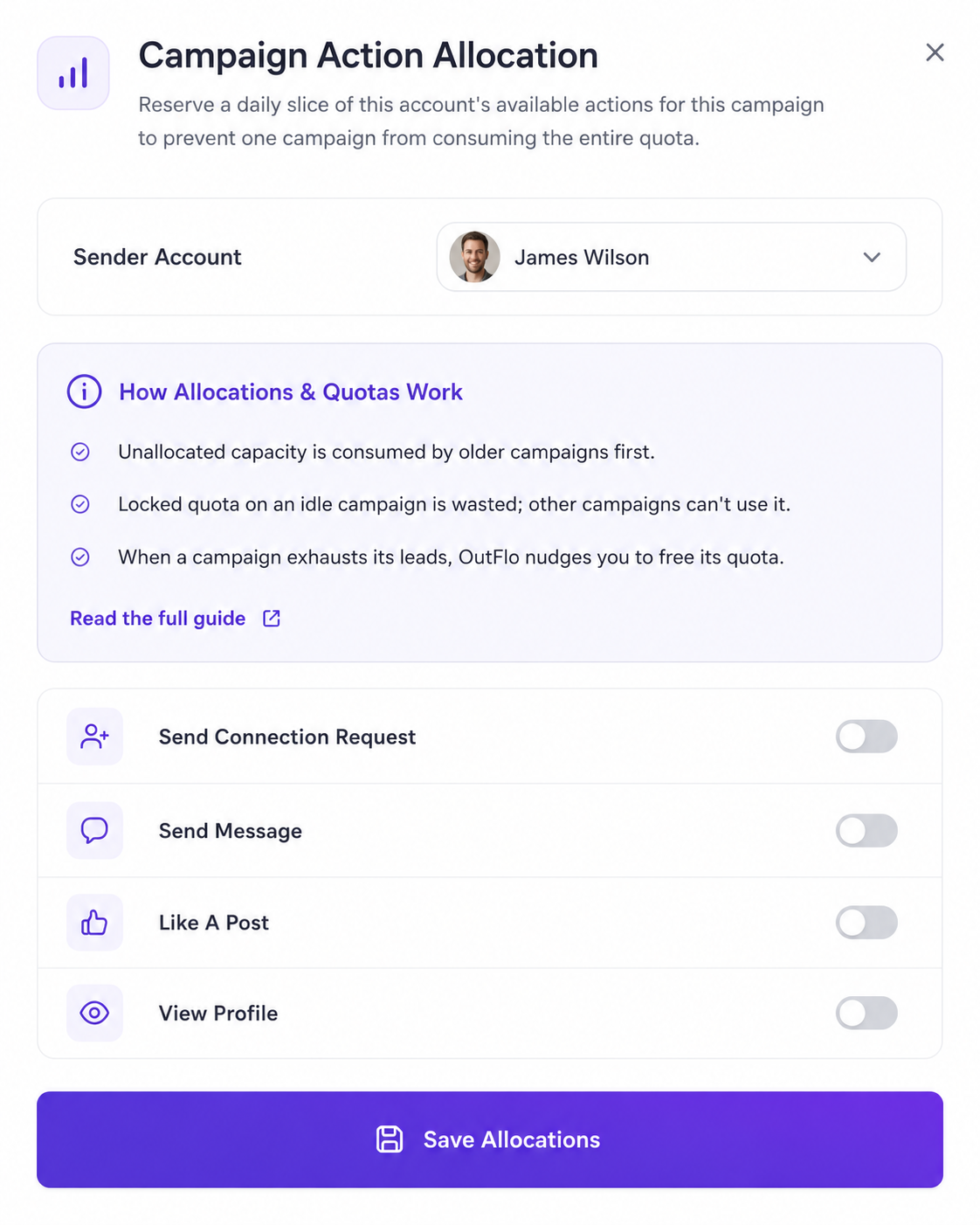
    Open the sliders on a sender row and reserve the exact connection, message or post-like capacity this campaign may use.

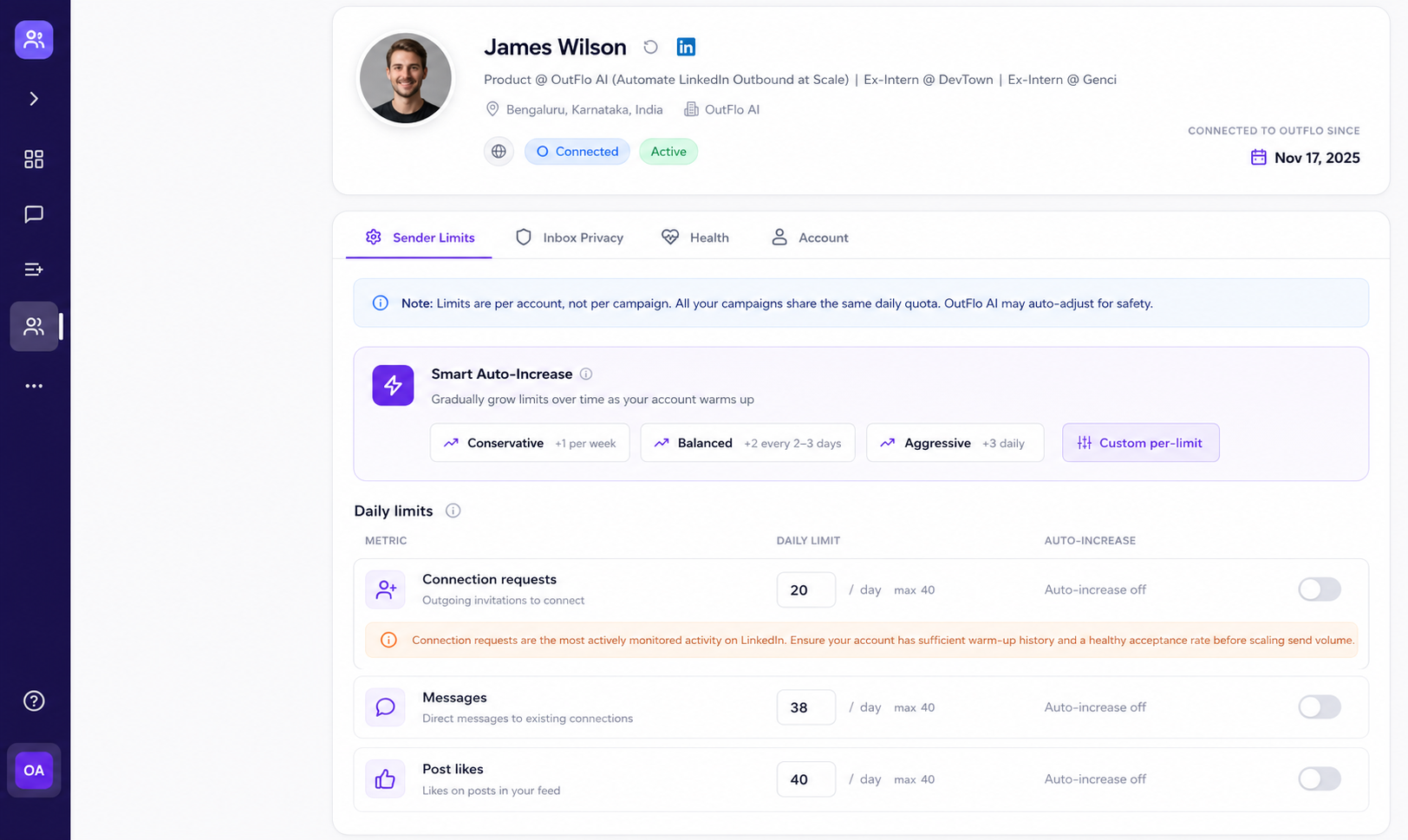
    Sender limits live under Accounts, where connection requests, messages and post likes receive daily caps. Campaign allocation lives in the LinkedIn Senders step.

    Unallocated capacity flows to older campaigns first. If a campaign has no leads left, locked capacity is wasted until you release it, and OutFlo prompts you to do so.

    Smart Auto Increase gradually raises new-account caps across the warm-up period without a manual weekly schedule.

    Actions spread across the active window at randomized intervals with variable pauses. Missed volume stays missed; it is not batched into a catch-up burst the next morning.

    OutFlo LinkedIn sender allocation controls
    Reserve campaign capacity by sender.
    OutFlo Smart Auto Increase warm-up settings
    Set account caps and warm up automatically.

    OutFlo is AI-native

    The AI runs the campaign and answers the inbox.

    Most outreach platforms added AI to an existing template engine. OutFlo was built around models from the start, so AI operates at the moment the work happens.

    Claude drafts every interested reply in Unibox.

    Every Interested conversation receives a written draft. Your team opens the thread, reads it, changes a line and sends.

    Drafts are shared, so one person can queue work for another to review. At 200 replies a week, drafting becomes a focused daily review instead of a full-time writing job.

    Connect Claude through mcp.outflo.io to read lead lists and thread history and write into the same draft field. Teams building their own stack can use the full API.
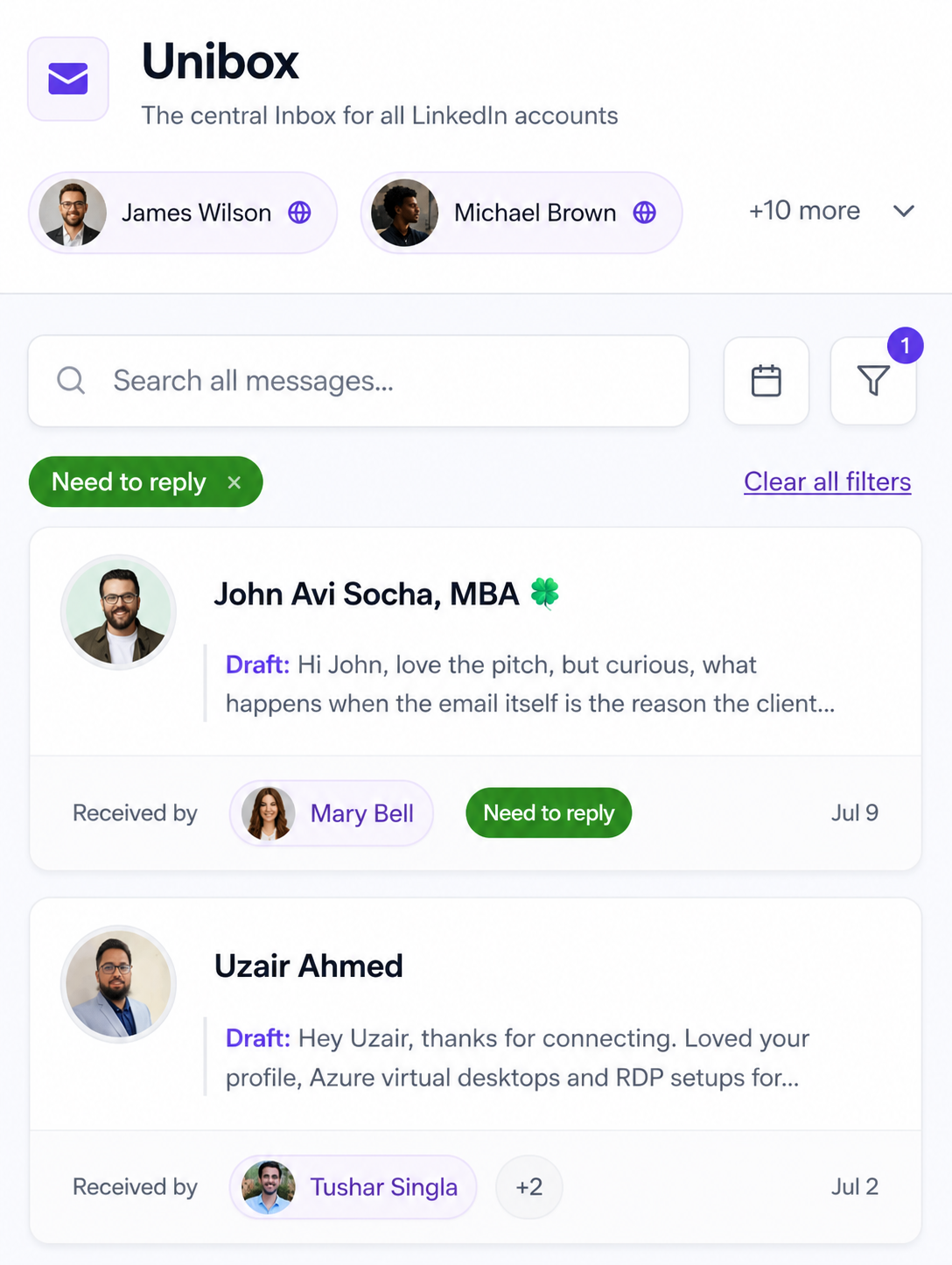
    OutFlo Unibox showing an AI reply draft
    Drafts remain visible inside the shared conversation.
    OutFlo campaign goal and send-time AI generation
    Describe the campaign goal; generate copy when it is due.

    AI writes each message the second before it sends.

    Set a goal and describe a good outcome. OutFlo writes each message lead by lead using the profile and recent posts available at that moment.

    A six-week-old list contains six-week-old job titles and company context. Send-time generation can reference the post published on Tuesday because it waits until the message actually exists.

    Your team does not need to write a fixed sequence for every lead. OutFlo writes lead by lead for as many leads as you load; heavier accounts use this as their default campaign workflow.

    Free InMail on every account

    Get 100+ free InMails a month on every connected account, so you can reach people outside your network without a Sales Navigator seat. InMail elsewhere in this category is tied to a Sales Navigator licence, which means paying per seat across your whole team to unlock it.

    AI voice notes

    Voice notes are not new. Ours are generated, personalized per lead and spoken in a hyper-realistic voice, so you send them at campaign volume instead of recording each one yourself.

    The rest of the AI

    Full Auto Mode

    Picks the next action for each lead from the campaign stage and what the lead has already done. You set the goal instead of maintaining every sequence step.

    AI Appointment Setter

    Runs the booking conversation through qualification and scheduling so reps can focus on warm calls.

    Smart Sequences

    Branches on actual outcomes such as a profile view or accepted connection, giving different next steps to leads who behaved differently.

    Full API and MCP access

    Connect your own agents and tools, use Clay in the workflow, or point Claude directly at the workspace through OutFlo’s MCP server.

    Your whole funnel in one view

    Put pipeline outcomes next to outreach activity.

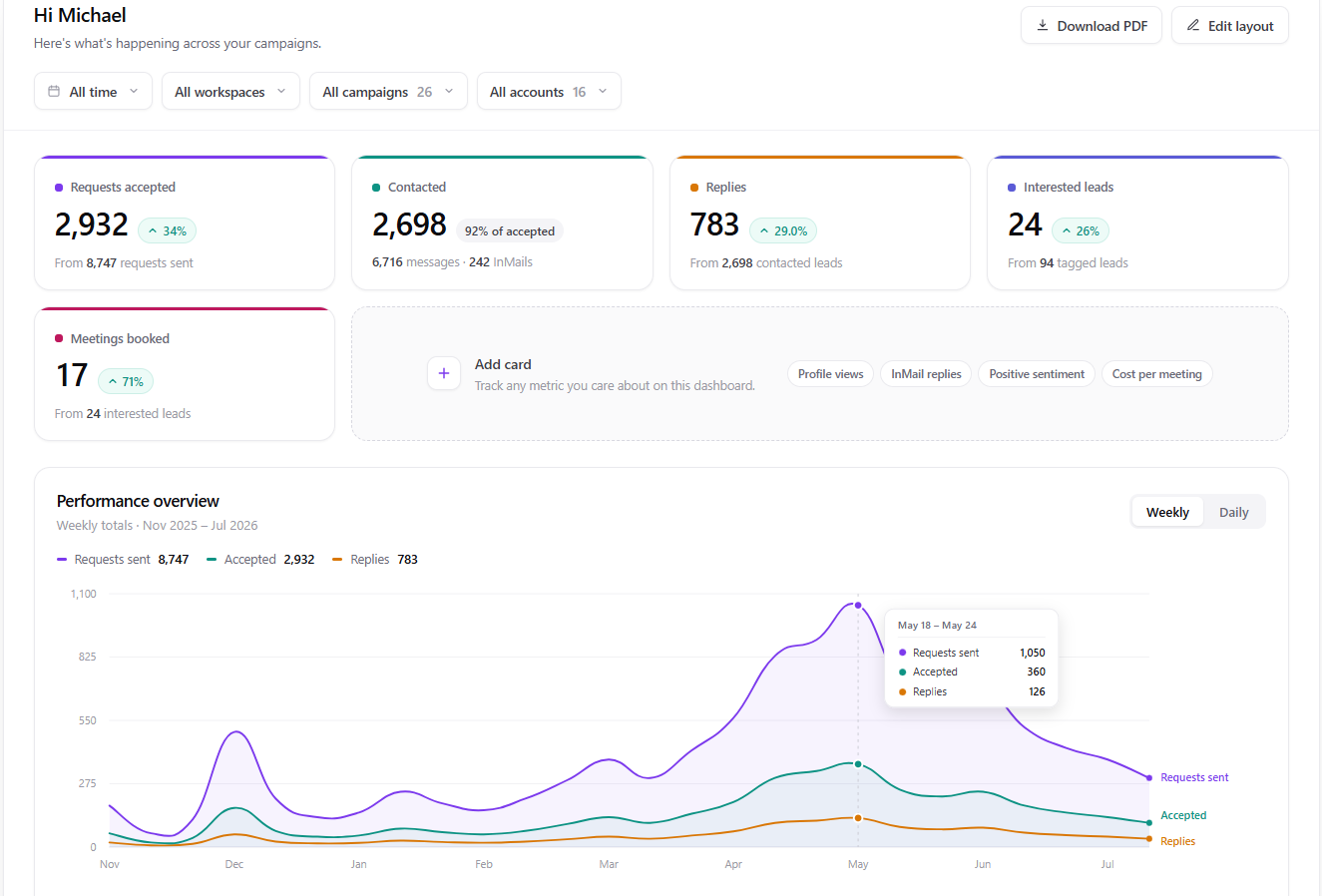
    The default dashboard tracks Requests Accepted, Contacted, Replies and Interested Leads. Edit those cards or add metrics from your own tags, such as Meeting Booked or Qualified.

    Scope reporting by date range, campaign or sender. Download PDF creates a client-ready report with key metrics, a trend chart, and sender and campaign breakdowns.

    Between the dashboard, Lead Action Timeline and Unibox, OutFlo covers most of the operational CRM work for a LinkedIn outbound motion.

    OutFlo custom reporting dashboard with PDF export
    Customize the funnel instead of reporting activity alone.

    Scale the account supply when your own profiles are not enough.

    OutFlo can supply rented LinkedIn accounts that run inside your existing workspace.

    We work with a small number of vetted vendors rather than a marketplace because account quality varies widely. Restricted supplied accounts are replaced.

    Ask us on a call and we will tell you whether renting profiles makes sense for your campaign and risk tolerance.

    Nothing here is capped by the thing you need to grow.

    Unlimited LinkedIn accounts
    Add SDR, founder, executive and client profiles without a workspace cap.
    Unlimited leads per campaign
    Load the whole list without record caps or pagination workarounds.
    Every account in one workspace
    No separate login or Chrome profile just to see another sender.
    Standard LinkedIn is enough
    Run full campaigns and use 100+ free InMails a month on every connected account without Premium or Sales Navigator. Import a Sales Navigator search if you already have one.

    OutFlo pricing

    $39

    per account, per month

    HeyReach published price

    $79

    The gap widens as the account count grows.

    Custom pricing applies to 50+ profiles, with enterprise pricing for agencies running 50, 100 or 500+ accounts.

    Dedicated residential IPs, 100+ free InMails a month per connected account and AI features are included rather than appearing as separate proxy, Sales Navigator or AI add-on bills.

    Switching is on us. We migrate accounts, campaigns and lead data from HeyReach so the setup does not have to be rebuilt manually.

    Tushar Singla, Founder and CEO of OutFlo

    The people you deal with

    Direct access to Tushar and the OutFlo team.

    Every account gets a dedicated Slack or WhatsApp channel with the OutFlo team.

    That means getting on a call when something needs fixing, reviewing live campaigns, suggesting copy changes from what is working across other accounts, and prioritizing custom requests when a setup genuinely needs one.

    Support is difficult to verify before buying, but it is one of the reasons customers most often give for switching.

    The smaller things

    The parts that are easier to feel than explain.

    Some OutFlo features are simply tasks that used to sit on somebody’s list and quietly stopped.

    01

    Lead Action Timeline

    Every action against every lead is timestamped in one chronological log, so a client question can be answered from one screen.

    02

    Edit campaigns after launch

    Change messaging through Edit Campaign. Updates apply to messages that have not gone out, without a relaunch or support ticket.

    03

    Stale invites withdraw themselves

    Connection requests left unanswered for two weeks are withdrawn automatically instead of remaining open indefinitely.

    04

    Inbound connection handling

    If a targeted lead connects with you first, OutFlo can accept the request and move that lead into the follow-up flow.

    05

    Lead list operations

    Combine lists, find their intersection, or exclude one from another. Each list keeps its source, including the original search URL.

    What customers notice after switching.

    The recurring themes are fewer account-switching tasks, more visibility, saved time and more organized follow-up.

    “This isn’t a paid post. Just appreciation from a paying customer for a great product and the people behind it. Tushar gives personal founder support on WhatsApp. Voice notes are a huge part of my workflow. OutFlo didn’t have it when I bought. I flagged it. Days later, shipped. That’s the difference between a team building a product and a team building it for you.”
    Del AryikuDel AryikuEnterprise Account Executive at Socio Local · Building Officedays
    View the original post
    “OutFlo is exactly what my agency needed—affordable, scalable, and built for growth. We manage outreach for 15+ clients from one dashboard and get full visibility into every account.”
    Michael TurnerMichael TurnerLead Generation Agency
    “OutFlo has made managing multiple LinkedIn accounts effortless, saving us hours every week. Our outreach is more organized, and we’re seeing a noticeable increase in booked meetings.”
    Daniel BrooksDaniel BrooksFounder, Tech Startup
    “Managing multiple LinkedIn accounts used to mean constantly switching profiles. With OutFlo, everything is in one place.”
    Sophia BennettSophia BennettSaaS Startup

    Run it alongside what you already have.

    You do not have to move everything to find out.

    Connect a few accounts, leave the rest of the setup where it is, import the same list and run both tools for two weeks. Compare reply rate, response speed and the time spent keeping accounts running.

    Import from CSV, a LinkedIn search URL or a Sales Navigator search. When you move the rest, OutFlo handles the accounts, campaigns and lead data.

    1. 01Connect a few accountsAbout a minute for each profile.
    2. 02Import the same listCSV, LinkedIn URL or Sales Navigator search.
    3. 03Run both for two weeksCompare replies, speed and operational effort.

    Common switching questions

    Start with the seven questions most teams ask. Ten more remain available without turning the page into a wall of text.

    Yes. OutFlo covers the core HeyReach workflow, plus AI reply drafting, per-sender campaign allocation, and send-time message generation. We can migrate your accounts, campaigns, and lead data.

    Everything HeyReach does, plus a few things.

    A few accounts, the same list, two weeks. That is the only comparison that settles it.

    No credit card required. One-minute setup.

    Comparative observations about HeyReach are based on public user feedback and official competitor documentation, including HeyReach pricing and its sending-limit documentation. No LinkedIn automation platform is risk-free; this page describes specific controls rather than guaranteeing account safety.