
Expandi vs OutFlo
An Expandi alternative for teams that need more than campaign replies
Expandi is strong for conditional LinkedIn and email campaigns. OutFlo is for teams that also need multiple senders, the broader LinkedIn inbox and reply context in one workspace.
Where should you start?
Choose your workflow to jump to the section that matters most.
You need one campaign to coordinate several client-facing LinkedIn senders.
01 · Inbox scope
Expandi brings campaign conversations together. OutFlo broadens the operating layer.
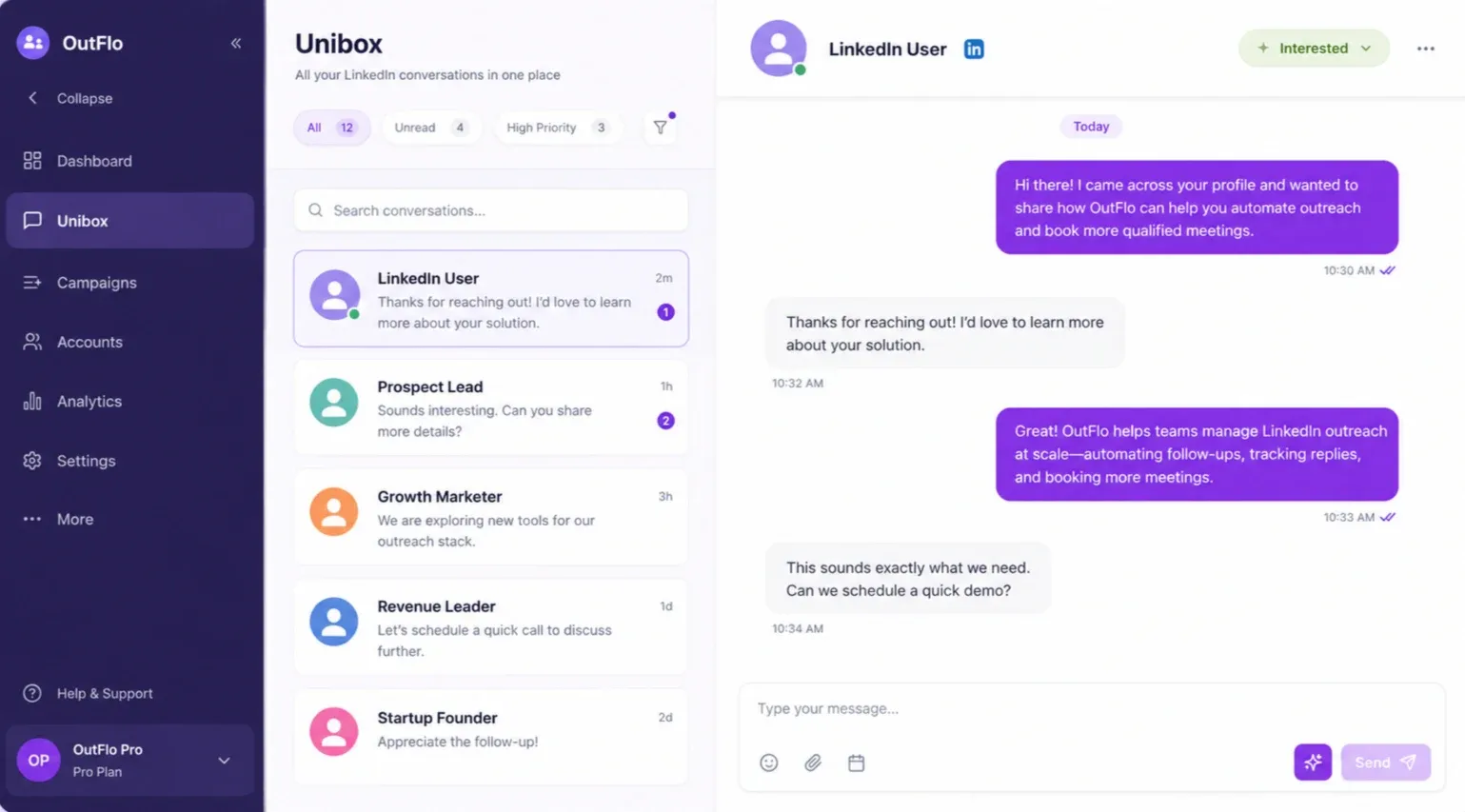
Expandi's Global Inbox is useful for bringing active campaign conversations into one view. Its documented scope is centered on campaign leads and workspace activity.
OutFlo's Unified Smart Inbox is designed around the broader LinkedIn conversation across connected sender accounts, with tags, sender context, and AI-assisted reply handling close to campaign activity.
02 · Shared campaigns
Both platforms coordinate senders. The surrounding operating layer is different.
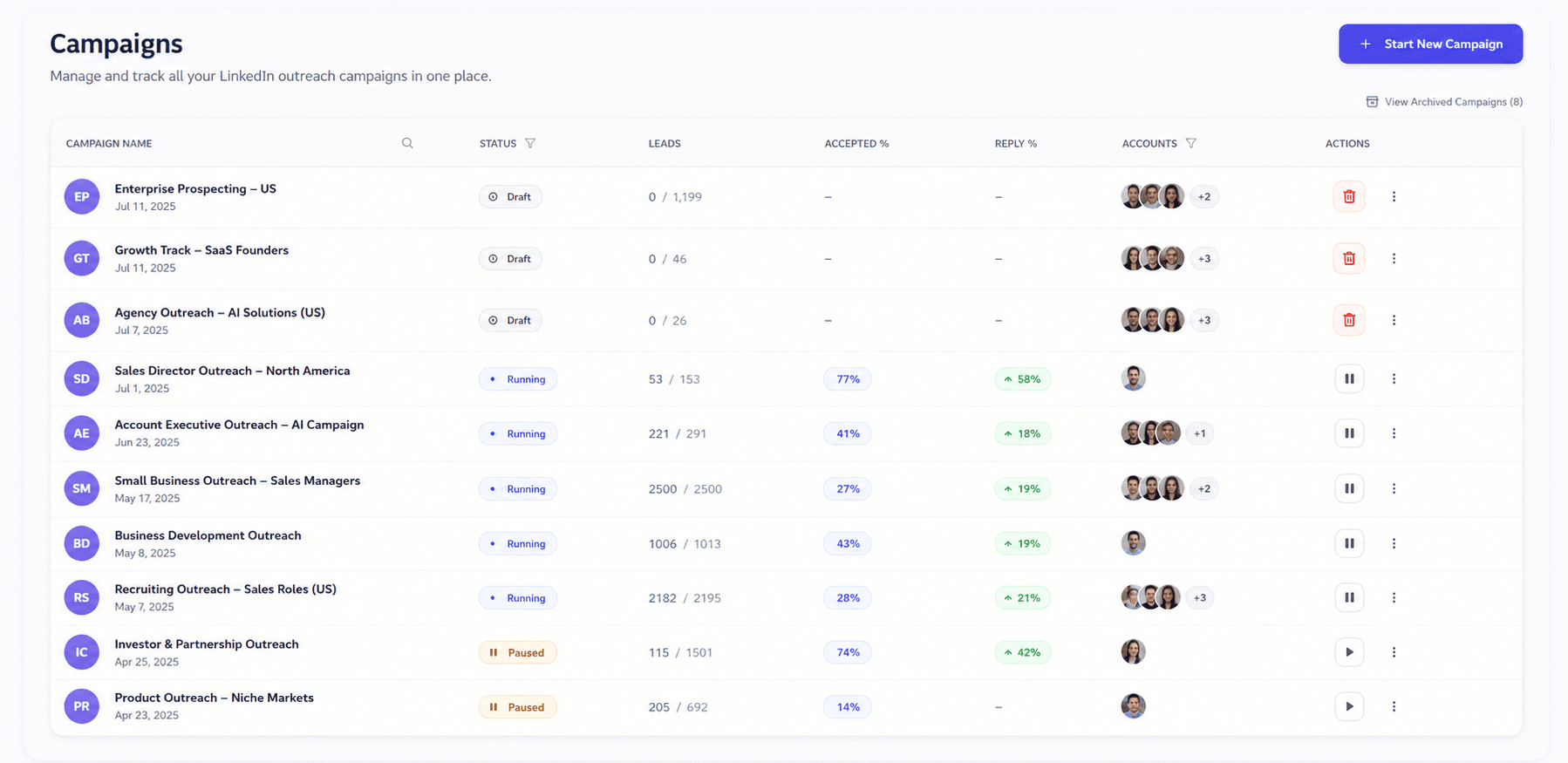
Expandi Shared Campaigns can distribute leads across campaign contributors. It is a capable campaign coordination model for teams that already work inside Expandi's workspace structure.
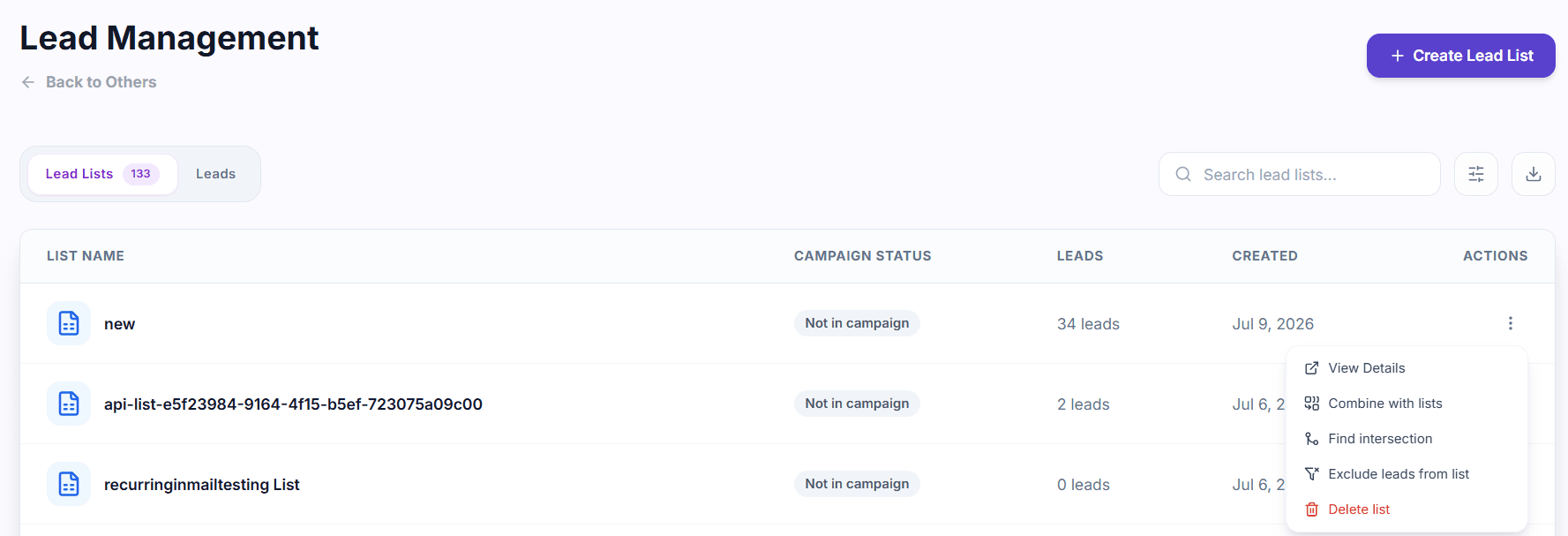
OutFlo puts multi-account campaign assignment next to shared inbox visibility, lead-list operations, sender-level context, and cross-account reporting.
03 · Sequence logic
Do not switch for conditional logic alone.
Expandi supports if/action logic, delays, LinkedIn steps, email follow-ups, and personalization options including image and GIF workflows.
OutFlo's advantage is how Smart Sequences connect to the full inbox, lead history, contextual AI message and reply drafting, voice notes, and the rest of the operating layer.
04 · AI personalization
The message is only one part of the context.
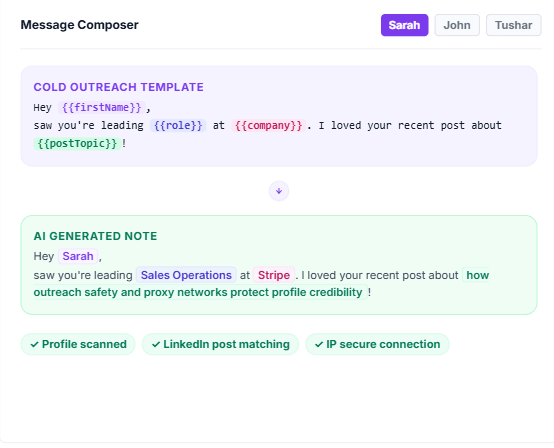
Expandi can personalize messages using profile, company, experience, About, recent activity and other visible prospect context.
OutFlo generates AI messages and reply drafts around the live conversation, then makes the result available inside the shared inbox and connected assistant workflows, with voice notes as part of the campaign workflow.
05 · MCP control layer
An assistant-accessible operating layer, not just another message step.
OutFlo MCP lets compatible AI assistants inspect and manage campaigns, leads, conversations, replies, tags, account status and analytics through scoped read and write access.
Expandi supports integrations, webhooks, Zapier and n8n connectivity. The comparison is about the operating interface your team wants around the campaign.
07 · Pricing
Compare the account model before the headline price.
Expandi bills each Business account separately. OutFlo uses connected LinkedIn accounts as the operating unit, with the same campaign, inbox and workflow layer available across the workspace.
OutFlo
$49
per account, per month
Expandi Business one-account price
$99
per account, per month
Every connected LinkedIn account gets the same shared campaign, inbox and operating layer.
The useful comparison is how the model scales: connected accounts are the operating unit in OutFlo, while Expandi Business uses its own plan, seat or sender structure.
| Connected accounts | Expandi Business | OutFlo | What changes |
|---|---|---|---|
| 1 | $99/month | $49/month | $50/month lower |
| 5 | $495/month | $245/month | $250/month lower |
| 10 | $990/month | $490/month | $500/month lower |
| 25 | Agency/custom | $699/month Booster ($27.96/account) | Booster tier for larger multi-account operations |
| 50 | Agency/custom | $999/month ($19.98/account) | Lower per-account cost at higher volume |
07 · Full comparison
OutFlo versus Expandi
| Capability | OutFlo | Expandi |
|---|---|---|
| Operating model | Multi-account LinkedIn workspace with a Unified Smart Inbox | Campaign workspace with one LinkedIn profile per workspace |
| Inbox | Full inbox sync across connected accounts | Global Inbox focused on campaign conversations |
| Shared campaigns | Multiple senders can contribute to one campaign | Shared Campaigns distribute leads across contributors |
| Sequence logic | Smart Sequences branch on prospect behavior | Mature if/action logic with LinkedIn and email steps |
| AI personalization | Send-time AI messages, AI replies and voice notes | Profile, company, experience, About and recent-activity context |
| MCP and automation | MCP, API and workflow integrations | Integrations, webhooks, Zapier and n8n connectivity |
| CRM and workflows | OutFlo supports CRM and workflow integrations, with availability depending on the connection. | Integrations and CRM connections vary by plan |
| Monthly price | $49 per connected account per month; Booster bundles are available for 25, 50 or 100 accounts | $99 per Business account; agency pricing is custom |
| Best fit | Teams that need campaigns connected to the broader LinkedIn conversation | Teams primarily optimizing multichannel campaign logic |
08 · The right fit
We would rather you choose the operating model that fits.
Choose OutFlo when LinkedIn is the center of outbound and campaigns need to connect to a shared multi-account inbox, AI messages, contextual replies, voice notes, MCP workflows, and clearer sender operations.
Choose Expandi when you specifically need LinkedIn plus email sequences, if/action logic, visual personalization, or its established agency controls.
Also compare OutFlo with HeyReach, Dripify, and Linked Helper.
09 · Migration
Move the active operation campaign by campaign.
Export the lead and campaign data you need to retain, connect the relevant sender accounts, import active lists, rebuild the sequence logic, and run the first workflow in a controlled test.
Keep the old setup available while you compare reply handling, sender operations, and campaign performance. Move the next account or campaign after the first workflow is stable.
10 · Frequently asked questions
Before you switch
Expandi focuses on campaign automation, LinkedIn plus email sequences, and profile-based personalization. OutFlo is built around multi-account operations, full inbox visibility, contextual reply support, voice notes, and an assistant-accessible control layer.
Run the campaign and the conversations around it from one place.
Connect your senders to one cloud workspace, one inbox, and one operating layer.
Every tool looks similar on paper.
Campaigns, shared sending, personalization and an inbox are category basics. The meaningful differences show up when something changes after launch.
These are the moments that separate campaign logic from the operating layer around it.
Campaign conversations
Expandi's Global Inbox is centered on campaign conversations. OutFlo keeps the broader LinkedIn conversation beside campaign activity.
02Shared sending
Expandi Shared Campaigns coordinate contributors. OutFlo adds sender-level controls and a cross-account operating view.
03Reply context
Expandi helps run the next campaign step. OutFlo keeps replies, sender identity and conversation history together.
04Personalization
Expandi uses profile and recent-activity fields. OutFlo adds live thread context, AI replies and voice notes.
05Support after launch
OutFlo keeps a direct support path for teams that need a campaign reviewed, changed or unblocked.

The people you deal with
When you are the sender, support is part of the product.
For a founder running outreach under their own name, the difference is not another channel in a checklist. It is whether the campaign, inbox and account context stay understandable when something changes.
OutFlo gives teams a direct operating layer for LinkedIn accounts, with founder access for campaign reviews, copy changes and workflow decisions.
The smaller things
The operational differences show up after launch.
Inbox ownership
Expandi brings campaign conversations into its Global Inbox. OutFlo keeps broader LinkedIn conversations next to campaign activity.
Sequence context
Expandi is strong on if/action campaign logic. OutFlo connects the next action to inbox history, sender context and reply handling.
Campaign coordination
Expandi Shared Campaigns distribute leads across contributors. OutFlo puts that coordination beside sender controls and cross-account operations.
Message context
Expandi personalizes from profile and activity fields. OutFlo adds live conversation context, AI replies and voice notes.
Founder support
OutFlo keeps a direct support path for teams that need a campaign reviewed, changed or unblocked.