
The best Dripify alternative for growing LinkedIn outreach.
In this Dripify vs OutFlo comparison, see what changes when outreach grows beyond one profile. Dripify is a capable tool for a single operator; OutFlo connects every rep or client account under one workspace, inbox and bill.
One seat. One account. One inbox.
Dripify connects each LinkedIn account to its own Dripify account and paid seat, with its own dashboard and inbox. Team controls make oversight easier, but campaign and reply work remain tied to those account contexts.
That is manageable at one. At four, somebody is moving between profiles before the actual outreach work begins.
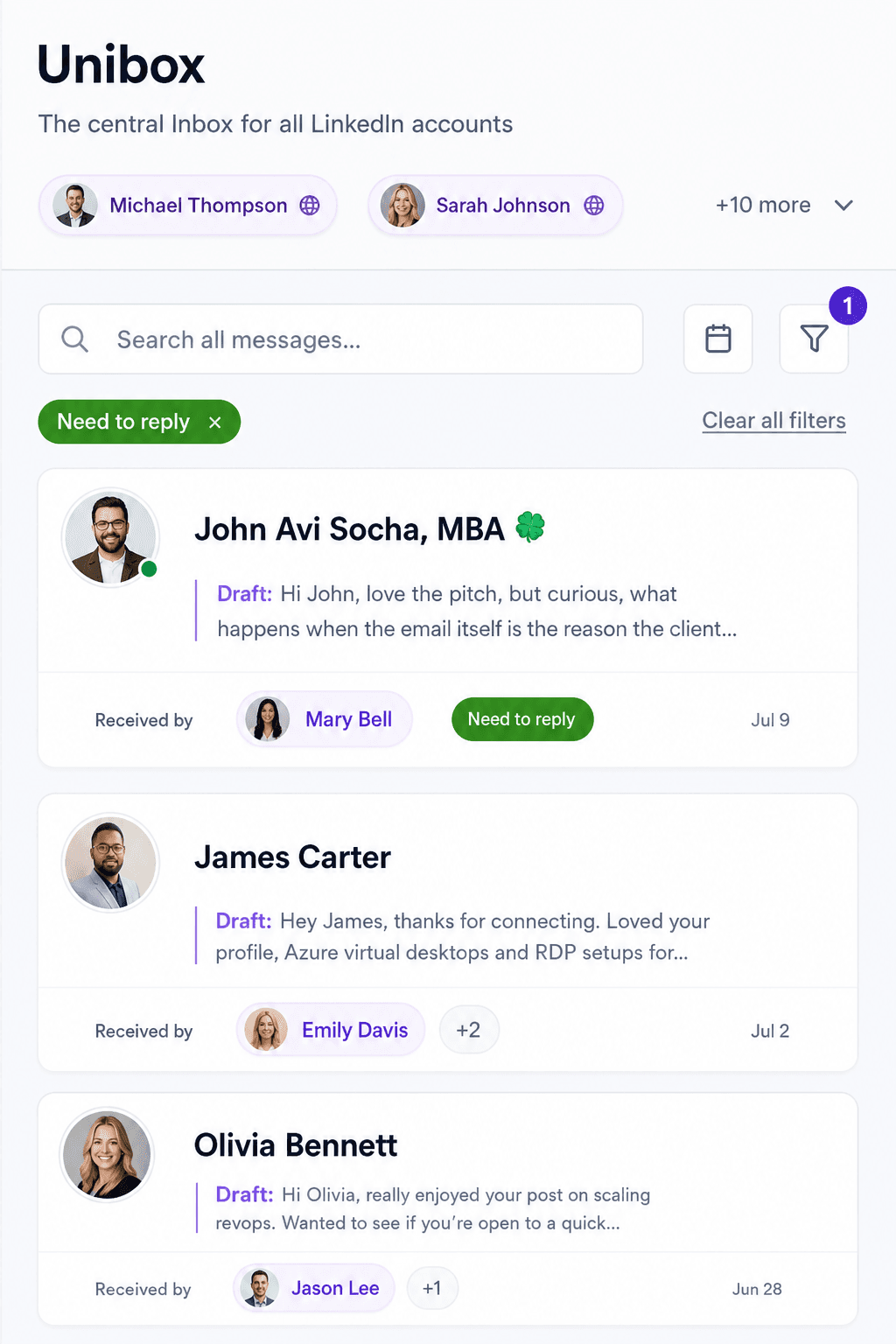
OutFlo treats accounts as infrastructure inside one workspace. Your profile, co-founder, SDRs and client profiles can share campaigns, reporting and one Unified Smart Inbox. One campaign can distribute volume across all of them, while your team tags, sorts and answers every reply without changing account contexts.
One workspace
One campaign, multiple senders.
Dripify connects each LinkedIn profile to its own Dripify account. Its team view can monitor account performance and share templates, but the campaign still runs inside the account connected to that sender.
OutFlo attaches multiple sender accounts to one campaign. Build the sequence once, choose the senders and keep the resulting activity in one campaign report.
400 prospects · 4 sender accounts
Build once
The same sequence and message logic serves every selected sender.
Respect each account
Every sender keeps its own limits, allocation and ramp configuration.
Change once
Update supported campaign copy or sequence settings in one place.
What you pay per connected account.
Dripify’s published monthly price for Advanced is $99 per user. We use Advanced because its team management, full quotas, tagging and built-in safeguards make it the closest like-for-like tier for OutFlo’s feature set.
| Connected accounts | Dripify Advanced | OutFlo |
|---|---|---|
| 1 | $99/account/mo | $49/account/mo Growth |
| 5 | $99/account/mo | $49/account/mo Growth |
| 10 | $99/account/mo | $49/account/mo Growth |
| 25 | $99/account/mo | $27.96/account/mo Booster |
At 10 connected accounts
$50
less per account, monthly
OutFlo Growth is $49 per connected account with the full feature set. At twenty-five accounts, the $699 Booster list price works out to $27.96 per account each month.
See current OutFlo pricingSales Navigator is a separate LinkedIn subscription. Dripify’s own help center notes that one Sales Navigator account can be reused to source and export leads for teammates, so a Sales Navigator seat is not required for every profile. OutFlo campaigns run on standard LinkedIn accounts.
Built for one profile and for forty.
Dripify’s per-user model is coherent for one operator. Every additional LinkedIn account adds another paid user and account context.
OutFlo keeps the same workspace, Smart Sequences, Unified Smart Inbox and API access as you add senders. Campaigns, sequences and reply history stay in place; only the account count and pricing plan change.
At fifteen accounts, Growth reaches $735 per month, so the $699 Booster plan becomes the lower list price for up to twenty-five accounts. Larger teams can choose bigger Booster bundles without moving to a different product.
One profile
$49 Growth. The complete operating model starts here.
Ten profiles
$490 Growth. The campaign, inbox and reporting model stays the same.
Crossover
Growth reaches $735; Booster is $699 for up to twenty-five accounts.
Larger operation
Keep the workspace and operating history, with pricing set directly for the team.
Branch when behavior changes. Edit when the campaign does.
Dripify’s visual builder and conditions are genuine strengths. Leads can take different branches when Dripify checks connection, message-view or Open Profile status.
Dripify also documents a post-launch boundary: message copy and delays can change, but actions cannot be added to or removed from a launched sequence.
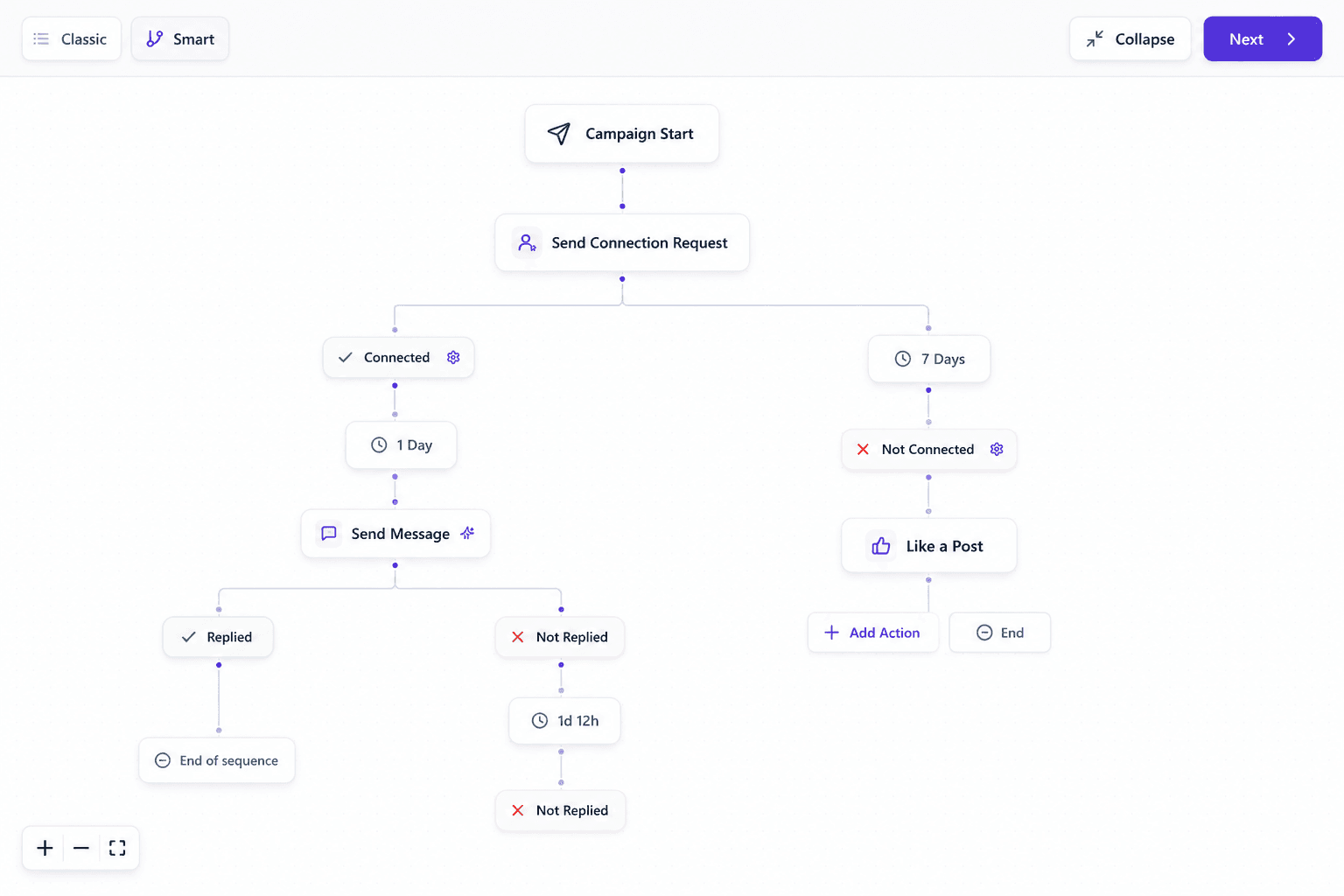
OutFlo Smart Sequences branch on what the prospect does next: viewed but did not accept, accepted but went quiet, replied with a question, or sent the connection request first.
When the live campaign needs a supported sequence change, pause it, update it and resume. Existing leads retain their campaign progress instead of moving to a replacement campaign.
Personalization that is not a merge tag.
Dripify publishes more than fifteen personalization variables. OutFlo takes a different approach: it writes at send time from the lead’s current profile and recent context.
Explore AI personalizationGenerate at send time
Reference what is true when the message goes out, not only what was in the list when it was imported.
AI voice notes
Generate a personalized voice note per lead in a hyper-realistic voice, then send it at campaign volume.
Claude reply drafts
Interested conversations receive a draft in the shared inbox, turning reply writing into a review pass.
100+ free InMails per account
Reach people outside your network from every connected account without requiring a Sales Navigator seat.
An AI layer your stack can actually reach.
OutFlo exposes campaign, lead-list, inbox and analytics operations through its remote MCP server and REST API. An authenticated assistant can inspect the workspace and perform supported actions instead of stopping at a copy suggestion.
https://mcp.outflo.io/mcp
Explore MCP for OutFloCampaigns and lead flow
Create a campaign, create or populate a lead list, add leads, launch the campaign and pause or resume it from an authenticated workflow.
Replies with context
List conversations, read thread and lead context, save a draft or send a reviewed reply from the connected sender.
Reporting where you work
Query organization, sender, campaign, funnel and sequence analytics without exporting a report first.
Dripify documents Zapier and webhook support on eligible plans. Its help center says those webhooks transfer lead data, not message content. OutFlo adds an agent-facing MCP tool surface and public API alongside webhooks.
Choose the ramp. OutFlo handles the increments.
Dripify documents daily quotas, randomized ranges, unique local IPs and an Activity Control algorithm that adjusts processing limits. Those are real safeguards, including an automatic control rather than a purely manual quota.
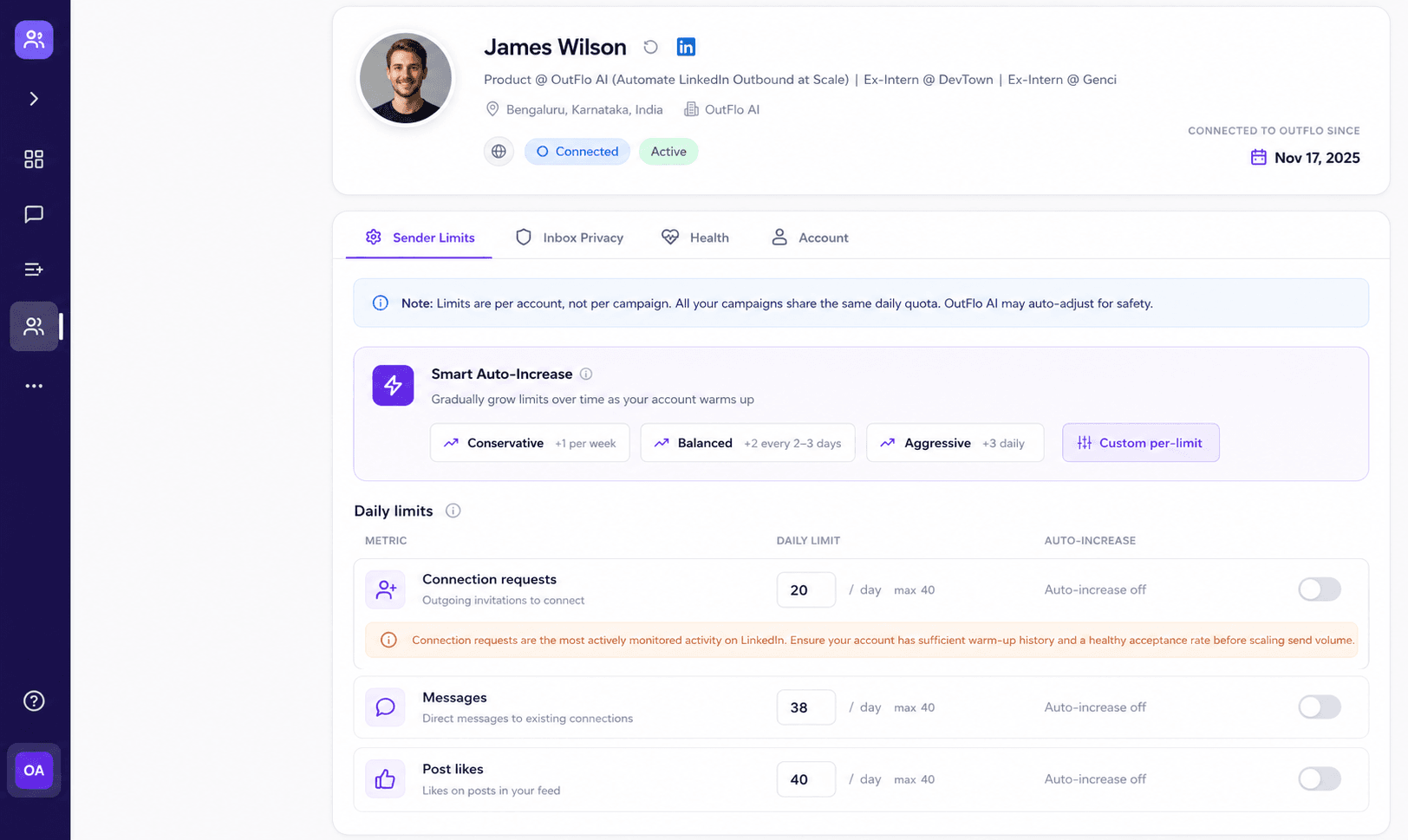
OutFlo makes the schedule explicit. Smart Auto-Increase offers a conservative preset at +1 per week, a balanced preset at +2 every two to three days and an aggressive preset at +3 daily. Each action can stop at the ceiling you configure.
+1 weekly · +2 every 2–3 days · +3 daily
Pick a preset, set the ceiling and keep the schedule visible on the account.

Direct support from the founder.
Every account gets a dedicated Slack or WhatsApp channel with Tushar Singla and the OutFlo team. Bring live campaigns, copy questions and workflow problems. Teams running twenty or more profiles can discuss custom pricing directly.
Connect with Tushar“Tushar gives personal founder support on WhatsApp. Voice notes are a huge part of my workflow. OutFlo did not have it when I bought. I flagged it. Days later, shipped.”
 Del AryikuEnterprise Account Executive · Paying customerView the original post
A practical one-hour path off Dripify.
Keep Dripify running while you test. Compare both tools for a week, then cancel only when the new setup is ready.
- 01Export the leadsUse Dripify’s CSV export on Pro or above.
- 02Connect each accountUse the OutFlo extension or cloud agent. Each profile takes roughly a minute and no password changes hands.
- 03Rebuild the sequenceBuild it yourself or send screenshots and let the OutFlo team help recreate it.
- 04Run both for a weekCompare reply rates, inbox effort and account operations before switching fully.
OutFlo and Dripify, line by line.
Dripify remains strong at visual sequence building, email steps and documented cloud safeguards. OutFlo is built around multi-account operations, run-time AI and one shared inbox.
| Dimension | OutFlo | Dripify |
|---|---|---|
| Pricing model | Per connected account from $49, or $699 flat-rate Booster for 25 accounts; Booster bundles are available for 25, 50 or 100 accounts | $99 per user/month for Advanced on monthly billing |
| Account model | Unlimited connected accounts inside one workspace | Each LinkedIn account maps to its own Dripify account and seat |
| Inbox | Unified Smart Inbox across every connected account | Dedicated inbox within each seat |
| Message generation | Generated at send time from current profile context | Template personalization with 15+ variables |
| Reply drafting | Claude drafts replies directly inside Unibox | Manual reply writing |
| Voice notes | AI-generated and personalized per lead | Not listed in published plan features |
| Sequence logic | Behavior branches plus supported sequence edits while paused | Condition branches; launched sequences cannot add or remove actions |
| Account ramp-up | Visible Smart Auto-Increase presets with configurable ceilings | Activity Control algorithm plus editable daily quotas |
| Sales Navigator | Not required for campaigns | Optional; one Sales Navigator account can source searches for teammates |
| Free InMail | 100+ monthly per connected account for Open Profiles | Up to 25 daily for Open Profiles without using paid InMail credits |
| Channels | LinkedIn-first, with API, MCP and webhooks | LinkedIn and email sequences |
| Automation access | REST API, MCP server and webhooks | Zapier and lead-data webhooks on eligible plans |
| Free trial | 8 days | 7 days |
Dripify switching questions.
Pricing, account setup, migration and the limits of each platform.
It depends on how many accounts you run. At one account, OutFlo Growth is $49 per month against Dripify Advanced at $99 on monthly billing. The gap widens with every account because Dripify bills per user, while OutFlo Booster has a $699 list price for up to twenty-five connected accounts.
One workspace. Every account. One bill.
Connect your team’s profiles and your clients’ profiles in the same place. Start free for eight days.
No credit card required. One-minute setup.
Comparative observations are based on Dripify’s publicly published documentation as checked in July 2026, including its pricing and feature table, multi-account documentation and Sales Navigator guidance.
Sequence, safety and integration comparisons also reference Dripify’s current guidance on editing launched sequences, Activity Control, free Open Profile InMails and webhook behavior.
No LinkedIn automation platform is risk-free. This page describes specific controls rather than guaranteeing that an account will not be restricted. Comparing another multi-account tool? See the HeyReach alternative.