
SalesRobot vs OutFlo
OutFlo vs SalesRobot: AI-native LinkedIn outbound for agencies that need more than campaign automation
SalesRobot is feature-loaded. Using those features can feel like a nightmare.
Both platforms are AI-powered. SalesRobot focuses its AI on campaign execution, personalization and reply handling; OutFlo adds AI-powered personalization and assistance to a workflow agencies can see, adapt and operate across client accounts.
The short version
The choice is between general-purpose automation from the previous software era and an emerging AI-era platform built for focused LinkedIn operations.
SalesRobot
Older, general-purpose automation
SalesRobot is a legacy, broad automation platform spanning LinkedIn automation, email automation, voice/video outreach and AI-led replies. It is built around adding more channels and automation types—not around the deep LinkedIn operating control an agency needs when LinkedIn is the channel that matters.
OutFlo
Emerging AI-era LinkedIn infrastructure
OutFlo is built specifically for agencies that want focused LinkedIn automation across clients: AI personalization, behavior-based Smart Sequences, unified inbox, multi-workspace operations, human handoff and MCP workflow control.
01 · Operating reliability
Campaign automation needs a trustworthy operating picture.
SalesRobot brings AI personalization, automated follow-ups, time savings, onboarding help and reply management together. The practical challenge appears when the team has to operate and troubleshoot the system:
- Campaigns or lists sometimes failing to send as expected
- Slow lead processing or slow initial loading
- A UI that feels confusing or like a black box
- Mixed support experiences when technical issues occur
- Basic analytics that do not clearly connect replies to discovery calls
- Legacy-account migration and pricing changes complicating continuity for some older AppSumo users
The operational difference
The comparison is not about whether SalesRobot has automation. It is about how quickly a team can see what is running, what failed, which lead is affected and what needs to change.
02 · Sequence UX
OutFlo combines more useful actions, more complex sequences and a simpler workflow UI.
OutFlo's sequence builder includes Send Connection Request, Send Message, Send Voice Note, Follow Profile, Like a Post, View Profile, Send Free InMail, Send InMail and Withdraw Invite. These actions remain visible in the workflow while the sequence is being configured.
SalesRobot also offers a broad set of outreach actions and a separate advanced conditional-sequence mode. The issue is not a lack of features; it is the operating experience. In the standard flow, configuring each action requires moving between the action picker, configuration screens and the sequence itself. Reviewing the complete sequence or checking several prospects can therefore feel slow and confusing.
Once a SalesRobot campaign has been launched, actions cannot be added or removed from the sequence. That makes the initial workflow structure especially important: a missing step may require rebuilding or duplicating the campaign instead of simply adding it to the live sequence.
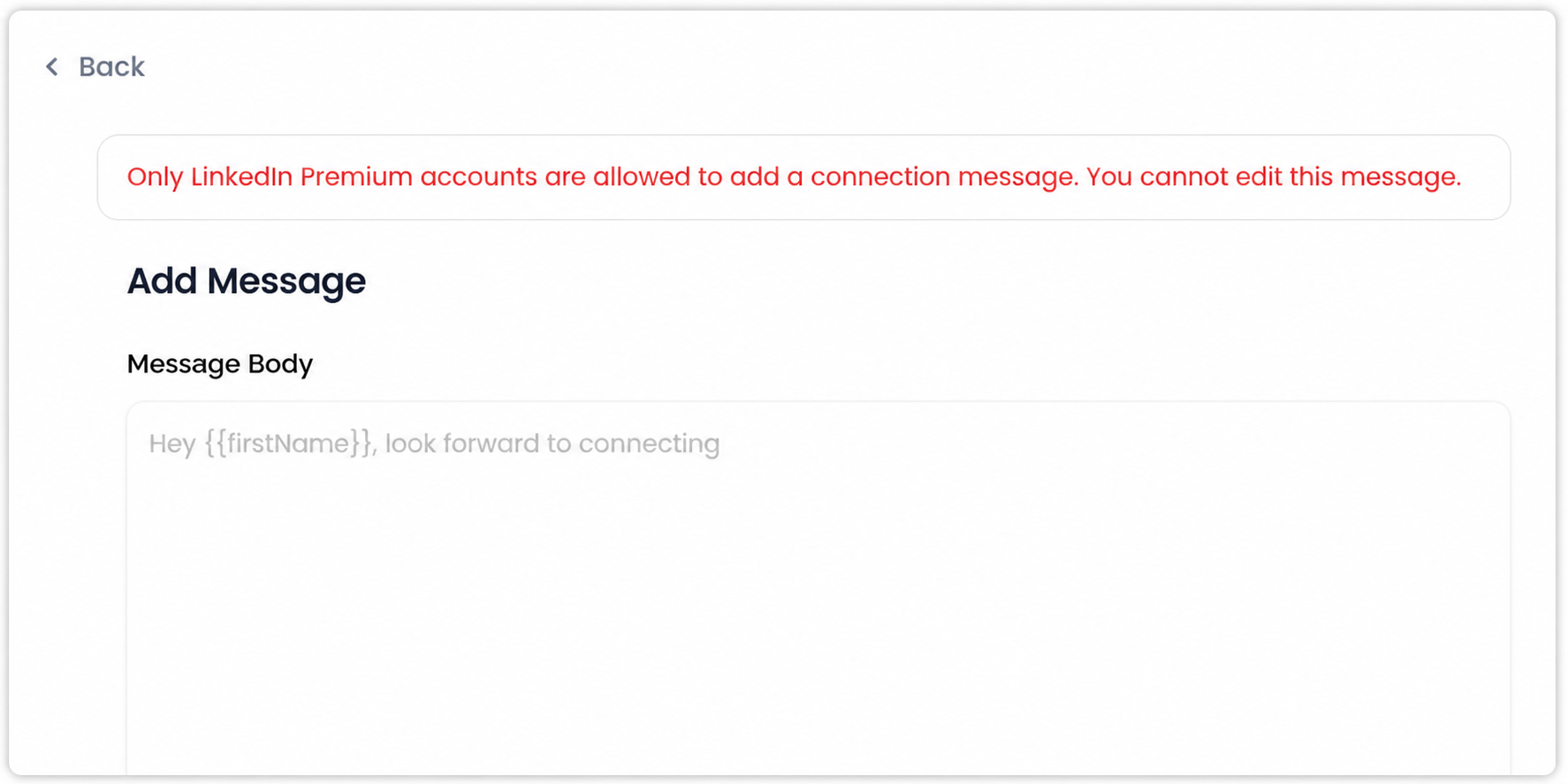
There is also an account-level restriction in the SalesRobot connection-request flow: the product displays that editing the connection message requires a LinkedIn Premium account. OutFlo allows connection-message customization for standard LinkedIn accounts.
SalesRobot: select an action → open its configuration → go back to the sequence → repeat for the next action. After launch, adding or removing an action is not available.
OutFlo: keep the sequence visible → choose the action from the control → configure it in context → review the workflow without losing the operating picture.
OutFlo makes complex workflows easier to see, understand, and configure in one place, while SalesRobot’s action-heavy setup requires more navigation and makes advanced logic harder to inspect.
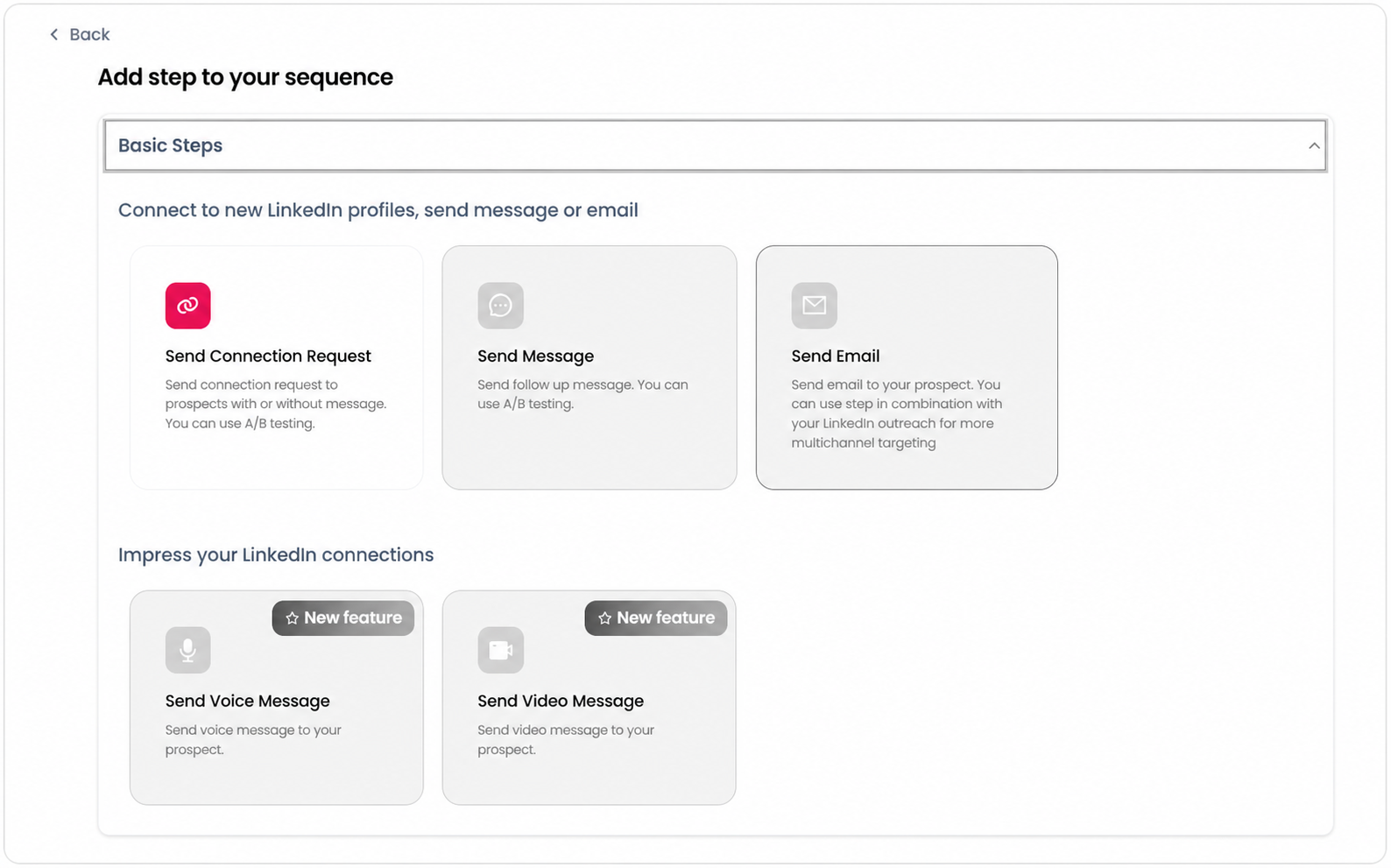
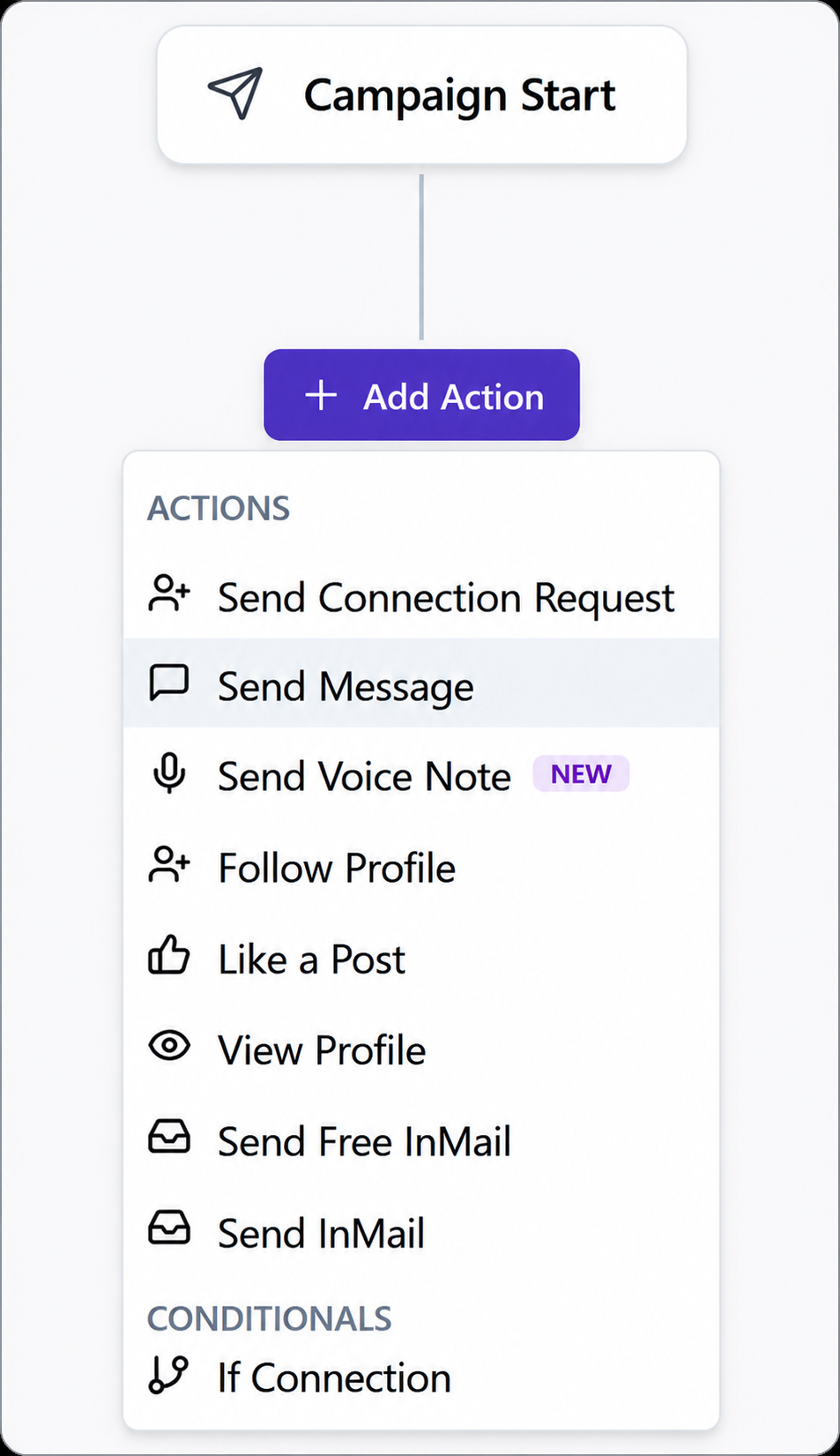
The difference is visible in the interaction model: OutFlo keeps the action menu and sequence context together on one page. In SalesRobot, each action sends the operator to another configuration view and then back to the sequence, so the page context changes as the workflow is assembled.
OutFlo's UI advantage
OutFlo keeps the operating picture visible while actions are configured, so agencies can understand the sequence without repeatedly leaving the workflow to find and configure the next step.
What the OutFlo action menu changes:
- Choose the next action from one visible menu.
- Keep the sequence on screen while adding or configuring that action.
- See useful actions and the If Connection condition together, instead of treating branching as a separate campaign type.
That makes the builder easier to scan: the operator can decide whether the next step is a message, voice note, profile action, InMail or a connection-status check without losing the sequence context. The OutFlo action menu shown above is the single visual reference for this explanation.
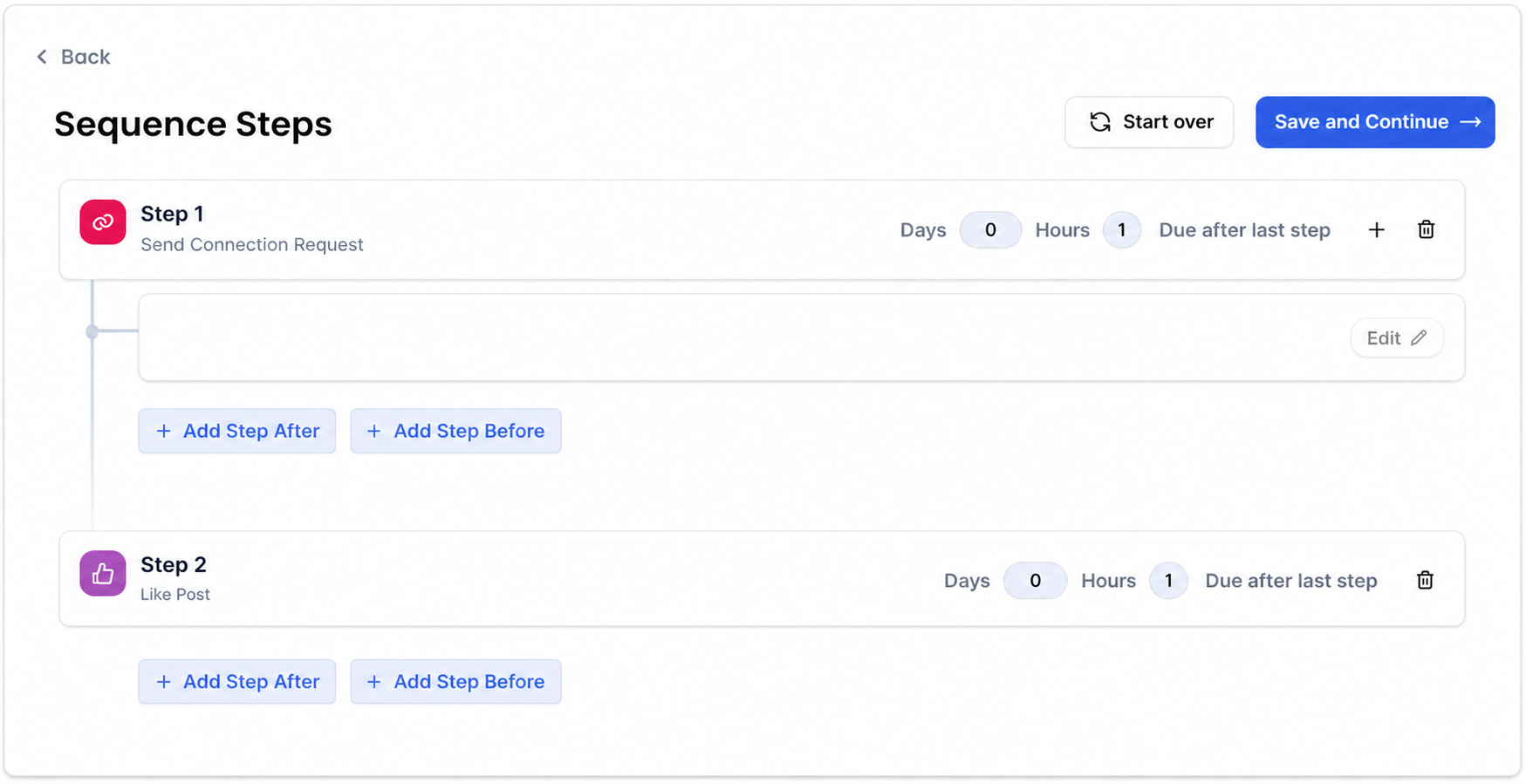
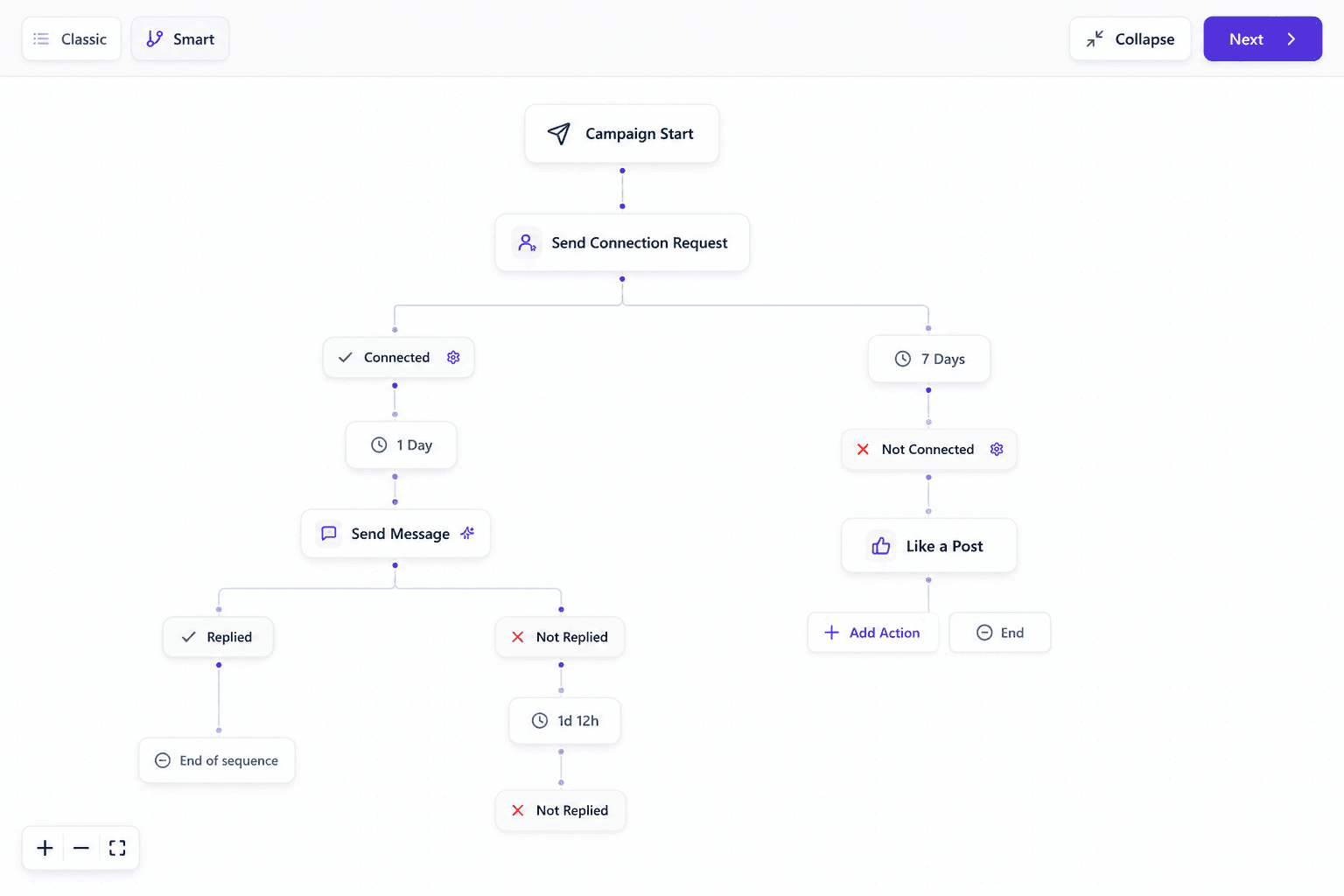
OutFlo keeps the action library, sequence structure and branch edits visible on the same page. SalesRobot requires more to-and-fro movement: select an action, configure it, return to the sequence, then repeat—and the working page changes for each action.
03 · Smart Sequence logic
A smart sequence should decide what happens next—not just list more actions.
OutFlo adds behavior-based logic to those actions through conditions such as ifConnection, which checks whether a lead is already connected and routes the workflow accordingly. The same workflow can continue with different paths for accepted, unaccepted, replied and other lead states.
SalesRobot does support conditional sequences, including separate paths for outcomes such as connection status and acceptance. The difference is that this logic is presented as a separate advanced sequence mode rather than being as directly visible alongside the action-building experience.
SalesRobot supports conditional sequences as a separate advanced campaign type. However, the advanced workflow is not surfaced clearly in the standard campaign UI, and editing or attaching it after launch is restricted. OutFlo keeps behavior-based sequence logic visible and editable within the campaign workflow.
That makes complex decisions harder to design and verify:
- If connected → send a message
- If not connected → send a connection request or wait
- If accepted → continue the conversation
- If not accepted → follow or withdraw the request
- If replied → stop automation and hand the lead to a person
- If the profile is open → choose the InMail path
OutFlo's advantage
OutFlo Smart Sequences are built around behavior-based paths. The important difference is not only the number of actions; it is the ability to connect actions to connection status, acceptance, replies, profile state and previous outcomes.
Both products give you outreach actions. OutFlo lets you connect those actions to what the prospect actually did.
The comparison is therefore about usability and operating context—not whether SalesRobot has conditional logic. OutFlo keeps the actions, conditions and resulting paths easier to inspect as one workflow.
04 · MCP
SalesRobot gives AI access to outreach. OutFlo gives AI a model of the operation.
SalesRobot now publicly claims an MCP server with 55 tools for ICP import, prospect-level icebreakers, sequence creation, campaign launch and inbox workflows. Its detailed tool schema is behind a gated playbook.
The setup path is also materially different. SalesRobot's guide requires Node 18, a global CLI install, an API key from Settings, a local MCP configuration edit and a full client restart. OutFlo connects MCP from the workspace flow in roughly 3–5 clicks.
OutFlo publicly documents a broader, more inspectable workflow surface:
- Create a campaign and attach the full Smart Sequence, including conditional branches
- Get the full campaign sequence and workflow tree
- Pause a campaign, update sequence logic and relaunch it
- Read the complete action-and-message timeline for a lead
- Pause, resume or exclude individual leads
- Read, tag, classify, draft and reply to inbox conversations
- Analyze campaigns by sender, funnel, sequence step, tag and timeseries
- Check account status and solve LinkedIn OTP/checkpoint interruptions
SalesRobot’s MCP could create a campaign and a base sequence, but the advanced conditional sequence did not become the campaign’s active workflow. The campaign could be launched without the intended conditional path, and the advanced sequence could not then be edited or extended after launch through the MCP flow.
SalesRobot: “Create the campaign and sequence” → the campaign is created, but the advanced conditional workflow is not attached and the live campaign does not expose the intended branches for editing.
OutFlo: “Create the campaign, attach an ifConnection branch, inspect the sequence, add the follow-up path, verify it and launch.”
The real MCP difference
SalesRobot exposes MCP tools for outreach objects. OutFlo’s MCP is designed to carry out the complete operating workflow: create the campaign, attach the actual sequence logic, inspect it, change it, verify it and then launch it.
05 · Personalization verification
Personalization needs to be checked at the prospect level—not trusted blindly.
SalesRobot supports AI-generated personalization and variables. In the flow tested, previewing the final message for each prospect can require multiple clicks and the resolved-variable preview is not always consistent.
SalesRobot: navigate through the message and prospect views to verify how the variable resolves.
OutFlo: preview the resolved message for the prospect in a single click before deciding whether it is ready.
Why it matters
When an agency is running several client campaigns, message verification is not a cosmetic step. It is how the team catches missing names, stale context and awkward personalization before a message reaches a prospect.
OutFlo can also define what happens when live LinkedIn context is missing: skip the lead, send a blank value or use a fallback value rather than silently producing broken copy.
06 · Account and workspace operations
Multiple accounts are not the same as a clear agency operating layer.
SalesRobot supports multiple LinkedIn accounts and agency plans. An account added through an admin setting can appear there without appearing in the main LinkedIn Accounts section. Once a campaign is launched, sender accounts cannot be added or removed from that campaign, so changing the sender setup requires a separate campaign or configuration path.
That creates operational questions for an agency:
- Which accounts are actually connected and ready to send?
- Where should an account be managed?
- Can a sender be added to a live campaign?
- Which workspace owns the account and its conversations?
- Can the operator see all client replies without switching context repeatedly?
OutFlo's operating model
OutFlo separates individual workspaces while still allowing an agency to work across them. Teams can use individual or all-workspace Unibox views, analytics and integrations alongside multi-account campaign operations.
One client workspace for campaign changes. One all-workspace inbox for replies. Workspace-level analytics and integrations without losing client separation.
07 · Inbox and human control
AI should handle repetitive work without taking ownership of the relationship away from the salesperson.
SalesRobot's AI Appointment Setter and Autopilot modes are genuine strengths if the buyer wants an AI agent to continue conversations and work toward a meeting.
OutFlo takes a more controlled approach around the valuable moment:
- Read the conversation before acting
- Classify and tag the lead
- Draft a reply for review
- Pause the lead when a human should take over
- Keep the rest of the campaign running
The decision
Choose SalesRobot when the priority is more autonomous conversation handling. Choose OutFlo when the priority is AI-assisted execution with visible workflow context and deliberate human handoff.
08 · Pricing
Compare the billing unit—and the limits behind the headline price.
SalesRobot charges per LinkedIn account, but the monthly plan determines how many campaigns, daily actions, collaboration features and operating controls you actually receive. OutFlo keeps the agency calculation centered on connected accounts and multi-workspace operations.
OutFlo pricing
$39
per connected account, per month
Agency volume
25 accounts · $700/mo
50 accounts · $1,050/mo
SalesRobot monthly plans
The lowest price comes with the tightest limits.
Basic
$59/mo
1 active campaign
Limited daily quotas · no A/B testing, personal inbox, webhooks or team management
Advanced
$79/mo
Unlimited campaigns
Full daily quotas · A/B testing, personal inbox, webhooks and exports; no team management
Professional
$99/mo
Team management
Adds activity control and team operations
All three plans are priced per LinkedIn account. The meaningful difference is what gets gated: Basic limits campaigns and daily volume; Advanced unlocks more execution and integration controls but still does not include team management; Professional is required for activity control and team operations. Compare the plan required for your agency—not just the $59 starting point.
09 · Full comparison
OutFlo versus SalesRobot
A practical comparison of the operating model—not just the feature checklist.
| Capability | OutFlo | SalesRobot |
|---|---|---|
| Campaign automation | Behavior-based Smart Sequences with visible paths | Broad action set with linear campaign setup plus a separate conditional-sequence mode |
| Native sequence actions | Connection request, message, voice note, follow, like, profile view, Free InMail, InMail and withdraw invite | Connection request, message, email, voice/video and other outreach actions |
| Sequence editing | Sequence and workflow context stay visible while changes are made | Actions can be configured before launch, but launched sequences cannot have actions added or removed; the setup also requires more navigation |
| Decision logic | Branches can react to connection, acceptance, replies and lead state | Conditional sequences are available as a separate advanced campaign type, but are less integrated with the standard sequence-building view |
| MCP | Create, attach, inspect and change the full Smart Sequence workflow through MCP; setup takes roughly 3–5 clicks | Officially claims 55 MCP tools, but the tested MCP flow could not attach the advanced conditional sequence to the campaign or edit that workflow after launch |
| Lead control | Pause, resume and exclude individual leads through the workflow layer | Add/remove prospects and pause/resume individual prospect sequences through documented APIs |
| Personalization verification | Preview the resolved message for a prospect in one click | Variable preview can require repeated navigation in the tested flow |
| Connection-request notes | Available for standard LinkedIn accounts | The tested flow displayed a Premium-only restriction for editing the connection message |
| Inbox and handoff | Unified inbox across workspaces with draft, classify, tag and reply workflows | AI Inbox and Appointment Setter can manage replies, with Copilot and Autopilot modes |
| Analytics | Campaign, sender, funnel, sequence-step, tag and timeseries views | Campaign performance, acceptance, reply rates and prospect statuses |
| Multi-workspace operations | Individual and all-workspace inbox, analytics and integrations | Multiple accounts, agency plans and white-label support; workspace operating model is less clearly documented |
| Sender changes after launch | Manage sender accounts inside the workspace and operating context | Sender accounts cannot be added or removed from the campaign after launch |
| Voice and video | Native voice-note sequence step and hosted audio through OutFlo workflows | AI-personalized voice notes and video messages are a major SalesRobot strength |
| Best fit | Agencies and GTM teams that need adaptable, inspectable operations | Teams that want broad campaign automation and AI-led conversation handling |
10 · The right fit
Choose the product that matches how your team wants to operate.
Choose SalesRobot when you want broad campaign automation, AI-generated outreach, LinkedIn plus email sequences, voice/video messaging and an AI agent that can continue conversations toward a meeting.
Choose OutFlo when your agency or GTM team needs behavior-based Smart Sequences, visible lead and sender state, faster message verification, multi-workspace operations, a unified inbox, deeper analytics, APIs and MCP workflows.
Both platforms bring AI to outbound. SalesRobot focuses AI on campaign and conversation automation; OutFlo gives agencies AI-powered control over the campaign, inbox, account and human handoff.
11 · Frequently asked questions
Before you switch
Both SalesRobot and OutFlo use AI to personalize and automate LinkedIn outreach. SalesRobot emphasizes campaign and reply automation; OutFlo combines AI personalization with visible workflow control, multi-workspace operations, individual lead controls, deeper diagnostics and MCP-driven campaign changes.
Give your agency AI leverage without giving up the operating picture.
Run campaigns in one workspace, inspect the context and let the right person take over when the conversation matters.