
Existing session sync
Reuse the active LinkedIn session instead of creating an avoidable password handoff.
We use essential technologies to keep this site running. With your permission, we also use analytics, advertising, and functional tools to understand and improve it.Read our Privacy Policy
LinkedIn account safety by OutFlo
OutFlo combines stable account infrastructure, account wide limits, Social Selling Index aware automatic ramping, controlled daily variation, campaign quota protection, reply aware sequences, and visible recovery in one operating system. Product enforced ceilings stay active regardless of how much volume an operator requests.
No automation platform can guarantee freedom from LinkedIn restrictions. OutFlo reduces avoidable operational risk and makes safety decisions visible to the team running the account.
Sender protection stack
One account. One operating boundary.
Connect the existing session
Use the extension flow without handing over a LinkedIn password.
Isolate every sender
Assign one stable residential IP to each connected account.
Enforce the account ceiling
Keep every campaign below product enforced action maximums.
Ramp from account quality
Use Social Selling Index informed growth and avoid an identical daily pattern.
Control campaign demand
Reserve capacity so one campaign cannot consume the full quota.
Rotate across ready accounts
Distribute campaign work without pushing one sender past its boundary.
Stop and recover visibly
React to replies, reconnects, and checkpoints inside the workflow.
1000+
LinkedIn accounts supported by OutFlo
1:1
dedicated residential IP per sender
11
configurable sender action limits
40
enforced daily connection request ceiling
The operating model
Separate IPs are necessary, but they are not enough. The safer system also controls sessions, volume, timing, campaign demand, sender rotation, invitation hygiene, replies, and recovery.
| Risk pattern | OutFlo control |
|---|---|
| 01Shared IP concentration | Each connected sender receives a dedicated residential IP aligned with its region. |
| 02Unnecessary new logins | The recommended extension flow syncs the existing session without a password handoff. |
| 03Sudden activity spikes | Social Selling Index aware Smart Auto Increase begins lower and raises individual action limits over time. |
| 04Identical daily volume | Variable limits create controlled day to day movement around the selected ceiling. |
| 05Campaign quota collisions | Account limits remain shared while campaign allocations reserve visible slices of capacity. |
| 06Operator attempts to exceed a limit | Product enforced maximums remain active even when an operator requests more volume or launches additional campaigns. |
| 07Single sender overload | Automatic account rotation distributes campaign work across selected senders while each account keeps its own limits and pacing. |
| 08Continued sends after a reply | Smart Sequences can stop or reroute the lead when a reply is detected. |
| 09Stale invitation buildup | Withdraw invite steps can clean up unanswered requests after the chosen wait period. |
| 10Silent connection interruptions | Account state, reconnect actions, and checkpoint handling stay inside the operating workflow. |
01. Connection and network identity
OutFlo’s recommended extension flow connects the LinkedIn session already open in the owner’s browser. The workspace operator does not need the LinkedIn password, and campaign execution does not depend on keeping that laptop open.
Reuse the active LinkedIn session instead of creating an avoidable password handoff.
Every connected sender receives a dedicated residential IP aligned with its location.
Each sender keeps its own network identity, limits, pacing, and account state.
A shareable reconnect path lets the account owner restore access without sharing a password.
02. Account wide limits
LinkedIn sees one sender account, not ten campaigns. OutFlo enforces limits at the account level, then makes every campaign share that same quota. Adding campaigns, senders, or allocations never increases the capacity of the original account.
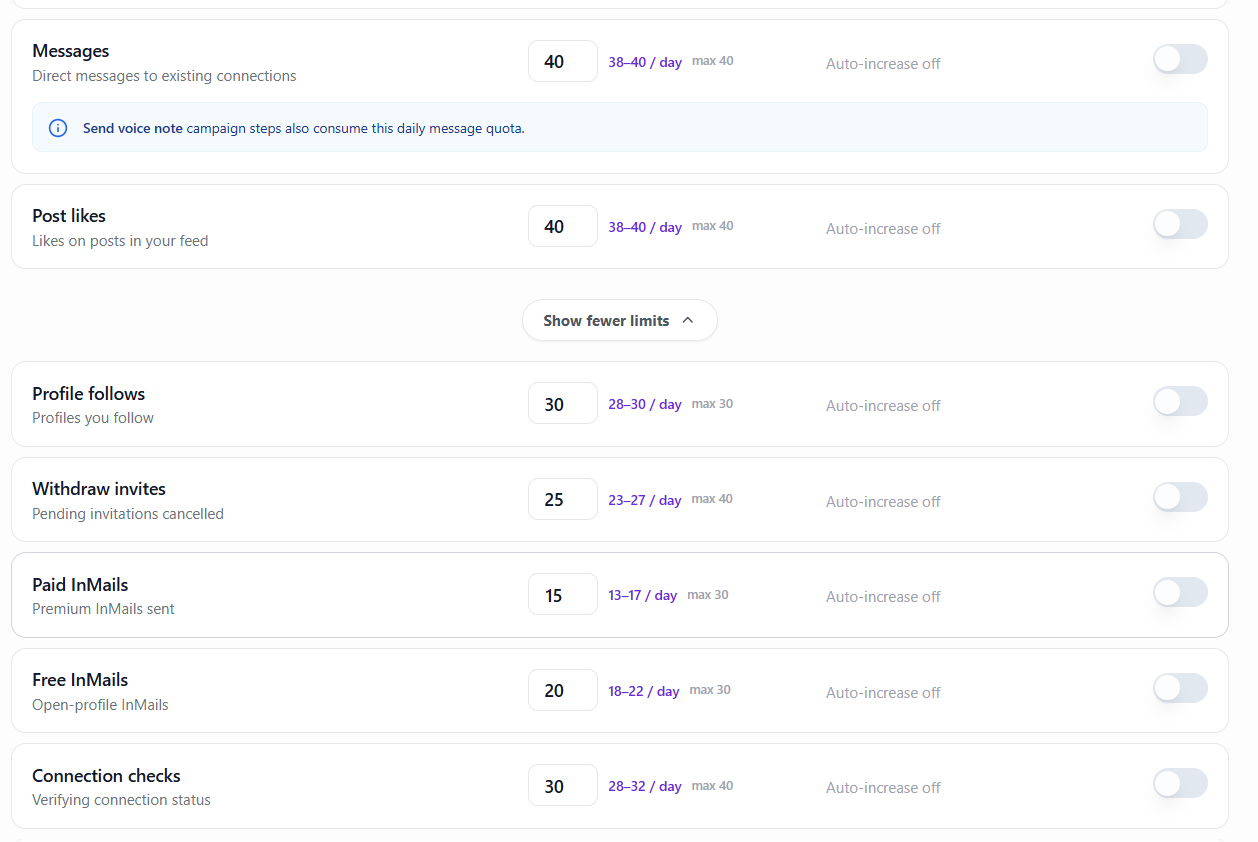
The operator controls
OutFlo enforces
Even if an operator deliberately tries to overdrive their own LinkedIn account, OutFlo will not allow activity beyond the enforced maximum. The boundary applies to every sender, campaign, and automatic rotation workflow.
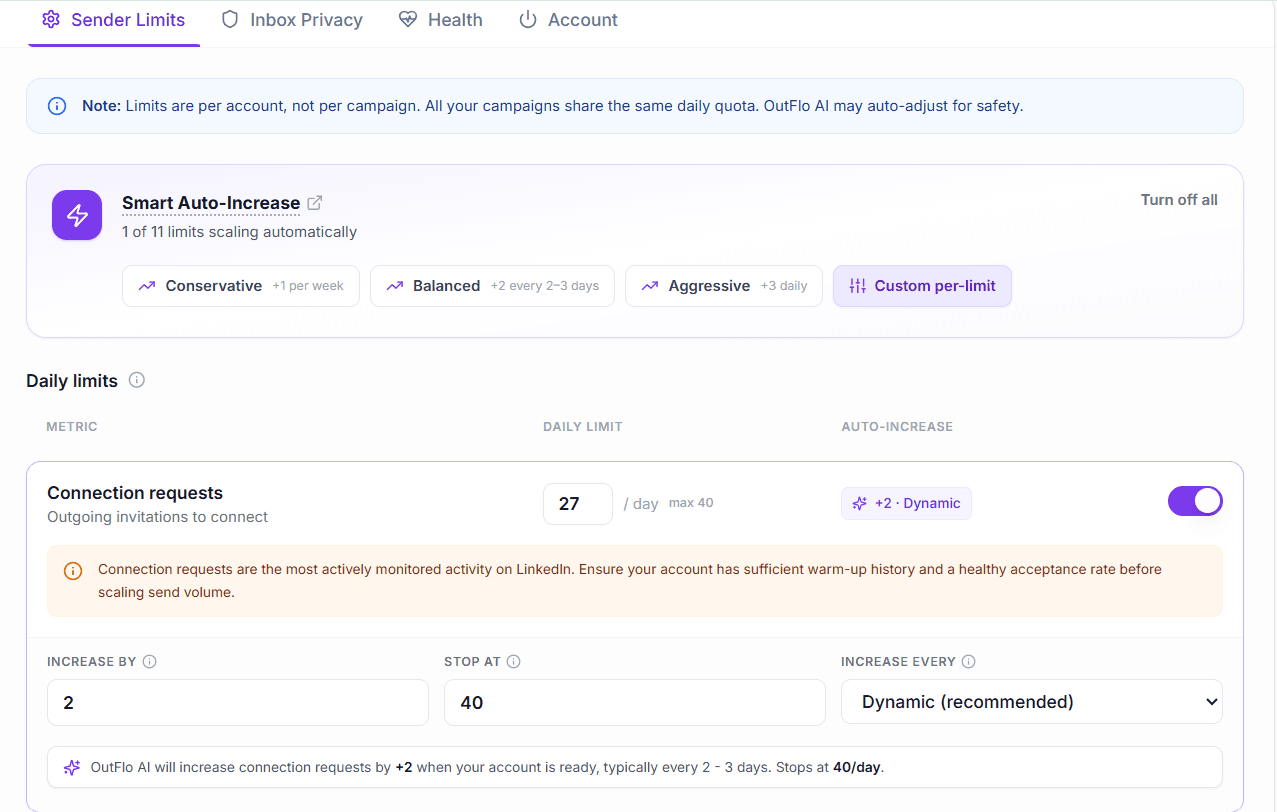
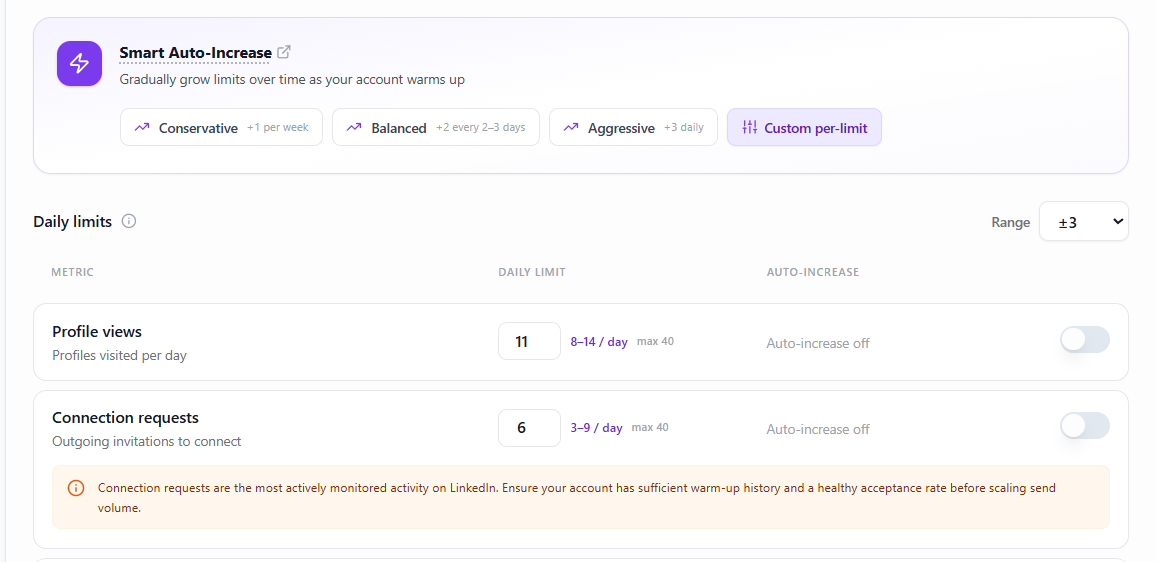
03. Social Selling Index aware automatic ramping
OutFlo uses the sender’s Social Selling Index as an account quality signal for automatic ramping. Smart Auto Increase controls how a selected action grows, while variable limits vary the executed total around the daily value. Neither control can move beyond the enforced maximum for that action.
Social Selling Index
Use account quality context to inform automatic growth.
Conservative
Increase by one action per week.
Balanced
Increase by two actions every two to three days.
Aggressive
Increase by three actions each day.
Custom
Choose the increase, ceiling, and timing for one metric.
Aggressive changes the pace of progression. It does not unlock a higher product maximum. The account remains bounded even when an operator deliberately selects the fastest available ramp.
04. Campaign Action Allocations
A daily limit is only useful if concurrent campaigns respect it. OutFlo lets the operator reserve a defined amount of a sender’s connection requests, messages, likes, and profile views for a specific campaign.
Reservations are visible from the account view. Finished or idle campaigns can release capacity, and unallocated capacity remains shared by the active campaigns using that sender.
Read the allocation workflowSender capacity map
Connection requests
Account ceiling: 40 per day
Campaign A
15
ReservedCampaign B
10
ReservedUnallocated pool
15
Shared05. Automatic account rotation
Add multiple LinkedIn accounts to one campaign and OutFlo automatically rotates campaign work across the selected senders. Every sender remains an independent operating boundary with its own IP, daily limits, pacing, allocations, and account state.
Multi account campaign flow
One campaign. Three independent safety boundaries.
Sender 01
18 available
Connected
Sender 02
12 available
Connected
Sender 03
0 available
At capacity
Rotation uses the capacity that is available now. It does not erase sender limits or turn several accounts into one shared identity.
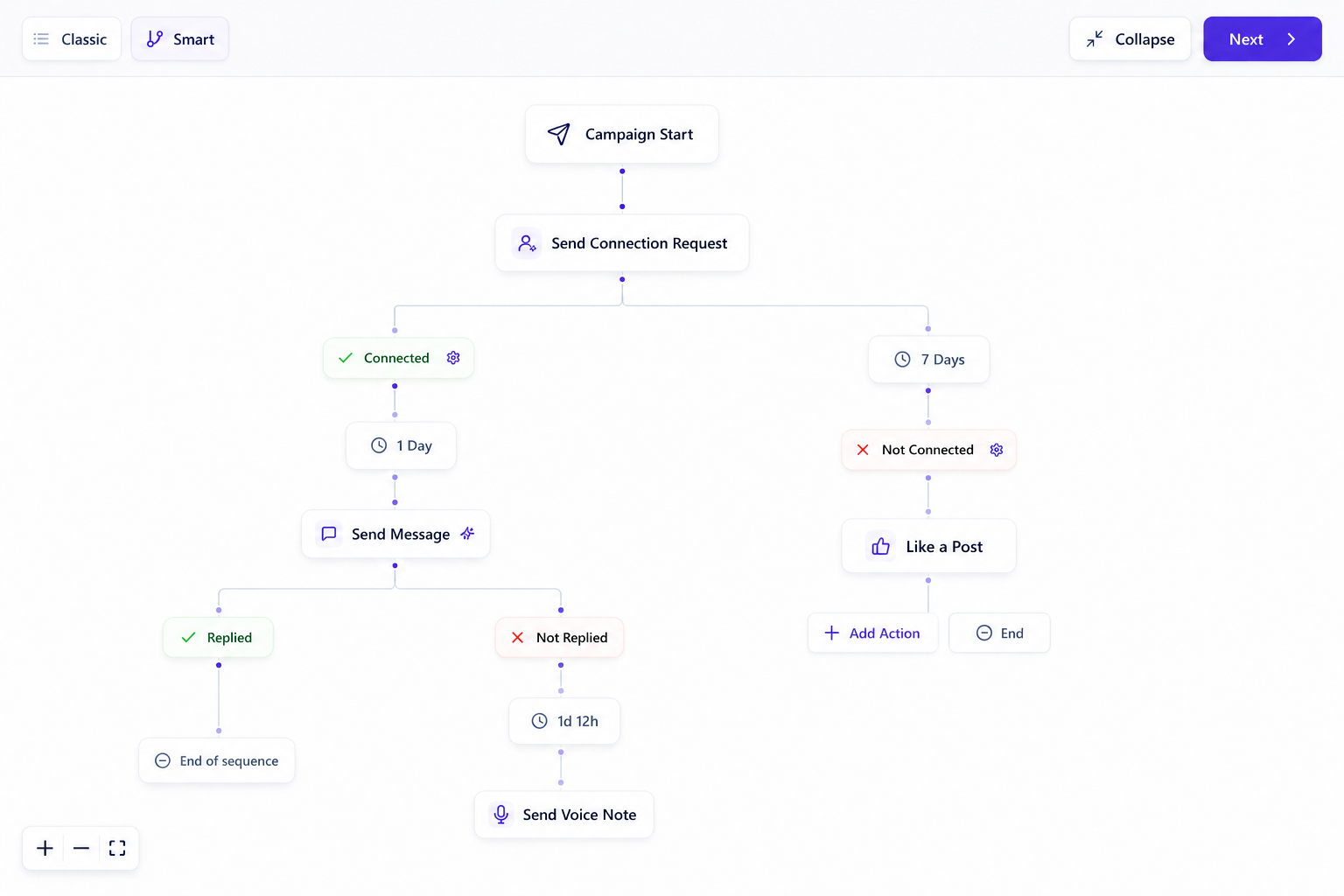
06. Reply aware Smart Sequences
A sequence checks whether the lead connected, replied, or reached a timer before choosing the next action. A reply can end the automated path and move the conversation to a person.
Withdraw invite steps can clean up unanswered requests after a selected waiting period. The general operating range used in the safety guide is 14 to 21 days.
07. Monitoring and recovery
Restrictions and checkpoints can still happen. OutFlo keeps account connection state, sender limits, health, reconnect actions, and OTP handling in the same operating layer as the affected campaigns.
See whether a sender is connected and active before campaign work continues.
Restore the account session through an owner led reconnect path.
Resolve supported email, SMS, authenticator, or mobile approval challenges.
Move replies into Unibox so the next conversation is handled deliberately.
OutFlo compared with common safety models
Major tools document their own limits, pacing, warmup, and IP controls. OutFlo’s advantage is not a claim that those controls exist nowhere else. It is the way they connect across every sender, campaign, sequence, reply, and recovery decision.
| Safety dimension | OutFlo | Other documented models | Practical difference |
|---|---|---|---|
| Network identity | A dedicated residential IP is included for every connected sender account. | HeyReach, Dripify, and Expandi also document dedicated or unique account IPs. Linked Helper uses the operator IP or a private proxy configured by the operator. | OutFlo includes the infrastructure while keeping the sender, limits, campaigns, and account state in one workspace. |
| Account warmup | Social Selling Index aware Smart Auto Increase combines account quality context with Conservative, Balanced, Aggressive, or Custom ramps for individual actions. | Dripify and Expandi also document automatic activity control or configurable account warmup. Linked Helper documents smart daily limits and start time variation. | OutFlo makes the ramp visible per metric and keeps every progression inside an explicit product ceiling. |
| Enforced maximums | Every action has a visible maximum that the sender, campaign, and rotation workflow cannot exceed. | Platforms differ in whether a displayed number is guidance, an operator setting, or a product enforced boundary. | OutFlo keeps the hard boundary at the account layer, so adding campaigns or rotating senders cannot override it. |
| Daily variation | The selected range varies actions around the account limit while preserving the configured ceiling. | Dripify and Linked Helper also document daily range or smart limit variation. | OutFlo places daily variation beside the same sender limits and warmup controls used by every campaign. |
| Cross campaign control | One account ceiling is shared across campaigns, with visible hard reservations for each campaign and action. | HeyReach documents one shared sender limit across active campaigns. Other tools expose account or campaign limits in different ways. | OutFlo shows exactly which campaign holds capacity and lets the operator release or rebalance it from the sender view. |
| Automatic account rotation | A multi account campaign can rotate work across selected sender accounts according to the capacity available on each sender. | Several multi sender tools also document sender rotation or lead distribution across accounts. | OutFlo keeps rotation inside the same account limits, pacing controls, campaign allocations, sequence logic, and shared inbox workflow. |
| Safety feedback | Warnings, maximum values, current limits, warmup state, and active allocations are visible in the product. | HeyReach documents cooldown mode and internal locks, including locks that are not visible in the product. Other tools provide their own alerts and controls. | OutFlo favors controls that an operator can inspect before volume becomes an account problem. |
| Recovery workflow | Reconnect, account state, and OTP or checkpoint handling sit beside campaign operations. | Recovery depth varies by tool, architecture, and connection method. | A team can identify the affected sender and respond without rebuilding the campaign in a separate system. |
Competitor capabilities change. This comparison describes the current publicly documented operating models and avoids claiming that any tool can guarantee account safety.
The limits that matter
The safer starting point depends on account age, history, targeting, acceptance, and recent activity. New or inactive accounts should begin below the current interface maximum.
Read the complete safety guide| Operating variable | Practical range | How to use it |
|---|---|---|
| Starting activity | 5 to 10 actions per day | Begin here for a new or inactive account. |
| Newer account requests | 15 to 20 per day | Increase only after the account has history. |
| Established account requests | 25 to 40 per day | Treat 40 as the current ceiling. |
| Weekly connection volume | Around 150 per week | Stay below the account’s practical threshold. |
| Genuine connections before scale | 100 or more | Build a credible account history first. |
| Stale invite withdrawal | 14 to 21 days | Remove unanswered invitations from the queue. |
Frequently asked questions
No. No automation platform can guarantee that. LinkedIn prohibits unauthorized automated activity and can change its enforcement at any time. OutFlo is designed to reduce avoidable operational risk through stable account infrastructure, conservative controls, gradual pacing, and visible recovery workflows.
Build the safety model before the volume
Start with the extension connection, confirm the dedicated IP, choose conservative limits, and review the sequence before the first campaign launches.
OutFlo is not affiliated with or endorsed by LinkedIn. LinkedIn’s current guidance states that unauthorized third party software that automates activity can violate its User Agreement and may lead to account restrictions. Review the current LinkedIn automated activity guidance before choosing any workflow.
Keep protected people and companies out of automated outreach within the selected scope.
Choose the appropriate protection scope for people or companies. DNC controls are respected by automated outreach; they do not guarantee account safety.
Let the account owner restore access through a secure shareable reconnect link.
Configure per-sender activity limits and variable daily pacing.
Daily limits and variable pacing are operational controls. LinkedIn’s rules and account conditions still apply.
Ramp selected activity limits using configured Smart Auto-Increase settings.
Configure automatic acceptance of incoming invitations per sender.
Invitation automation is configured per sender. Access is rolling out; check your workspace before planning around it.
Connect a LinkedIn account through the Chrome extension or with LinkedIn credentials, resolving supported checkpoints when needed.
Withdraw aged pending outbound invitations under configured rules.
Archive inactive senders while retaining their stored conversation history.
Review incoming invitations and choose whether to accept or ignore them.
Keep the choice explicit when reviewing who to connect with. This invitation review surface is rolling out.
Check the stored sender InMail balance and when it was refreshed.
The displayed balance is a stored value. Check its refresh time when deciding whether to use paid InMail.