Your LinkedIn account is safer when its activity does not look exactly the same every day. That is why OutFlo can vary the number of actions it takes around your selected daily limit.
What you will see
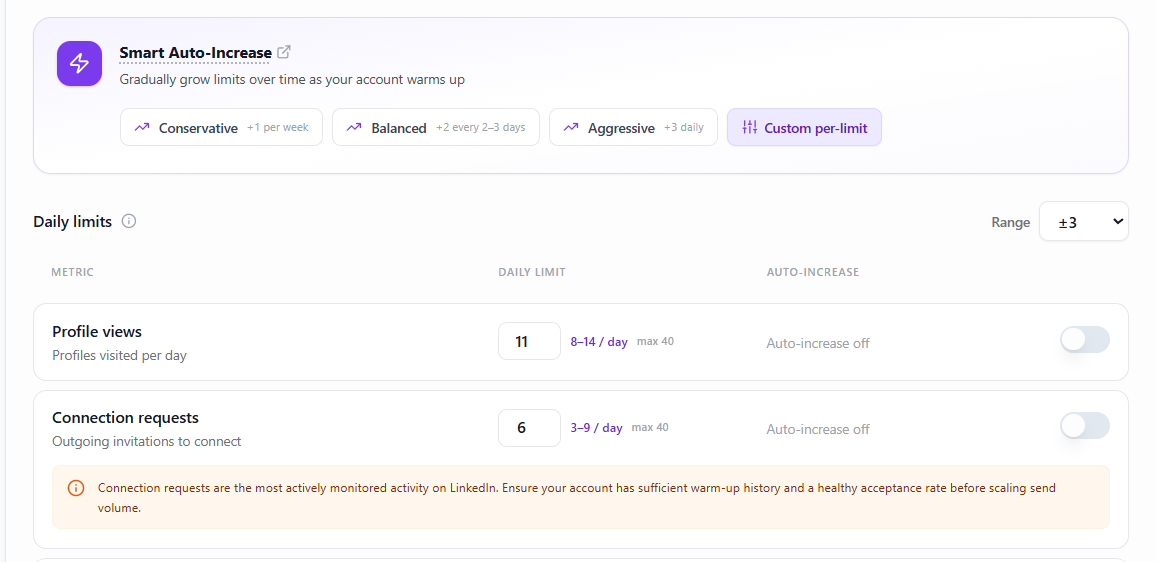
Your daily limit is still the guide you set for your account. With variability turned on, the exact number of profile views, connection requests, or messages may be slightly different from one day to the next.
For example, a limit of 40 actions may result in a day with a few fewer actions and another day with a few more. The changes stay close to your setting, so your campaigns continue to make steady progress without repeating one identical pattern.
Why this helps protect your account
People rarely perform the exact same number of actions at the exact same pace every day. Repeating a perfectly predictable routine can make automated activity stand out.
Variable daily limits help your account maintain a more natural rhythm. This can reduce repetitive patterns, avoid sudden bursts of activity, and support a healthier sending reputation over time. OutFlo also respects the safety limits for your account, so variability is used to make activity more natural—not to push beyond what your account should do.
How to choose your range
- 1.Open Account Details for the LinkedIn account you want to update.
- 2.Select the Sender Limits tab.
- 3.Find Daily limits and locate the Range selector.
- 4.Choose the amount of day-to-day variation you are comfortable with.
- 5.Click Save Limits.
Use a smaller range when you want your activity to stay closer to the number you entered. Use a larger range when you prefer a little more natural variation. You can return to the same setting whenever your outreach needs change.
A simple way to think about it
Your daily limit is the destination; variability is the natural pacing on the way there. You still control the level of activity, while OutFlo helps avoid an identical routine day after day.