
The safest LinkedIn automation tool isn't the one with the most features — it's the one that refuses to let you do the things that get accounts restricted. Four of the five tools below run cloud-based with a dedicated IP per account, which in 2026 is the entry ticket rather than a differentiator. Where they actually diverge is personalization depth, how replies get handled across multiple accounts, and — for one tool on this list — whether the underlying architecture is safe at all. Here's how they compare, ranked on account safety first and features second.
How We Ranked These
Four criteria, in order of weight:
1. Execution architecture — cloud-based or browser extension. This is non-negotiable and the largest single risk factor.
2. Per-account isolation — does each connected LinkedIn account get its own dedicated IP and independent pacing, or is infrastructure shared?
3. Enforced limits — does the tool cap daily volume, or let you configure your way into trouble?
4. Depth beyond sending — personalization quality and reply handling, since generic templates at scale are themselves a detection signal.
Step 1
Outflo
Best for: Agencies and GTM teams running outreach across multiple LinkedIn accounts on a flat fee.
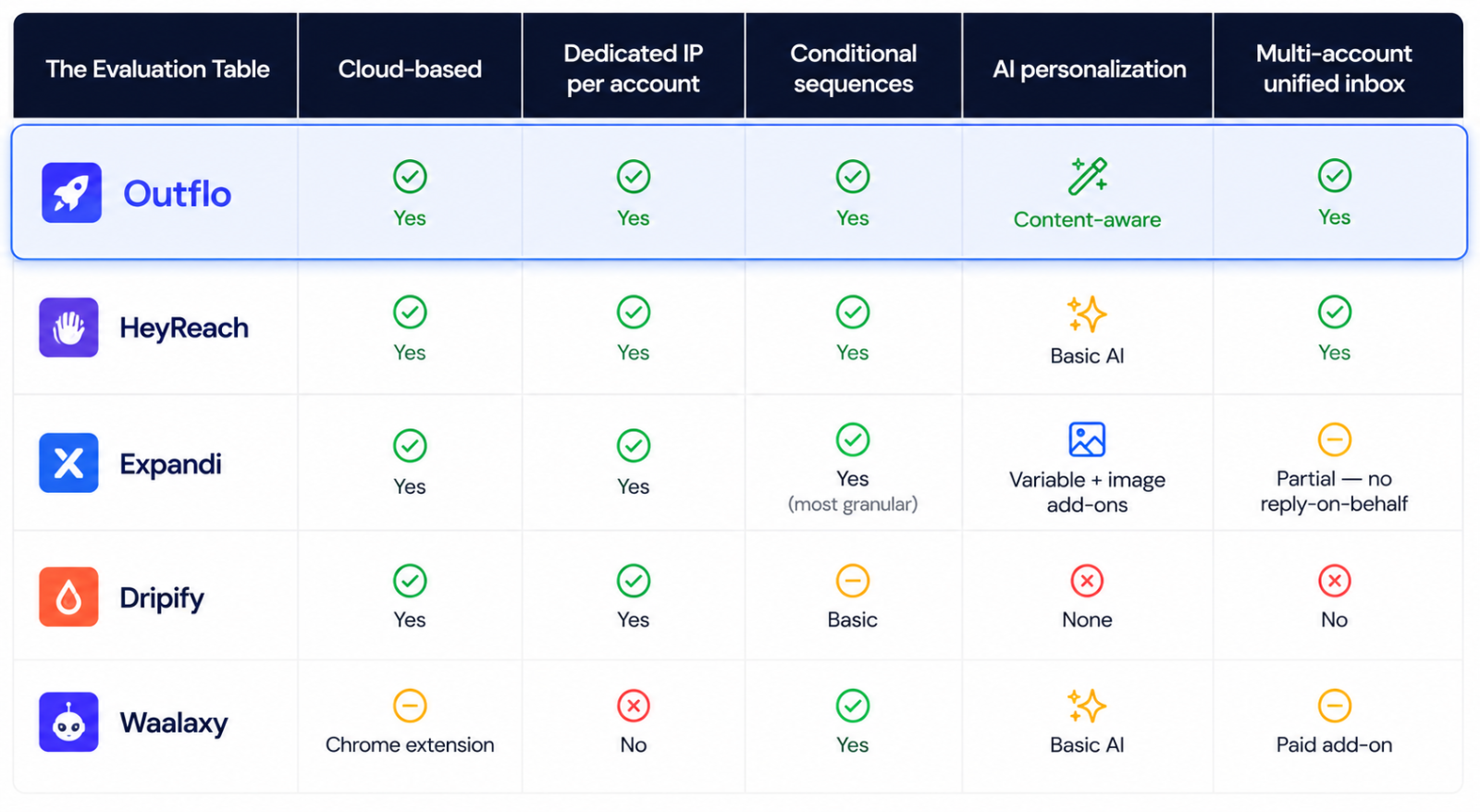
Outflo runs entirely cloud-based, and every connected LinkedIn account gets its own dedicated residential proxy with independent pacing — so one account's activity pattern has no bearing on another's, and a restriction on one doesn't cascade across a client roster.
The two things that separate it in practice:
AI personalization pulls from actual profile activity. This is where the list genuinely separates. Rather than inserting a name into a static template, Outflo drafts from the prospect's recent posts and profile content — which matters for safety, not just reply rates, since message-body similarity across sends is itself something detection systems look at. Most tools in this category personalize through variables or bolt-on image overlays; content-aware drafting is a different thing.
Sequences branch on live LinkedIn state. Conditional logic itself is standard now — the useful distinction is what a sequence can actually check. Outflo's Smart Sequences read connection status, reply status, and open-profile status, then route each lead down a different path based on the real answer rather than a timer.
Replies from every connected account land in one Unified Smart Inbox, so nothing sits unread in an individual sender's inbox — and the platform enforces its own guardrails server-side, including minimum wait times between steps and blocking structural edits to a sequence once real leads are moving through it.
The tradeoff: it's LinkedIn-focused. If you need email sequencing in the same tool, you'll be pairing it with something else.
Step 2
HeyReach
Best for: Agencies that want straightforward sender rotation with a short learning curve.
Cloud-based, with a clean interface and a genuinely low setup barrier — you can be running campaigns quickly without much configuration. Its reputation is built on sender rotation and realistic activity distribution across accounts, which is the right architectural approach for scaling volume safely. Its conditional sequences handle connection-status branching properly: already-connected prospects skip the request and go straight to messaging.
The tradeoff: personalization is lighter than the depth-focused tools — there's AI for opening lines and reply suggestions, but it isn't where the product competes. Once someone replies, handling the conversation is on you.
Step 3
Expandi
Best for: Teams that want mature, well-established safety tooling.
One of the longer-running cloud-based options, with dedicated IP assignment per account and warm-up features that ramp activity gradually rather than launching at full volume — exactly the behavior LinkedIn's systems reward.
Its sequence builder is the most granular on this list — roughly a dozen actions combined with ten conditional triggers, so flows can respond differently depending on whether someone accepts, replies, or ignores you.
The tradeoff: personalization is largely variable-based and image-overlay rather than content-aware, with the richer visual options requiring separate paid third-party subscriptions. The global inbox also doesn't let team members reply on each other's behalf, which matters if you're managing client accounts.
Step 4
Dripify
Best for: Smaller teams wanting sequence logic without much complexity.
Cloud-based with if-then sequence building and reasonable analytics. Does what it says without much overhead, and the workspace structure works acceptably for managing a few separate campaigns.
The tradeoff: it's a sequencer, and the branching is basic — conditions are essentially "connected or not connected." There's no AI personalization at all, so messaging is variable insertion only, and reply handling is entirely manual.
Step 5
Waalaxy
Best for: Teams that specifically want LinkedIn and email in one sequence.
The multichannel angle is the real draw — combining LinkedIn touches with email steps in a single campaign is genuinely useful for certain motions. Response detection pauses campaigns when someone replies, which prevents the awkward scripted-follow-up-after-a-yes problem.
The important caveat: Waalaxy runs as a Chrome extension rather than from cloud infrastructure, which means your browser needs to be open for campaigns to execute — and it's the one tool on this list without a dedicated IP per account.
The Evaluation Table
What Actually Matters When You Choose
If you're running one or two accounts: almost any cloud-based tool on this list will keep you safe, assuming you respect daily limits. Pick on features and price.
If you're running outreach for multiple clients: per-account isolation stops being a nice-to-have. Shared infrastructure means one flagged account can implicate others, and that's a client-relationship problem, not just a technical one.
If your reply volume is already meaningful: a unified inbox across accounts saves more time than any sending feature, because triaging replies across separate logins is where multi-account outreach actually breaks down operationally.
If your acceptance rate is the problem: no tool on this list fixes targeting. Sending infrastructure and message personalization only matter once you're reaching the right people.
- *
- *
Want per-account isolation, branching sequences, and one inbox across every client account? Start your free Outflo trial — no credit card required.
FAQ
Common questions
Q1: What's the single most important safety factor in a LinkedIn automation tool?
A1: Whether it runs cloud-based or as a browser extension. Extensions operate through browser permissions LinkedIn's systems can identify directly; cloud-based tools execute from external infrastructure that reads as a normal web session.
Q2: Does each LinkedIn account really need its own IP?
A2: For anything beyond a single account, yes. Shared infrastructure ties account activity patterns together, meaning a problem with one account can implicate others — which matters especially for agencies running client accounts.
Q3: Are ranked "safest tool" lists trustworthy when published by a vendor?
A3: Treat any vendor-published ranking, including this one, as a starting point rather than an objective verdict. The evaluation criteria are the useful part — apply them yourself to any tool you're considering, and ask each vendor directly where actions execute and what limits they enforce.
Q4: Do I need a separate tool for email if I'm using a LinkedIn-focused platform?
A4: Usually yes. LinkedIn-focused tools generally integrate with email platforms rather than replacing them. Whether that's a drawback depends on whether you want depth on one channel or adequacy across two.
