
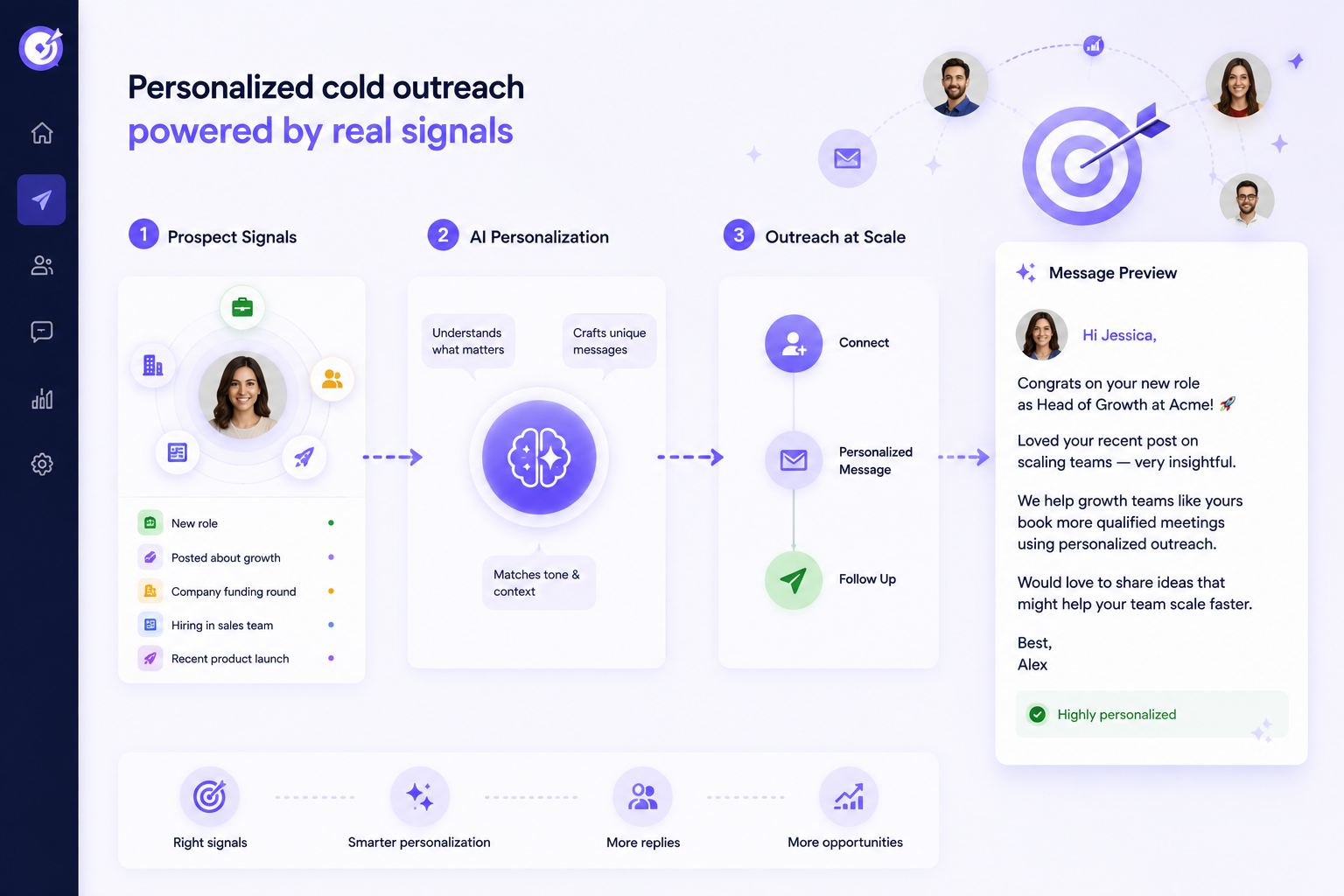
Personalizing cold outreach at scale means building a system that makes each message relevant based on a real signal about the prospect, rather than hand-writing a custom note for every person or hiding a first-name merge field inside a generic template. The unit of personalization is not the name. It is the reason you are reaching out to this person, right now, about this specific problem. Most teams get this wrong in a way that is worse than sending nothing, and the fix is a repeatable process, not more effort per prospect. This guide covers why most personalization fails, the signal framework that replaces it, and how to run it across hundreds of prospects without it collapsing into manual work.
Why most personalization fails
Here is the problem. Most teams think personalization means a first name, a company name, and maybe a throwaway line about a recent post. "Hey Sarah, loved your recent LinkedIn post, really insightful." That is not personalization. It is a template with a merge field, and the recipient knows it, because they have received a dozen versions of the same line this week.
This is personalization theatre. It looks personal and says nothing. It could be sent to a thousand people with only the name changed, which means it communicates the one thing you did not want to communicate: that you did no homework and this is a mass send.
Real personalization is about relevance, not recognition. Recognition is knowing someone's name and employer. Relevance is knowing why your message should matter to them today. The difference is the entire game. It is also why the goal changes: stop trying to write more custom messages, and build a system that makes messages relevant automatically.
The signal-based framework
Stop trying to write bespoke messages for every prospect. Build a system that personalizes based on signals instead.
A signal is any observable event or data point that tells you something about when and why a prospect might care about what you sell. It is the trigger that makes your outreach timely instead of random. The signals that actually move reply rates are concrete and recent: a funding round that means they are scaling and hiring, a hiring spike for the exact team your product serves, a new executive who arrives with new priorities and a new budget, a tech-stack change that creates a gap you fill, a company announcement like a launch or a market expansion, a post where they described a problem you solve, or a job change in the last 90 days.
The discipline that makes this work is picking one strong signal per prospect. Not three, not five. One. Stacking signals feels thorough, but it produces a message that reads like a research dossier rather than a note from a human, and it slows you down for no gain. One strong signal, tied to a likely pain, beats a pile of them every time.
The minimum viable personalization formula
Here is the part that keeps this fast: only a small slice of any message actually needs to change per prospect. Roughly 10 to 20 percent. The rest is templated, and that is fine.
Three things carry the personalization. The first one or two lines reference the signal and tie it to a problem the prospect likely faces. The problem framing shows you understand their specific context rather than a generic industry pain. And the call to action stays low friction, a yes or no question rather than a request for 30 minutes you have not earned yet. Everything else, the body, the way you explain what you do, the proof point, stays the same across a segment.
Compare the two versions. The weak one: "Hi Sarah, I noticed you work at Acme. We help companies like yours grow revenue, can we chat?" The strong one: "Hi Sarah, saw you are hiring eight AEs in EMEA while rolling out a new enterprise motion. That usually means ramp time becomes the bottleneck before pipeline does. Want a two-page playbook on how teams like yours handled it?" The second one proves you saw something specific, ties it to a real pain, and offers value before asking for anything. Only the first line changed. The offer behind it did not.
Personalizing LinkedIn outreach at scale
LinkedIn is not email, and the format has to adapt even though the framework does not. Messages are shorter, the context is more personal, and people are more suspicious of anything that smells automated.
The workflow that holds up in 2026 keeps the pitch and the connection separate. Warm before you pitch: view the profile, follow them, react to or comment on a recent post, so your name is faintly familiar before you land in their requests. Keep the connection note tiny or skip it, because a pitch in the connection request is the fastest way to get declined. Save the value for after they accept, when a first message can reference the same signal you would have used in email and offer something useful.
The signals that work especially well on LinkedIn are the ones native to the platform: a recent post you can respond to, a job change you can acknowledge, an event they are speaking at, a company announcement in their feed. For each signal type you build one template, and each prospect gets matched to the template that fits the first strong signal you found on them.
Using AI without sounding like a robot
AI is in every outreach stack now, and most people use it in the exact way that produces the worst output. They hand it a name and a company and ask for a personalized intro, and it returns "I was really impressed by your company's commitment to innovation and customer success." That line is worse than no personalization, because it actively signals automation. It could be about anyone.
The fix is to constrain the AI rather than free it. Give it structured inputs and strict rules: the signal type, the specific detail behind it, and the likely pain that signal implies. Then ask it to write only one or two lines, and explicitly ban generic praise, no "love your work," no "impressive growth." Inside those constraints, AI is genuinely useful, because it generates strong variants faster than a person can type them while staying anchored to a real, specific signal. Keep a human in the loop at first. Run the first fifty AI-written intros past a person, fix the recurring patterns, and only then let it scale.
The important shift is what you ask AI to personalize from. Template variables, first name and company, are the thing that made outreach feel robotic in the first place. Personalization that reads as human comes from the prospect's actual profile and recent activity, the post they wrote last week, the role they just started, not a static field that was true whenever the list was built.
Where OutFlo fits
That last point is exactly what OutFlo's AI Personalization is built to do. Instead of filling template variables, it generates the personalized part of each message from a prospect's real profile and recent activity, at send time. So the message can reference what the person is actually doing now, which is the difference between relevance and a merge field, applied automatically across a whole campaign rather than one prospect at a time.
The rest of the system the framework describes maps onto features that already exist. Signal-based templates run inside Smart Sequences, which branch on what the prospect actually does, connection accepted, profile viewed, message read, rather than firing on a blind timer, so the right follow-up reaches the right person at the right step. Running that across a real volume of prospects means spreading the load, which Multi-Account Campaigns handle by distributing sends across your team's LinkedIn accounts within safe per-account limits. And when the personalized outreach starts working, the replies arrive faster than one inbox can hold. The Unified Smart Inbox pulls every conversation from every account into one stream and tags the interested ones, so the point of the whole exercise, a warm reply, does not get lost in five separate logins.
To be clear about the boundary, OutFlo does not find the signals for you. You bring the enriched list, from a Sales Navigator search, a CSV, or a tool like Clay or Apollo, with the trigger data attached. What OutFlo runs is everything after that: turning the signal into a message written from live profile data, sequencing it, sending it safely across accounts, and collecting the replies in one place.
Start your free OutFlo trial · 8-day free trial, no credit card, connect an account in about a minute.
The bottom line
Personalizing cold outreach at scale is not about writing custom messages for everyone. It is about building a system. Define your signals, build one template per signal, enrich prospects with the trigger data, use AI to write only the dynamic part within tight constraints, and reach people from their real profile activity rather than a merge field. Do that and you can send hundreds of messages that read as if you did your homework on each one, because the system did, and reply rates move because the messages are finally relevant instead of merely addressed to the right name.
8-day free trial · No LinkedIn password · One-minute setup
FAQ
Common questions
What does it mean to personalize cold outreach at scale?
It means building a system that makes each message relevant based on a real signal about the prospect, rather than hand-writing a custom note for everyone or dropping a first-name merge field into a generic template. Only 10 to 20 percent of the message changes per prospect, anchored to one strong signal, while the rest stays templated.
What is a signal in cold outreach personalization?
A signal is an observable event or data point that tells you when and why a prospect might care about what you sell, such as a funding round, a hiring spike, a new executive hire, a tech-stack change, a company announcement, a relevant post, or a job change in the last 90 days. The rule is to pick one strong signal per prospect rather than stacking several.
How do I personalize outreach without spending hours on each prospect?
Build one template per signal type, then match each prospect to the template that fits the first strong signal you find on them. Enrich the list with trigger data programmatically, and use AI to write only the dynamic first line or two within tight constraints. That takes about 30 seconds per prospect instead of 20 minutes.
How do I use AI for personalization without sounding like a robot?
Constrain it. Give it the signal type, the specific detail, and the likely pain, then ask for only one or two lines and explicitly ban generic praise like "love your work." Personalize from the prospect's real profile and recent activity rather than static template variables, and keep a human reviewing outputs until the patterns are reliable.
Is personalizing LinkedIn outreach different from email?
The framework is the same, the format changes. Use the same signal and problem framing, but keep it shorter and more casual on LinkedIn, separate the pitch from the connection request, warm the prospect with a profile view or a comment first, and save the value for a message after they accept.
What is the biggest mistake teams make personalizing at scale?
Using weak signals or generic AI praise. "I saw you work in sales" is not a signal; "you just hired a VP Sales and are posting about ramping AEs" is. And an AI line like "love your commitment to excellence" is worse than no personalization because it openly reads as automated. Be specific and relevant, or do not personalize that field at all.
