
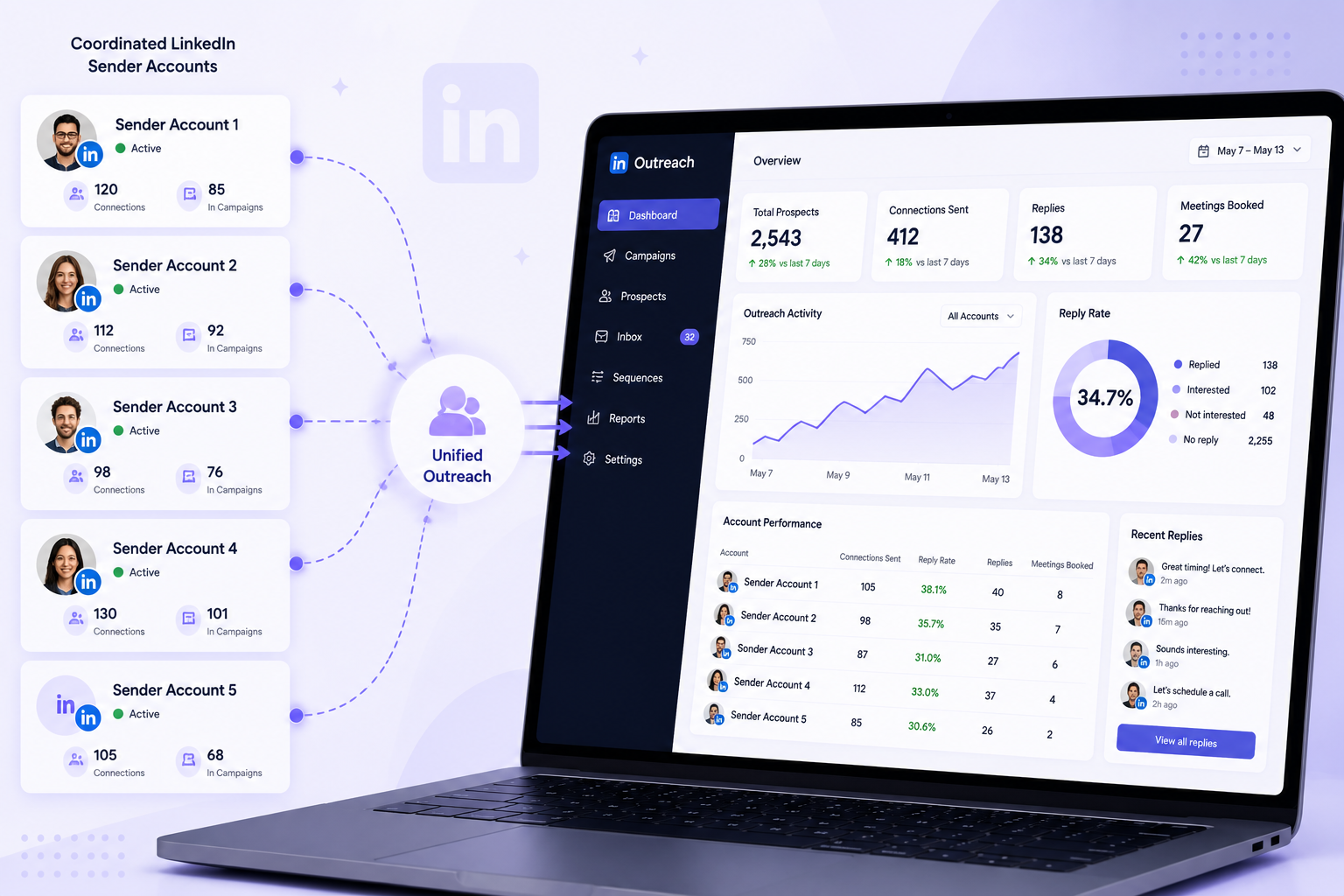
A LinkedIn company expansion strategy is the practice of distributing outreach across several coordinated sender profiles, each assigned to a specific segment, territory, or vertical, so your brand can run more qualified conversations at once without any single account exceeding LinkedIn's limits. It is an infrastructure decision, not a marketing one. Most teams never build it. They tie their entire pipeline to one profile, push that profile until LinkedIn throttles it, and conclude that LinkedIn outreach does not scale. It does. It just scales sideways, across accounts, rather than harder through one.
Why one account is a ceiling, not a channel
Here is the fact that governs everything else: LinkedIn's limits are per person, not per company. A single account safely runs about 40 connection requests a day, roughly 150 to 200 a week. LinkedIn caps connection requests somewhere in the 20 to 40 per day range depending on the account's age, activity history, and profile strength. Push past that and the account gets restricted, and a restricted account produces zero pipeline while you wait weeks for a review that often goes nowhere.
That cap sets a hard math problem. If one account reaches at most 200 prospects a week, then your entire weekly outreach ceiling is 200 times the number of accounts you run, no matter how good your copy is or how hard your SDR works. Effort does not raise the ceiling. Account count does.
So scaling LinkedIn outreach is a distribution problem. You spread the same total volume across more profiles, each running at a safe human pace, so the company covers far more ground than any one account could while no single profile carries a load that trips a flag.
This is where most expansion attempts go wrong. The instinct is to add accounts and assume more pipeline follows. It does not, and often the opposite happens. Add senders with no coordination and you get two reps messaging the same prospect in the same week, accounts drifting onto overlapping lists, and profiles quietly pushed past safe volume because nobody is watching them together. The account count is the easy part. The coordination is the strategy. The rest of this guide is how to build that coordination.
Layer the accounts by who should be sending
Not all sender accounts are interchangeable, and treating them as identical is the most common mistake at this stage. Each profile carries its own credibility, seniority, and relevance to a specific buyer. A message from a founder to a CFO lands on a different footing than the same message from an SDR.
A workable split by role:
- Founders and executives carry the highest credibility and the lowest volume. Point them at your most strategic accounts, the logos where a peer-to-peer message from someone senior changes whether you get a reply at all. One well-timed founder message on the right account outperforms a stack of SDR touches.
- Account executives handle mid-funnel conversations, demo invitations, and territory-specific outreach. Their profiles usually carry more history and connections than an SDR's, which gives their outreach more social proof.
- SDRs carry the top-of-funnel volume. They run the heaviest sequencing load, so they need the tightest ICP segmentation to keep that volume relevant instead of spraying.
On top of role, split by territory and vertical. The simplest model is one sender per slice of your ideal customer profile. Three verticals means three dedicated senders. Multiple regions means matching sender profiles to the region they cover, so an account reaching out in EMEA reads as local rather than as a US profile messaging across time zones. Most teams start with three to five senders and grow from there once the workflow holds.
Warm the ground before the first request
Cold outreach never lands in a vacuum. Every connection request arrives into whatever impression the prospect already has of your brand, and if that impression is blank, the request has to do all the work alone.
Content is what fills that space. When a prospect has seen a useful post from your company or one of your reps a few days before the request arrives, the request stops feeling fully cold. This matters more than most outbound teams account for, because the person you are messaging is rarely the only one shaping the decision.
The 2025 Edelman-LinkedIn B2B Thought Leadership Impact Report, a survey of nearly 2,000 professionals, put numbers on this. It found that more than 40% of B2B deals stall on internal misalignment inside the buying group, driven by hidden buyers in finance, legal, procurement, and operations who hold real influence but rarely talk to sales. Among those hidden buyers, 95% say strong thought leadership makes them more receptive to outreach, while 71% report little direct contact with sales teams. People are forming opinions about your company long before anyone books a demo, and content is what tilts those opinions in your favor before your senders ever reach out.
In practice, the company page posts consistently about the problems your buyers actually face, and individual sender profiles amplify that with their own angle, client wins, and commentary. Content is the pre-sell. The outreach is the ask. Skip the pre-sell and the ask carries the whole load.
Segment the list before it reaches any tool
For a multi-sender setup to work, the segmentation has to be finished before the leads enter your outreach tool. Each sender needs a clean, non-overlapping slice of the ideal customer profile, structured so the campaign routes it without anyone making manual calls on import.
Start with your full ideal-customer list, filtered by your baseline firmographics, in an enrichment tool like Clay or Apollo. Add columns for the variables that map to your sender structure: geography, vertical, headcount band, and any intent signals you track. Then split the enriched list into one export per sender, and add an assigned-sender value to every row before it leaves the enrichment tool. That value is what tells your campaign which profile owns the lead. Without it, you are back to sorting by hand, which defeats the point of the whole system.
Two rules keep this from breaking. One prospect gets one sender, and the conflict gets resolved before import, not after. If a lead could belong to two senders, decide the rule up front: whoever is geographically or vertically closest wins. And keep the naming exact. The assigned-sender value has to match how the account is labeled in your tool character for character, because one mismatch between "emma.jones" and "Emma Jones" sends the routing sideways.
Keep every account safe while you scale
Scale creates risk unless you build the guardrails before you need them. Since LinkedIn's limits are per account, every sender needs managing both on its own and as part of the group.
Warm up new accounts slowly. Do not connect a fresh profile and immediately run it at full volume. In week one, keep it to profile views, light engagement, and a handful of connection requests. Increase only if acceptance rates hold. A useful checkpoint: if an account's acceptance rate sits below about 13% in the first few weeks, something upstream is off, usually list quality, an incomplete profile, or volume rising too fast. Fix that before adding volume.
Hold the daily ceilings as hard caps. New accounts in weeks one and two run 10 to 15 connection requests a day. Warming accounts move to 15 to 25. Established accounts with healthy metrics reach 30 to 40, and not beyond. Space follow-ups at least 5 to 7 days apart, because tighter spacing adds pressure without adding replies. And withdraw connection requests that sit unanswered past two or three weeks, so stale invites do not pile up and flag the profile.
Run all of this and account health holds across the network even as total volume climbs, because the volume is spread thin across many profiles instead of concentrated in one that eventually breaks.
The reply problem nobody plans for
A multi-sender setup that works generates a volume of replies that a single LinkedIn inbox, or five separate ones, cannot realistically handle. Five sender accounts means five logins, five notification streams, and a near-certainty that a warm reply sits unanswered in an inbox nobody checked today.
That unanswered reply is the most expensive failure in the whole system. You paid for the account, warmed it, ran the campaign, earned the reply, and then lost the deal because it took two days to respond. The best predictor of whether a multi-account program produces pipeline is not the number of senders. It is whether someone can see and answer every reply fast, across all of them, from one place.
Where OutFlo fits
Everything above is the strategy. Running it by hand across five or ten accounts is where it falls apart, because the coordination work, the per-account limits, the deduplication, the reply triage, is more than a person can hold together manually. That coordination layer is what OutFlo is built to be.
Multi-Account Campaigns run outreach across all your sender accounts at once, with per-account daily limits enforced as hard caps and per-campaign quota allocation so no single campaign drains an account's whole day. You assign each segmented list to its sender and the volume distributes across the network at a safe pace. Smart Auto-Increase handles the warm-up ramp for you: it starts a new account around 10 requests a day, adds 2 every two to three days, and pauses the ramp if acceptance drops below 20%, so the number reacts to account health instead of sitting at a fixed guess. For the one-owner-per-lead rule and your suppression lists, Lead Lists with Find Intersection and Exclude let you catch overlaps and remove existing customers before anyone gets messaged twice.
Then the replies. The Unified Smart Inbox pulls every conversation from every sender account into one stream, tags the interested ones, and keeps the sender and campaign context on each thread, so whoever picks up a reply knows which account it came from and what was already said. When a deal is ready to move, the bidirectional HubSpot sync pushes the full record and its sender attribution into your CRM, so you can see which part of the expansion is actually generating pipeline. Teams that want to drive the whole thing programmatically can run it through the MCP server at mcp.outflo.io, where an assistant like Claude reads lists, launches campaigns, and drafts replies.
More accounts get you coverage. Coordination gets you pipeline.
Start your free OutFlo trial · 8-day free trial, no credit card, connect an account in about a minute.
Scale coordinated, not just wide
More sender accounts do not automatically mean more pipeline. Without coordination, expansion is just more noise sent faster. What moves the needle is the discipline underneath: every sender owns a defined slice of the market, every lead has exactly one owner, every account runs at a pace that stays invisible to LinkedIn's flags, and every reply lands somewhere a person can act on it quickly.
Build it that way and a collection of LinkedIn accounts becomes one coordinated outreach engine, with the company page as the anchor, the sender network as the volume, and a coordination layer keeping all of it deduplicated, safe, and measurable.
8-day free trial · No LinkedIn password · One-minute setup
FAQ
Common questions
What is a LinkedIn company expansion strategy?
It is the practice of distributing your LinkedIn outreach across several coordinated sender profiles, each covering a specific segment, territory, or vertical, instead of running everything through one account or the company page. The goal is to scale the number of qualified conversations your brand can run at once while staying inside LinkedIn's per-account limits and keeping every message personal.
How many LinkedIn sender accounts should a company use?
It depends on how wide your ideal customer profile is and how many segments you cover. Most teams start with three to five senders, prove the workflow, and expand from there. What matters more than the raw count is that each sender owns a clean, non-overlapping slice of the market, because uncoordinated accounts create overlap and get flagged rather than adding pipeline.
Is it safe to run outreach from multiple LinkedIn accounts?
Yes, when each account is warmed up gradually, held to safe daily limits, and coordinated so no two senders message the same prospect. The risk is not the multi-account model itself, it is running accounts without coordination: duplicate outreach, overlapping sequences, and profiles pushed past safe volume are what trigger LinkedIn restrictions.
How many connection requests can one LinkedIn account send per day?
Roughly 20 to 40 per day for an established, healthy account, which works out to about 150 to 200 a week. New accounts should start far lower, around 10 to 15 a day in the first week, and increase only if acceptance rates hold. If acceptance drops below about 13%, something upstream is off and volume should come down, not up.
How do I stop two senders from messaging the same prospect?
Resolve it in your data before the leads reach your outreach tool. Segment the list so each prospect is assigned to exactly one sender, deduplicate any overlaps in your enrichment tool, and keep a suppression list of existing customers and anyone already in a sequence. In OutFlo, Lead Lists with Find Intersection and Exclude let you catch overlaps and remove those contacts before anyone gets messaged twice.
How do you manage replies across many LinkedIn accounts?
Route them into one place. Running five accounts means five separate LinkedIn inboxes and near-certain missed replies, which is the most expensive failure in a multi-account program. A unified inbox that pulls every sender's conversations into one stream, tags the interested ones, and keeps sender and campaign context lets one person work replies across all accounts quickly.
