
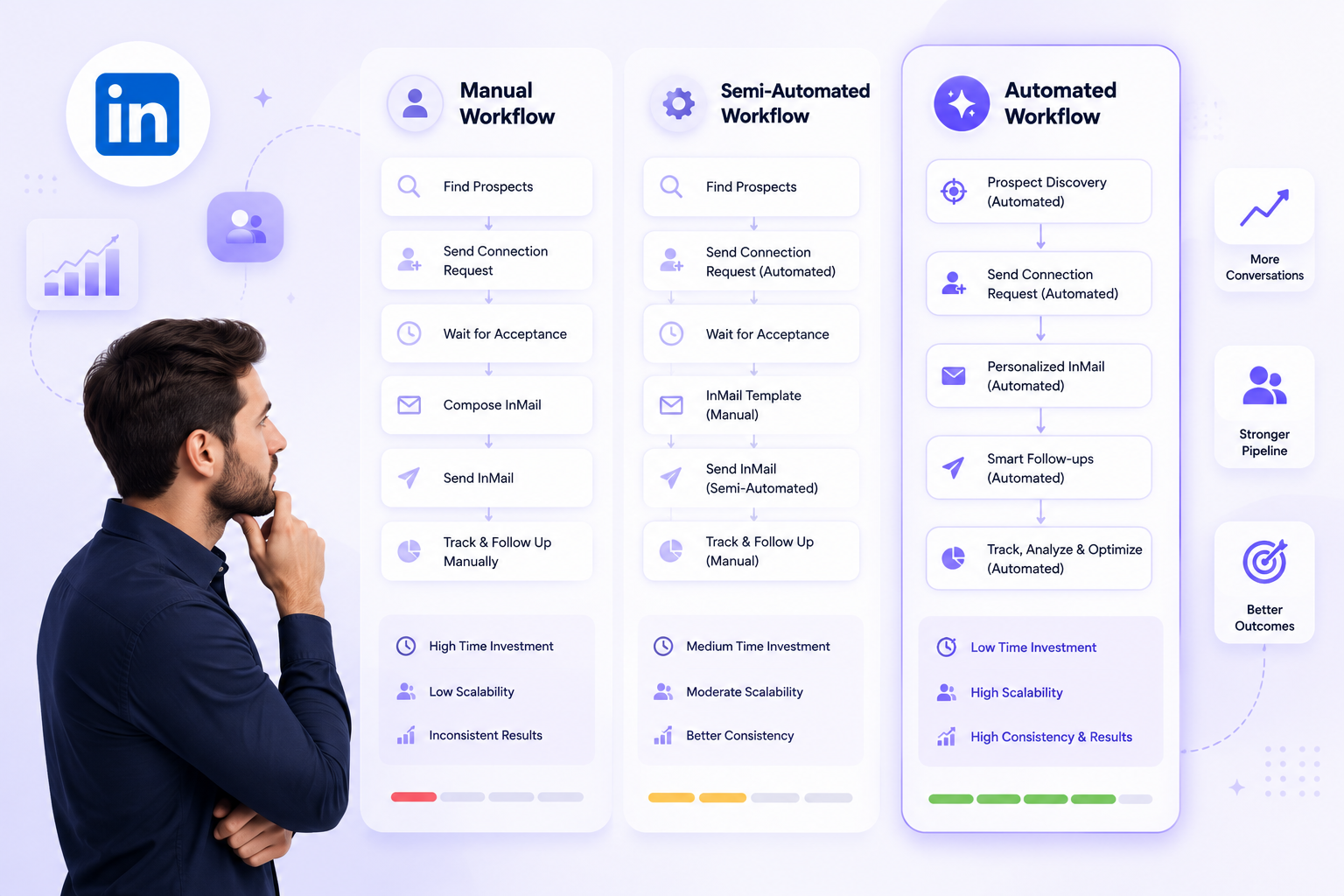
Choosing the right LinkedIn InMail approach means matching how you send, personalize, and follow up on InMail to your team's size, personalization needs, and compliance tolerance, rather than defaulting to whatever tool a competitor mentioned last. The three real options are manual, semi-automated, and fully automated, and the right one changes based on five concrete factors, not gut feel.
Why your InMail strategy needs a decision framework
Most teams don't choose an InMail approach. They inherit one. A rep starts sending InMails by hand because that's how the last person did it, or a manager buys a tool because a competitor mentioned it in a sales call, and six months later nobody remembers why the process works the way it does. Neither path involved a decision. Both just happened.
That absence of a decision is expensive in a specific way. InMail is not an unlimited resource. Sales Navigator gives a standard seat 50 credits a month, Premium Career gives 5, Premium Business gives 15, and even Recruiter Lite tops out at 30. Every InMail sent with the wrong approach, generic, mistimed, or aimed at a prospect who didn't need one because their profile was open anyway, is a credit spent for nothing. Multiply that across a team of five or ten reps guessing their way through it, and the waste compounds every month.
The fix is not a better template. It's a decision made once, deliberately, based on what your team actually looks like. That decision has three real options.
The three core InMail approaches
Manual InMail is a rep opening a prospect's profile, reading it, writing a message from scratch, and sending it, one at a time. A senior AE reaching out to two or three strategic accounts a week is the natural home for this. The message can reference something specific from the prospect's last post, their exact title change, or a mutual connection, because a human read the whole profile before writing a word. The cost is obvious: it does not scale past a small number of high-value targets, and it depends entirely on the rep doing it that week.
Semi-automated InMail sits in the middle. A rep or a tool pulls a research variable, current company, recent job change, a shared connection, into a template, and the rep reviews or lightly edits before sending. A team of five to fifteen SDRs running a defined ICP with variable-based personalization usually lands here. It scales further than fully manual work because the writing itself is faster, but a person still touches every message, which caps how far it stretches before the review step becomes the bottleneck.
Fully automated InMail runs inside a sequence: a research step, message generation, send, and scheduled follow-up, all without a person manually initiating each one. This is where larger SDR teams and agencies running outreach for multiple clients end up, because volume makes person-by-person review impractical. The tradeoff is real. Automation without safeguards produces generic messages at scale, and a generic InMail is worse than no InMail, since it burns a limited credit and teaches the prospect to ignore your name next time.
None of the three is universally correct. A two-person founder-led sales motion doing manual outreach to twenty target accounts a month is using the right approach for its size. So is a fifteen-person SDR team running full automation with strong personalization guardrails. The mismatch happens when a team's approach and its actual size, targets, and personalization needs stop matching each other, which is usually the moment nobody remembers choosing the approach in the first place.
How to choose: five decision criteria for your sales team
Run your team through these five questions in order. Each one narrows the field.
Team size. A team of one to three reps sending fewer than fifty InMails a week rarely needs automation to survive the volume, manual or light semi-automated work is usually enough. Once a team crosses roughly five to ten reps, or the weekly InMail volume climbs into the hundreds, manual research becomes the bottleneck, not the message quality, and semi-automated or full automation becomes the only way to keep pace.
Personalization depth required. Selling into a narrow, high-value account list, enterprise deals, six-figure ACV, a handful of named targets, rewards the depth only a human reading the whole profile can produce. Selling into a broad ICP where the message hinges on two or three variables, role, industry, a trigger event, tolerates and often benefits from automation, because the personalization that matters is structural, not artisanal.
Follow-up complexity. If your InMail strategy is a single message and nothing else, any approach handles it. The moment a real sequence is involved, a follow-up if no reply in four days, a different angle if the first message was opened but ignored, manual tracking becomes error-prone fast. This is usually the single strongest signal that a team has outgrown manual or semi-automated InMail, regardless of team size.
Compliance and account-safety risk. LinkedIn is explicit that its own automation and scraping restrictions apply regardless of the tool used, and account restrictions fall on the account holder, not the software. A team with low risk tolerance, a small number of accounts and no dedicated ops resource to monitor them, should weight this heavily toward manual or semi-automated approaches, or toward automation with built-in safety limits rather than raw scripts with no guardrails.
Budget and resourcing. Manual and semi-automated approaches cost time, not software. Full automation costs a subscription in exchange for time back. The right tradeoff depends on whether the constraint on your team right now is headcount hours or budget dollars, and that answer is worth stating explicitly rather than assuming.
Score your team against these five and the right approach is usually obvious. What's rarely obvious without going through them is that a team can outgrow its approach quietly, still doing what worked at five reps after growing to fifteen, for months before anyone notices the reply rate quietly declining.
A real-world InMail workflow, from research to follow-up
Picture a mid-market SaaS company with an eight-person SDR team, targeting VP-level buyers at companies with 200 to 2,000 employees. The workflow has four steps regardless of approach: research the prospect, personalize the message, send it, and follow up if there's no reply.
Run this manually and step one alone, opening the profile, reading recent posts, checking for a job change or a mutual connection, takes several minutes per prospect. At eight reps sending even twenty InMails a week each, that's meaningful hours spent before a single message goes out, and the follow-up step is where manual processes usually break down first: without a system tracking who was messaged when, follow-ups either don't happen or happen inconsistently, and a prospect who didn't reply in week one silently falls out of the pipeline.
Semi-automated work speeds up research by pulling the job title, company, and a trigger event into a template automatically, cutting the research step to seconds and leaving the rep to personalize the opening line and hit send. Follow-up still depends on someone remembering to check, which is where this approach usually caps out as volume grows.
Full automation removes the manual research and send steps entirely and replaces the memory-dependent follow-up with a scheduled one, so an eight-person team's true bottleneck stops being time spent per message and becomes whether the messages sound personal enough to earn a reply. That is the tradeoff the next section is about.
Common automation pitfalls and how to avoid them
Automation solves the volume problem and can quietly create three others.
Generic messages that read like automation. A message built entirely from template variables and nothing else reads as automated the moment a prospect opens it, and a visibly automated InMail converts worse than a shorter, more specific one. The fix is not less automation, it's better inputs: personalization pulled from what the prospect is actually doing right now, a recent post, a real title change, rather than static fields filled in once and never revisited.
Spam flags and account restrictions. LinkedIn's limits exist regardless of which tool sends the message, and pushing volume past safe thresholds risks the sending account, not just the campaign. Fixed daily caps, gradual warm-up on new accounts, and randomized timing are not optional extras, they are what keeps an automated program running past its first month.
Compliance blind spots. A sequence that keeps messaging someone who already replied, or that has no way to suppress a prospect who asked to stop, creates real risk that has nothing to do with LinkedIn's rate limits. Any automated approach needs a clear way to see who has replied and to stop a sequence the moment they do, not a system that fires blind on a fixed schedule.
Each of these is a reason to automate carefully, not a reason to stay manual. A well-built automated system with real personalization inputs, safe sending limits, and reply-aware sequencing avoids all three. A poorly built one hits all three within a month.
Where OutFlo fits
The workflow above, research, personalize, send, follow up, is exactly what OutFlo's Smart Sequences run, with InMail available as one of the action types alongside connection requests and messages, so a sequence can route to InMail specifically when that's the right way to reach a given prospect. OutFlo does not set its own InMail cap or unlock extra credits: a sequence can send as many InMails as your LinkedIn or Sales Navigator account's own credit limit allows, with no additional restriction layered on top. Message content is generated from the prospect's actual current profile and recent activity at send time, which is the direct answer to the generic-message pitfall: the input feeding personalization stays live instead of static.
The account-safety pitfall is handled the same way regardless of how many sender accounts are running. Daily limits are set per account, and Smart Auto-Increase ramps a new account's volume gradually rather than starting at full speed, pausing the ramp if acceptance drops. And because every account's replies land in one Unified Smart Inbox with automatic Interested, Not Interested, and Generic tagging, a sequence never keeps messaging someone who already answered, which closes the compliance blind spot from a system level rather than relying on a rep to notice.
None of that removes the decision this article opened with. A two-person team doing manual outreach to a short list of strategic accounts still doesn't need any of it. OutFlo is built for the point past that, once follow-up complexity or team size has already made manual and semi-automated approaches the actual bottleneck, and the choice is between building the safeguards above by hand or getting them by default.
Start your free OutFlo trial · 8-day free trial, no credit card, connect an account in about a minute.
Test your InMail approach
The five criteria are the whole exercise: team size, personalization depth, follow-up complexity, compliance risk, and budget. Run your team through them honestly, and the right approach for right now, not the one you inherited, gets obvious fast.
If that answer turns out to be automation, the easiest way to know if it fits is to run it, not to keep reading about it.
8-day free trial · No LinkedIn password · One-minute setup
FAQ
Common questions
What's the difference between manual, semi-automated, and fully automated InMail?
Manual InMail is a rep researching and writing each message from scratch, best for a small list of high-value accounts. Semi-automated pulls research variables into a template that a rep reviews before sending, suited to mid-sized SDR teams. Fully automated runs research, message generation, sending, and follow-up inside a sequence without per-message manual review, which fits larger teams once volume makes manual review impractical.
How many InMail credits do I get on LinkedIn?
It depends on your account type. Premium Career gives 5 credits a month, Premium Business gives 15, Recruiter Lite gives 30, and Sales Navigator gives 50. Unused credits can roll over up to 3 times the monthly quota, and LinkedIn refunds a credit if the recipient replies within 90 days.
How do I know if my sales team needs to automate InMail?
Run your team through five criteria: team size, personalization depth needed, follow-up complexity, compliance and account-safety risk tolerance, and budget versus available hours. A small team targeting a short list of strategic accounts usually doesn't need automation. A team of five or more sending high weekly volume, with multi-step follow-up, usually does.
Is automated LinkedIn InMail safe for my account?
It's as safe as the safeguards built into it. LinkedIn's sending limits apply regardless of which tool is used, and restrictions fall on the account holder. Automation that uses fixed daily caps, gradual warm-up on new accounts, and randomized timing is safe; automation that ignores those limits risks the account the same way manual overuse would.
What's the biggest mistake teams make when automating InMail?
Sending generic, template-only messages that read as automated the moment a prospect opens them, which converts worse than a shorter, more specific manual message. The fix isn't less automation, it's better personalization inputs pulled from what a prospect is actually doing right now rather than static fields filled in once.
