
A sequence describes what should happen next for a prospect. It should also describe when nothing should happen: while waiting for an accepted connection, after a reply, or when a branch is no longer appropriate.
OutFlo supports action steps, waits and conditions. Build the intended path in a draft, then use execution controls carefully when managing a launched campaign.
Write the decision path before adding steps
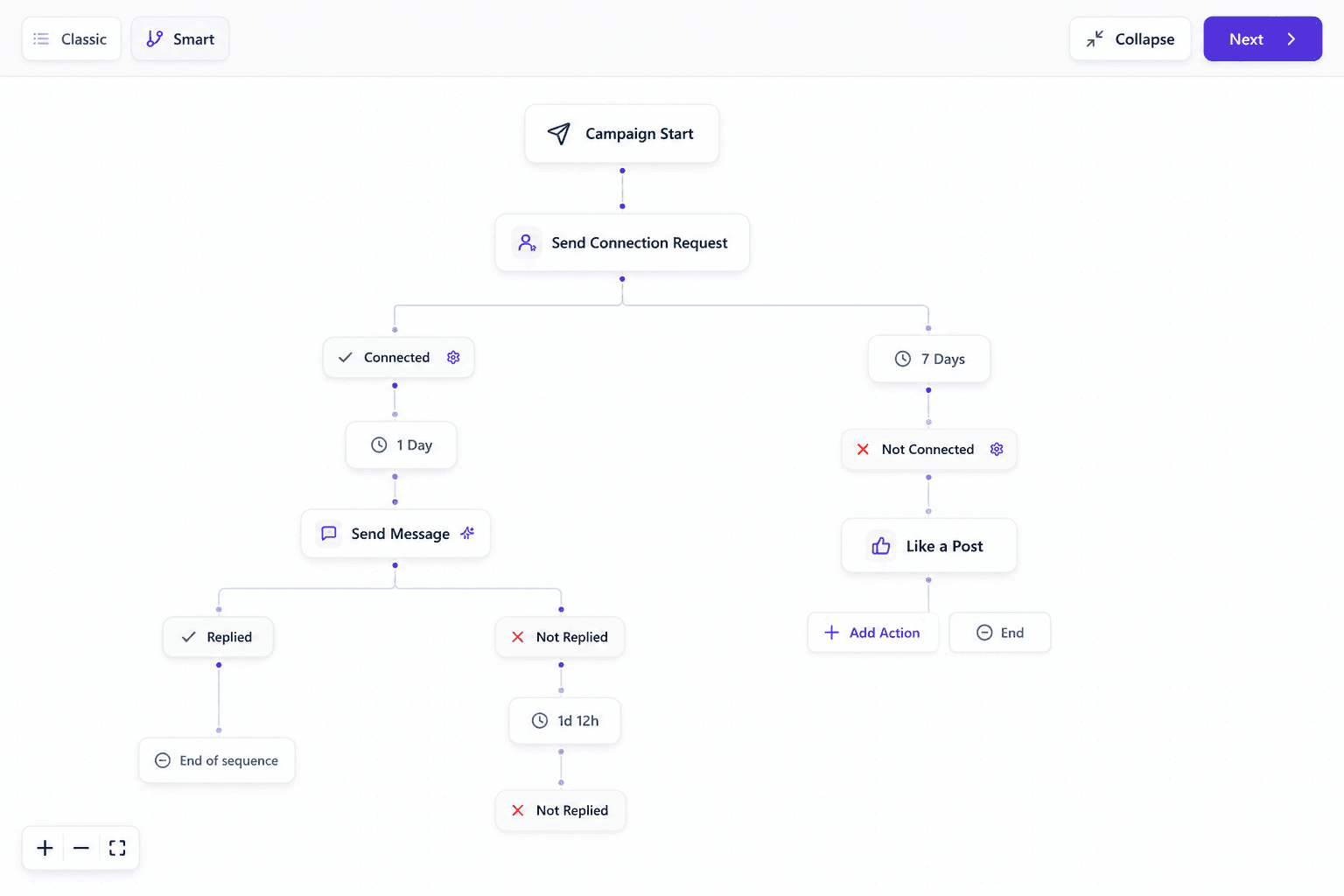
For a simple connection-based campaign, your plan might be:
- 1.Send a connection request to an eligible prospect.
- 2.Wait for the relevant connection outcome.
- 3.Send an introductory message on the accepted path.
- 4.Wait before a follow-up.
- 5.Stop automated follow-ups when the prospect replies, according to the campaign's reply settings.
This is a planning example. Choose the supported actions and conditions in the builder, and check each action's prerequisites. A normal LinkedIn message, recorded voice note, free Open Profile InMail and paid InMail are different delivery routes. An unaccepted connection does not automatically make a normal message deliverable, and a free InMail route is not a universal substitute for paid InMail.
Keep every path readable. If you cannot explain why a prospect reaches a particular message, simplify the sequence before launch.
Set timing at the campaign level
Review the campaign timezone, enabled operating days and hours. Then review waits between steps. A wait becoming due does not override the campaign's operating hours or the sender's action limits.
For example, a follow-up may finish its wait outside the campaign's allowed hours. It still needs the schedule and sender controls to permit execution. Use the campaign timezone shown in the setup; do not assume OutFlo automatically sends at each recipient's local time.
Preview messages for representative leads, including a missing-variable case, before launching. Review exclusions and reply-stop behavior along with the sequence itself.
Distinguish step controls from editing the graph
Execution controls change what happens when leads encounter supported nodes. They do not make every launched sequence structure freely editable.
- Control
- Run
- Intended effect
- Allow normal processing at the node
- What to review
- Whether previously stopped leads also need an explicit resume choice
- Control
- Stop
- Intended effect
- Stop progression at that node
- What to review
- Which current and downstream leads the chosen operation affects
- Control
- Skip
- Intended effect
- Bypass the node through a valid continuation
- What to review
- The exact next, positive or negative path selected
- Control
- Disable or enable a branch
- Intended effect
- Change execution for a supported subtree
- What to review
- Leads already inside the branch and actions already in flight
| Control | Intended effect | What to review |
|---|---|---|
| Run | Allow normal processing at the node | Whether previously stopped leads also need an explicit resume choice |
| Stop | Stop progression at that node | Which current and downstream leads the chosen operation affects |
| Skip | Bypass the node through a valid continuation | The exact next, positive or negative path selected |
| Disable or enable a branch | Change execution for a supported subtree | Leads already inside the branch and actions already in flight |
On a branched node, skipping requires an explicit supported outcome. A skip cannot guess between two possible continuations. Some structural nodes and connection-request steps in flat sequences do not support these controls.
Review existing leads before changing a control
Read a few affected lead timelines and locate their current steps. An action already sent cannot be undone by changing a node. An action in flight may also limit which leads can change immediately.
If you turn a stopped node back to Run, inspect whether the operation offers to resume leads stopped there. Changing future processing and resuming existing stopped leads are separate decisions. Do not assume that changing a branch restarts every lead beneath it.
For substantial changes to the audience or sequence structure, a reviewed new draft may be easier to reason about than a series of runtime controls.
Share a reusable sequence
A public sequence preview link lets someone inspect the structure and import it into their own draft. The destination team chooses its own audience and senders before launch.
Review the message copy before sharing: remove client-specific wording or details that should not travel with a template. Revoke the link when it should no longer be accessible. Reusing a sequence does not validate the destination campaign's sender access, data or schedule.
Diagnose a lead that has not progressed
Check the lead's current state, next node, wait and condition outcome. Then check whether the node or branch is stopped, skipped or disabled, whether a reply stopped outreach, and whether sender capacity or campaign hours are blocking the next action. Use the timeline to distinguish a successful action from a waiting or failed attempt.
See campaign setup and the recorded voice-note walkthrough, or explore Smart Sequences.