When a lead replies before the campaign has fully finished, you may want to restart outreach for that lead and let the campaign continue from an active state again. OutFlo gives you two ways to do that:
- From Unibox: Open the lead's journey and resume them from the side drawer.
- From the Campaign Lead List: Select the lead in the campaign and use the resume action from the toolbar.
This guide explains when the option appears, how each flow works, and what to expect after the lead is resumed.
1. When Can A Lead Be Resumed?
A lead becomes eligible for resume when both of these conditions are true:
- The lead has received a reply
- The campaign on that lead was not fully completed
In practice, this means the lead replied during the campaign journey, but there are still campaign actions that can be allowed again after you choose to resume them.
2. Resume A Lead From Unibox
In Unibox, eligible leads show a fast forward icon beside the star icon on the lead row.

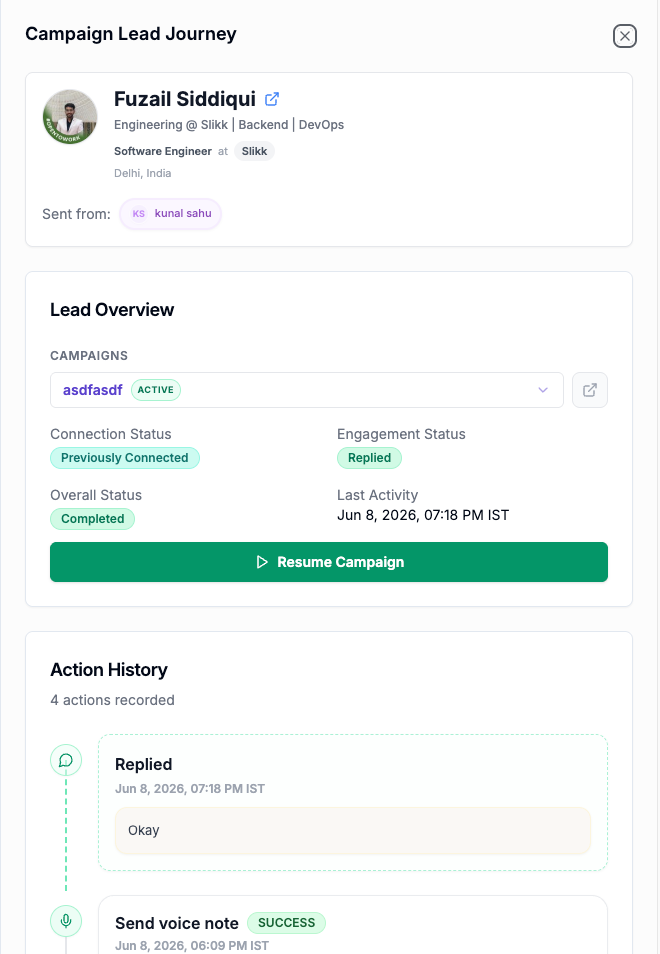
Clicking this icon opens the Campaign Lead Journey drawer for that lead.
Inside the drawer, you can review:
- The active campaign associated with the lead
- Connection status
- Engagement status
- Overall status
- Last activity
- The lead's action history
If the lead is eligible, you will see a Resume Campaign button in the Lead Overview section.
What Happens In The Drawer Flow?
When you click Resume Campaign from this side drawer, the lead is resumed immediately. There is no confirmation modal in this flow.
This is the faster path when you are already reviewing replies inside Unibox and want to restart the campaign directly from the lead's journey.
3. Resume A Lead From The Campaign Lead List
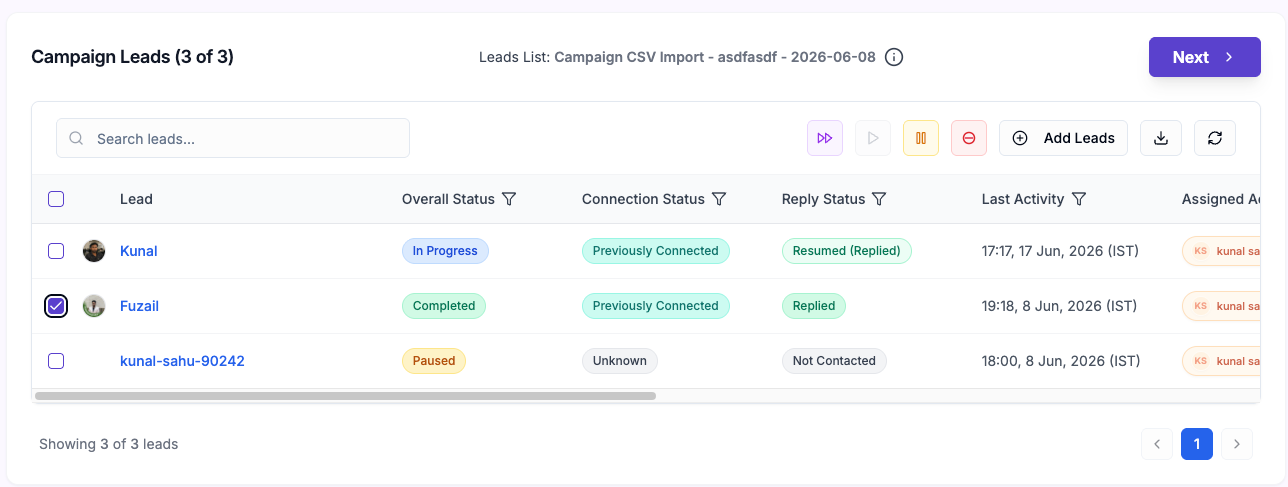
You can also resume eligible leads from the lead list view inside a campaign.
Open the campaign, go to the lead list, and select a lead that matches the resume conditions. When at least one selected lead is eligible, OutFlo shows the Resume Campaign option in the toolbar.
This is especially useful when:
- You are reviewing campaign leads in bulk
- You want to resume a lead without opening Unibox
- You are already managing statuses from the campaign page
4. Confirmation Modal On Campaign Page
When a lead is resumed from the campaign page, OutFlo shows a confirmation modal before restarting the campaign for that lead.
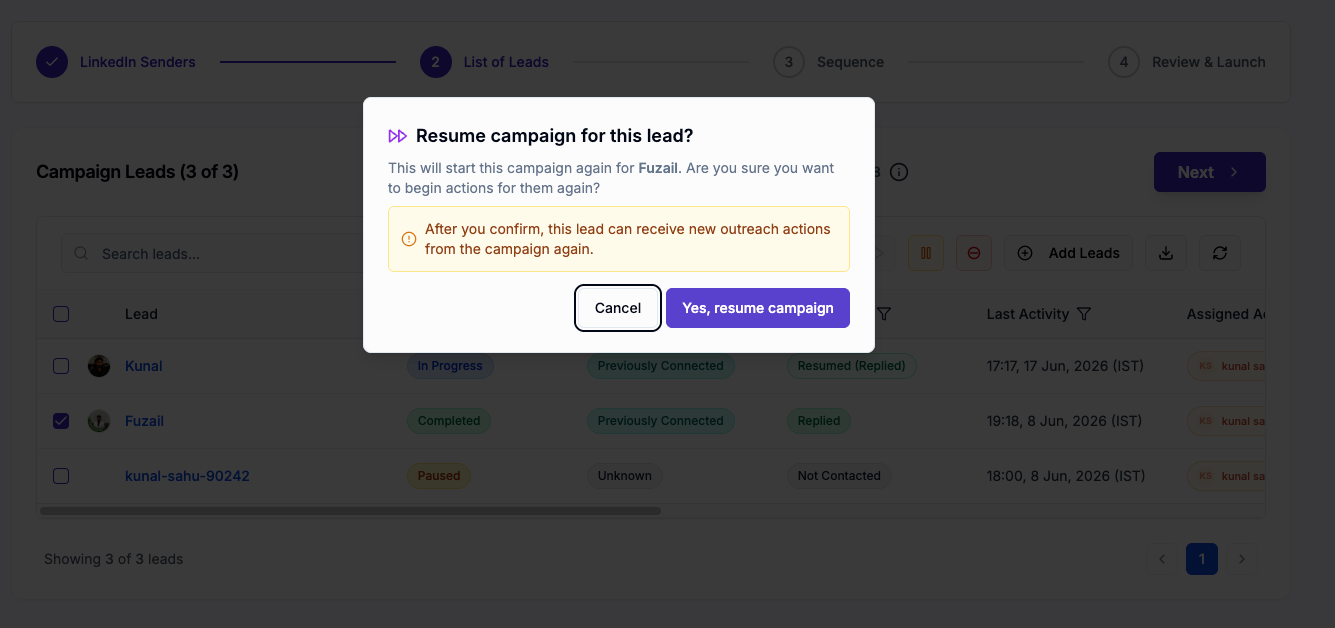
The modal makes it clear that:
- The campaign will start again for that lead
- The lead can receive new outreach actions from the campaign again
To continue, click Yes, resume campaign.
5. What Changes After A Lead Is Resumed?
Once resumed, the lead becomes active in the campaign again and can receive future outreach actions based on the configured sequence.
You may also notice status changes in the lead list that help indicate what happened. For example, a reply-related status can reflect that the lead has been resumed after replying.
This makes it easier for teams to understand:
- Which leads replied
- Which replied leads were resumed
- Which leads are now active again inside the campaign
6. Best Practices Before You Resume
Before resuming a replied lead, it's a good idea to quickly review the conversation and the lead's recent activity.
Use resume when:
- The reply does not fully close the conversation
- You want the lead to continue through the remaining campaign flow
- Your team has intentionally decided to re-enter the lead into outreach actions
Avoid resuming immediately when:
- The reply already indicates strong intent and should move to manual follow-up
- The conversation has already progressed outside the campaign
- Additional automation would feel repetitive or unnecessary
7. Quick Summary
Here is the full behavior in one place:
- 1.A lead is eligible when they have received a reply and the campaign was not completed on that lead.
- 2.In Unibox, a fast forward icon appears next to the star icon for eligible leads.
- 3.Clicking that icon opens the Campaign Lead Journey drawer.
- 4.In the drawer, users can click Resume Campaign to resume the highlighted campaign immediately.
- 5.On the campaign lead list page, users can select an eligible lead and use the resume action from the toolbar.
- 6.The campaign page shows a confirmation modal before resume.
- 7.The side drawer flow resumes directly with no modal.
If your team regularly works replied leads across both Unibox and campaign views, this feature gives you a quick and controlled way to restart campaign actions exactly where you need them.