
Someone visits your pricing page, leaves, and comes back a few days later. They may be comparing tools or checking whether your product fits their budget. If they never book a demo or start a trial, that interest is easy to miss.
At OutFlo, we use Warm AI to get more context on the companies visiting our website. It connects identified businesses to their browsing activity, and sends visitor alerts to our Slack channel.
We can see which accounts are returning and what they have been looking at before deciding whether to follow up. Here is what that looks like in our own account.
What Warm AI helps us see
Warm AI is a website visitor identification tool. It shows identified companies alongside their website activity, including pages viewed, visit history, active time and engagement labels. Company profiles add context such as industry, size and location.
That helps us answer a question a total traffic count cannot: which businesses are looking at OutFlo, and what are they spending time on?
Warm AI says it combines several identification sources to improve coverage. For our team, having the company and its browsing history together makes it easier to choose which accounts deserve a closer look.
What our 30-day report shows
On 19 October 2026, Warm AI’s Reports screen, with 30 days selected, displayed these figures for our website:
- Metric in Warm AI
- Companies identified
- Displayed total
- 288
- Metric in Warm AI
- High-intent visitors
- Displayed total
- 114
- Metric in Warm AI
- Returning visitors
- Displayed total
- 84
- Metric in Warm AI
- Pricing page visits
- Displayed total
- 68
| Metric in Warm AI | Displayed total |
|---|---|
| Companies identified | 288 |
| High-intent visitors | 114 |
| Returning visitors | 84 |
| Pricing page visits | 68 |
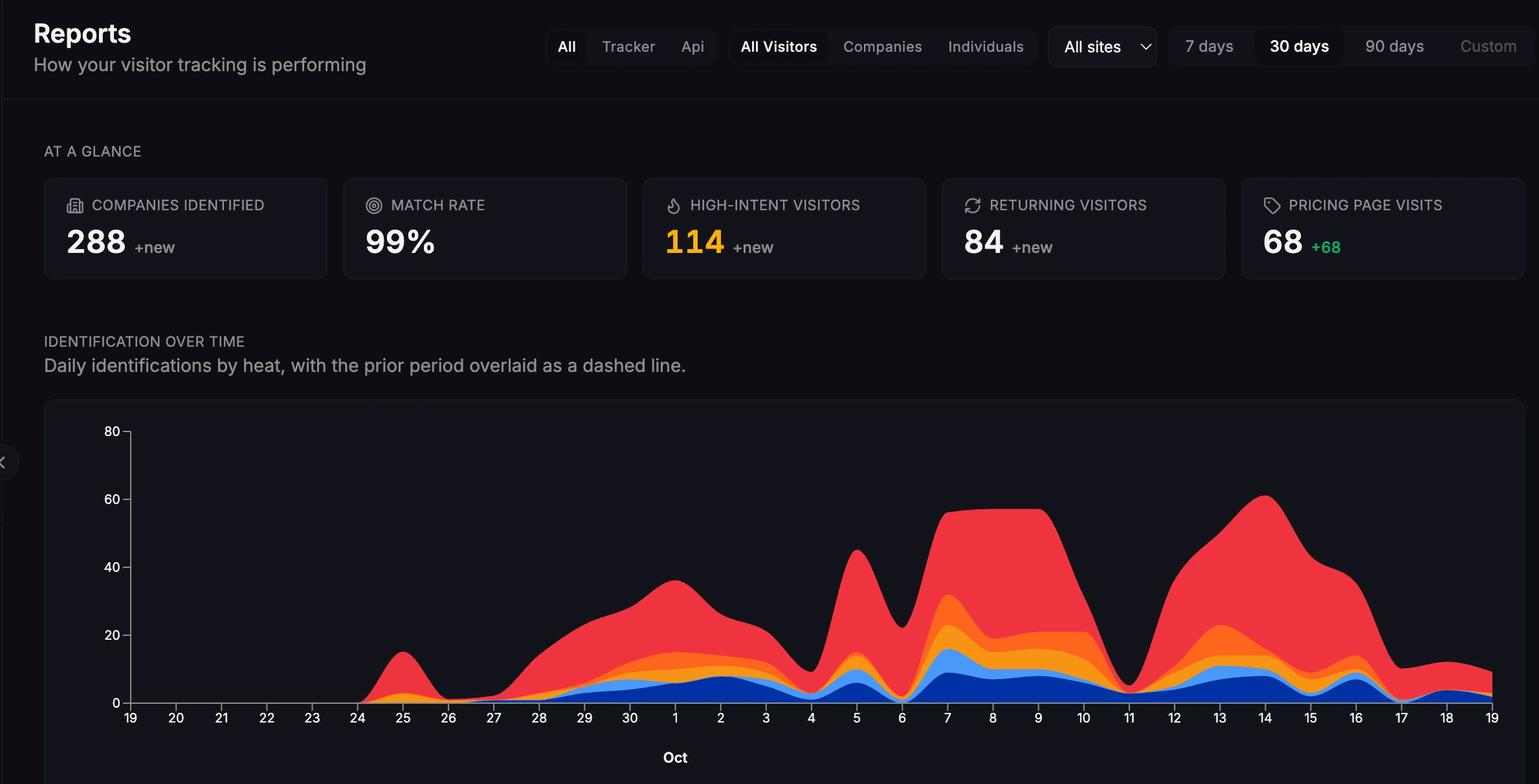
The categories can overlap. These are activity figures from the selected report, not a count of qualified sales opportunities.
The report gives us an overview. Opening an individual company lets us look at its sessions and page journeys to understand what is behind the activity.
A real example from our pricing page
One account had four recorded sessions on 6 and 19 October. Three sessions were on the first day, followed by another visit nearly two weeks later.
Across those sessions, the journey showed eight page views. Seven were on /pricing. The most recent session returned directly to that page and recorded about 30 seconds of active time.
That is a more specific reason to investigate than a single homepage view. The account has repeatedly returned to a page that answers a commercial question, and its interest has reappeared after a gap.
We can then check whether the company fits OutFlo and whether there is already a conversation with someone on the team.
We also have a saved segment called Pricing page visitors. Its card displayed 58 companies on 19 October. This is the size shown for that saved segment, separate from the report’s Pricing page visits metric.
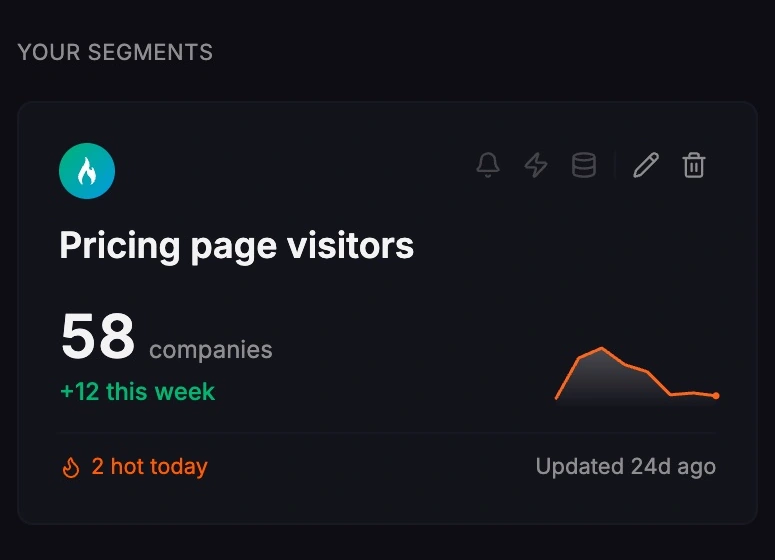
Saved groups give the team a list to return to without starting again from the full visitor feed. Industry, size, location and engagement filters help narrow the review further.
Website visitor alerts in our Slack channel
Our Warm AI account sends visitor alerts to Slack, where the team can notice them during the working day.
The alerts include the company name, its domain and the time of the visit, with a View visitor in Warm AI button. Someone can open the profile from the alert and review the activity while it is recent.
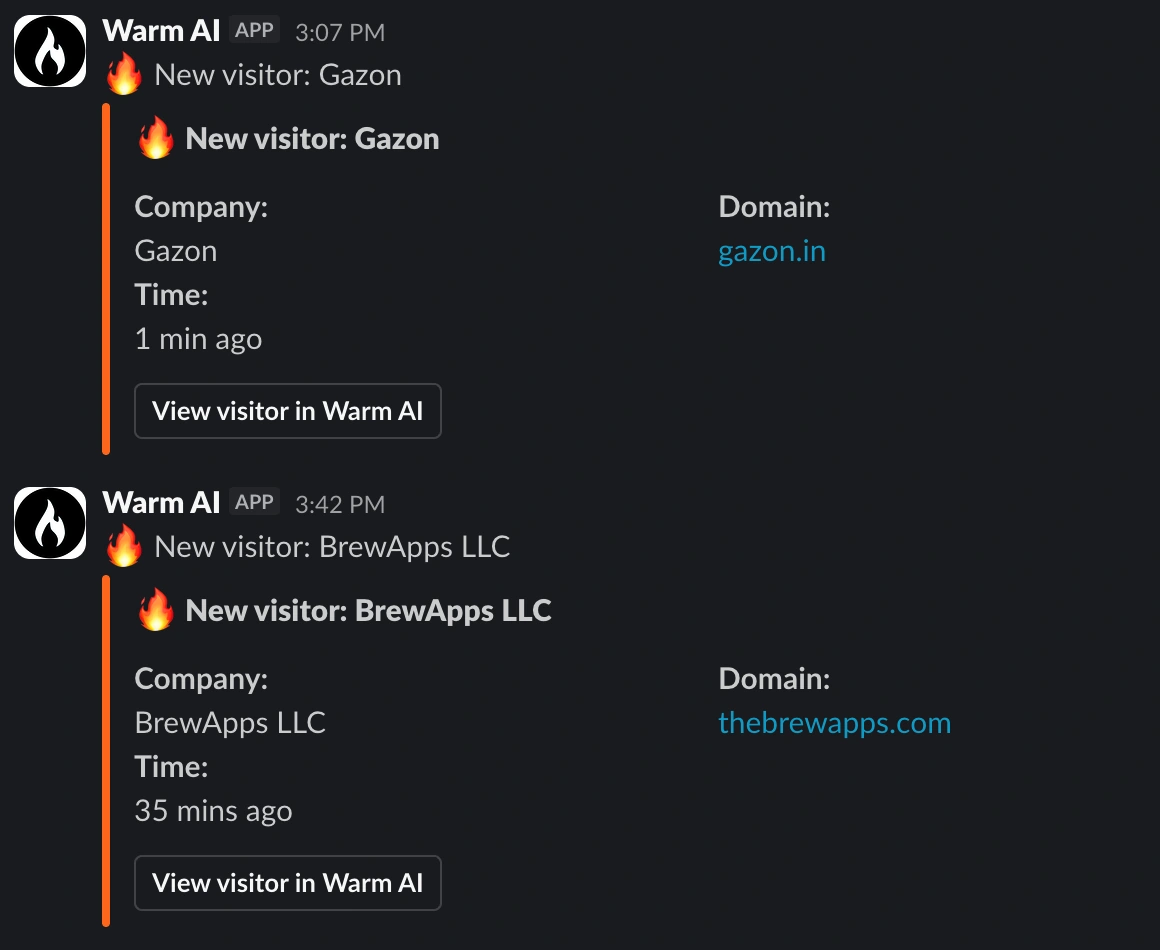
For a small team, this removes the need to keep checking another dashboard. An alert brings the account to our attention; the visitor history helps us decide what to do next.
How to decide which visitors deserve attention
Consider account fit and behaviour together. A good-fit company returning to pricing deserves more attention than an unrelated business making a brief visit. A useful review looks at four things:
- 1.Company fit. What does the company do, and does your product solve a relevant problem for it?
- 2.Recent activity. Which pages did it view, did it return, and how recently? Read the session history alongside the engagement label.
- 3.Existing relationships. Is it already a customer, in a trial or talking to someone on the team?
- 4.The next step. Research a relevant contact, share the activity with an account owner, or watch for another visit. Some accounts will need no action.
A high-intent label is a useful starting point for that review. It does not tell you who makes the buying decision or establish that the company is ready to buy.
Where Warm AI fits alongside OutFlo
Warm AI helps a team choose which accounts to research. OutFlo handles LinkedIn outreach and the replies that follow. A team can use both in a simple workflow:
- 1.Review the company and its recent activity in Warm AI.
- 2.Confirm the account fits and check for an existing conversation.
- 3.Find a relevant person on LinkedIn and decide whether outreach would be useful.
- 4.Use OutFlo’s Smart Sequences for the outreach steps and shared inbox to manage replies.
This is a manual review workflow. The Slack alerts do not automatically enroll visitors in an OutFlo campaign.
Keep any message relevant to the person’s role and business. A company match does not prove that a particular employee visited. If there is already an active conversation, answering their question may be more useful than starting a new sequence.
How to evaluate Warm AI on your own site
Start with Warm AI’s Quick Start guide: add your website, install the tracking snippet and verify that sessions are appearing. Follow its installation and consent guidance for your site.
Then pick a question your team can act on. For a SaaS business, that might be which good-fit companies return to pricing or read a product comparison. Review a few profiles, read their journeys and check whether those companies match the customers you want to reach.
Use saved segments to keep useful groups available, and watch accounts you want to hear about again. The report’s traffic sources and page activity can help you see which content those visitors are finding. CSV export is available if you want to review identified accounts elsewhere.
For evaluation, we would look at how many accounts fit our customer profile and whether the browsing history gives the team a useful reason to act. That is more informative than the largest identification count on its own. Keep using your website analytics to measure traffic and conversions alongside this account-level view.
Company identification and privacy
Warm AI’s privacy documentation says named person identification is limited to US visitors. UK and EU visitors are shown at company level. The distinction matters when deciding what the data tells you and how to use it.
The same documentation explains the website operator’s responsibilities for deployment, notices and consent configuration, and links to its data processing agreement. Review those details for your own site.
Why we use Warm AI
Warm AI helps us notice companies that are researching OutFlo before a sales conversation begins. The repeat pricing-page visits give us something specific to investigate, and Slack makes that activity easier for the team to notice during the day.
If your website is getting visits but your team has little context on the businesses behind them, take a look at Warm AI. Start with the accounts that fit your product, and use their recent activity to decide on a helpful next step.
