
Saving hours with OutFlo
How OutFlo helps the Kirkham IronTech team reclaim time in their outreach workflow.
Kindsey HaynesCMO, Kirkham IronTech
Watch on YouTubeWe use essential technologies to keep this site running. With your permission, we also use analytics, advertising, and functional tools to understand and improve it.Read our Privacy Policy
OutFlo vs. MeetChase.ai
Turn your LinkedIn accounts into a pipeline. Run campaigns, personalize messages and handle replies in OutFlo—without a fee for every meeting that goes ahead.
8 days free · 3 account seats · No credit card · Guided setup
MeetChase.ai pricing vs. OutFlo
Chase starts at $39/month, then charges $250 for each qualified meeting actually attended. OutFlo’s LinkedIn subscription has no per-meeting success fee.
Illustration for one connected OutFlo account on Growth, billed monthly. Meeting volume is an input, not a forecast.
MeetChase.ai
$39 base + 5 × $250 attended meetingsOutFlo Growth
1 connected LinkedIn account · no meeting feeDifferent service scopes: Chase includes contacts and native calendar booking; OutFlo covers your LinkedIn campaign and inbox workflow. Chase add-ons and OutFlo AI/provider usage are excluded from this subscription illustration. No-shows and cancellations do not incur Chase’s meeting fee.
Running more accounts? See Growth and Booster pricing. Ready to start? Try OutFlo free for 8 days.
Built for the work behind the meetings
Run multiple LinkedIn accounts from one place. Allocate a slice of each sender’s daily capacity to the right campaign, so a priority client or offer gets its share.
Keep teams and clients organized in workspaces, build Smart Sequences and manage the campaign without switching between profiles.
Explore LinkedIn automation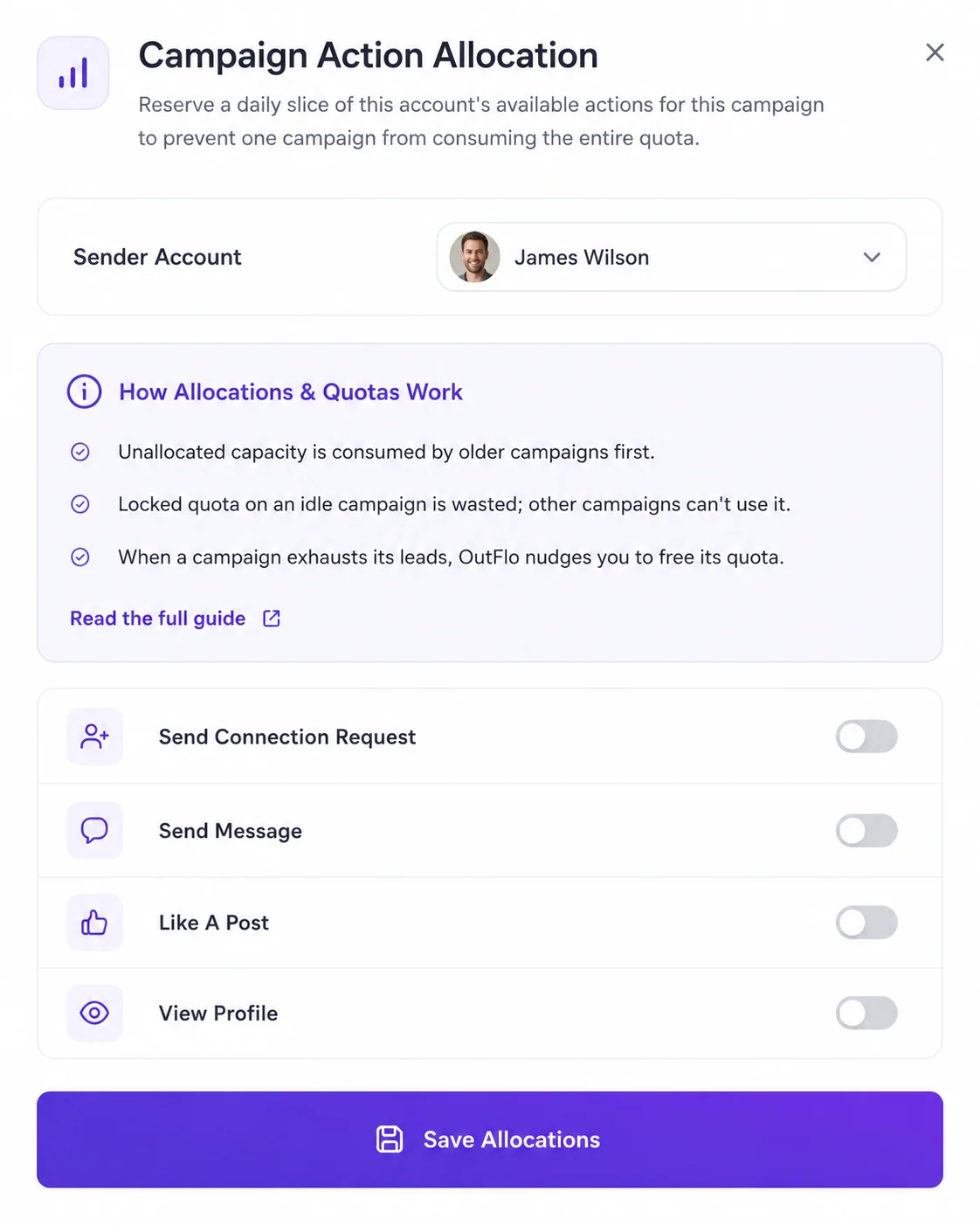
AI Reply Setter is available now. Use Copilot to prepare replies for approval, or eligible Autopilot replies within your configured limits. Take over when a conversation needs you.
Work from the shared inbox with conversation context, and move interested prospects toward your calendar link.
See AI Reply Setter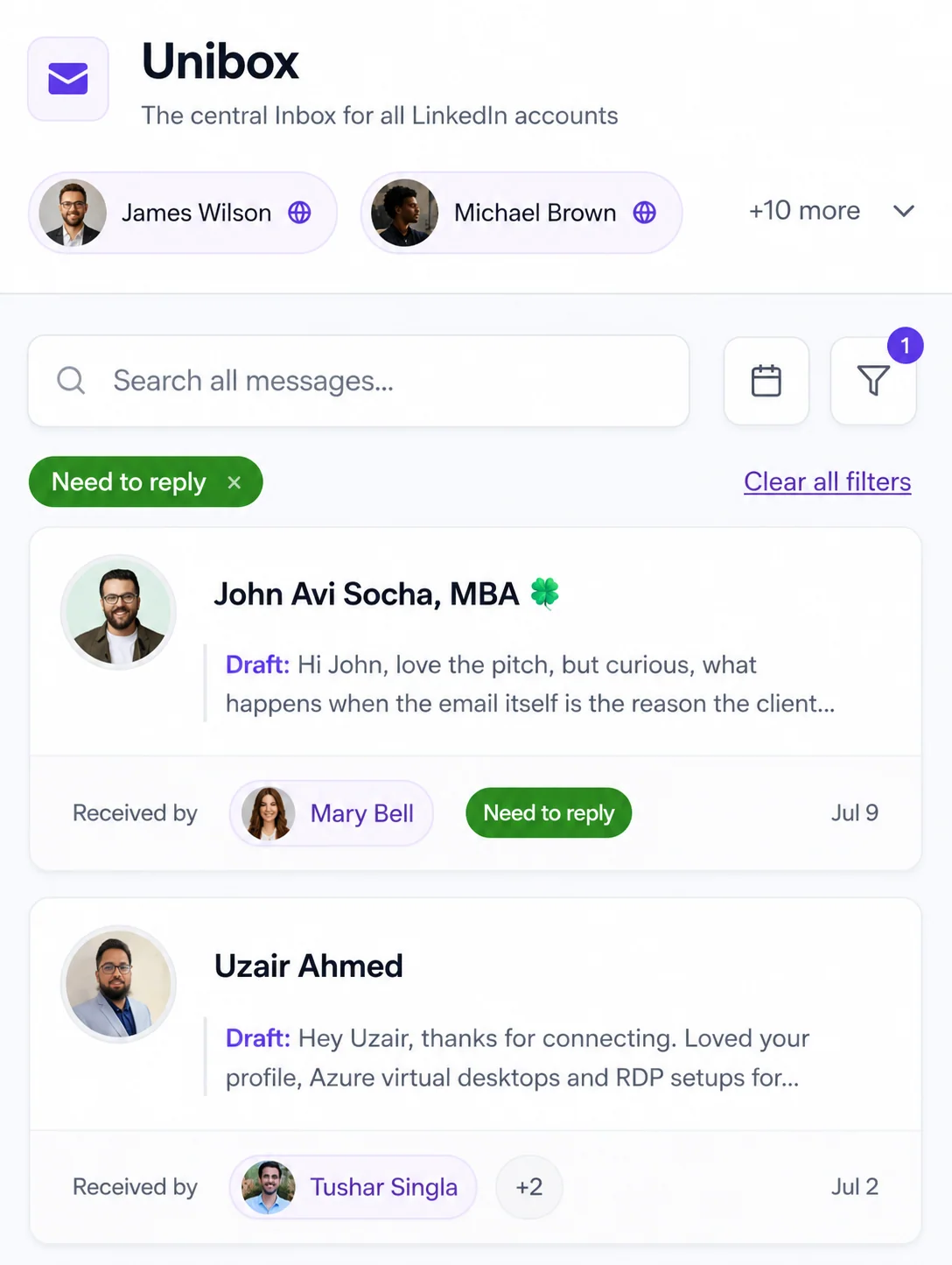
OutFlo generates a personalized voice note for each lead in a hyper-realistic voice. Send them at campaign volume, preview the result and use private voice cloning when you want the message to sound like you.
AI Voice Notes are available now.
Hear how AI Voice Notes workOutFlo vs. Chase by ChaseLabs
Bring LinkedIn campaigns, sender control and AI-assisted conversations into one workflow. Here’s how the two products compare.
Swipe the table to compare both tools →
| What you need | OutFlo | MeetChase.ai |
|---|---|---|
| Pricing model | From $49/connected account/month on Growth. No per-meeting success fee. | $39/month base + $250 per qualified meeting actually attended. |
| LinkedIn outreach | LinkedIn campaigns, connected senders and per-campaign sender allocations. | Email + LinkedIn in one sequence; LinkedIn is labeled beta. |
| AI reply handling | AI Reply Setter: Copilot approval, eligible Autopilot replies and human takeover in Unibox. | Knowledge-base replies, human review or autopilot, with escalation. |
| Personalized AI voice | Generated per lead, with voice previews and private voice cloning available. | Personalized AI voice notes are not described on the reviewed public skill pages. |
| Lead sourcing | Bring your prospect lists and existing data-provider workflow. | Advertises a 95M+ business-contact database, enrichment and ICP search. |
| Meeting handoff | AI replies can share your scheduling link. | Native Google/Microsoft calendar availability and confirmed invites. |
| Team workflow | Multiple connected accounts, client workspaces, shared inbox and campaign controls. | AI SDR workflow across prospecting, outreach, nurture and conversion. |
Comparison based on Chase’s published pricing, Craft, Nurture, Prospect and Convert pages. Undocumented features are not assumed absent. Prices and availability can change.
Real teams. Their own words.
From agency campaigns to the day-to-day inbox, hear what using OutFlo looks like for these teams.
How OutFlo helps the Kirkham IronTech team reclaim time in their outreach workflow.
Kindsey HaynesCMO, Kirkham IronTech
Watch on YouTubeMuhammad highlights affordable pricing and regular updates to the platform.
Muhammad Haroon KhaldiCEO & Co-Founder, Treszon
Watch on YouTubeWhy responsive, hands-on support mattered when the team changed their outreach platform.
Aakash MkCo-Founder & CEO, GrowthMak
Watch on YouTubeA practical look at keeping a multi-account outreach workflow organised, with founder access when it counts.
Nettie EmeryVP, ProspectHunter
Watch on YouTubeMake the switch
Start your 8-day trial and connect your senders. Guided setup helps you get the workflow in place.
Import an authorized CSV, set up your sequence and assign sender capacity. Carry across suppression lists and exclude active outreach.
Start with a separate prospect cohort. Set your AI reply preferences, preview your messages and pause overlapping outreach before expanding.
Campaigns are set up in OutFlo. Chase campaign history, conversations and reporting are not automatically transferred.
Your questions, answered
OutFlo gives you connected LinkedIn accounts, multi-account campaigns, sender allocations, a shared inbox, AI Reply Setter and personalized AI Voice Notes. Growth starts at $49 per connected account per month on monthly billing, without a per-meeting success fee. Start the 8-day trial to put your own LinkedIn workflow into action.
Chase by ChaseLabs is an AI SDR that sources prospects, sends email and LinkedIn outreach, nurtures replies and books meetings. Its public Craft page labels LinkedIn as beta. OutFlo focuses on running LinkedIn outreach across your connected accounts, controlling campaign capacity and handling conversations in a shared inbox. Choose OutFlo to put that LinkedIn operation in your team’s hands.
Chase’s published base plan is $39/month with 500 verified, ICP-matched contacts and an AI budget of up to $9. It adds $250 per qualified meeting actually attended; no-shows and cancellations are not charged. Extra contacts, provisioned mailboxes, domains and AI usage can add charges. Enterprise pricing is custom. Prices were checked on October 23, 2026.
No. OutFlo charges for your subscription and applicable usage, without a per-meeting success fee. Growth is $49 per connected LinkedIn account per month on monthly billing. Larger teams can use Booster account bundles. AI usage and provider allowances still apply; see the pricing page for plan details.
Yes. Chase’s Craft page describes email and LinkedIn within a single sequence and currently labels LinkedIn beta. OutFlo is built around LinkedIn campaigns, connected sender accounts, reply handling and personalized voice notes. OutFlo’s subscription does not replace Chase’s provisioned email infrastructure.
OutFlo offers a 8-day trial with 3 LinkedIn account seats, no credit card required and guided setup. Chase’s reviewed public pages offer Get Started and Book Demo links but do not specify a fixed free-trial duration. You can start OutFlo directly from this page.
Bring your prospect list into OutFlo and build LinkedIn campaigns around your niche, offer and target audience. OutFlo does not include the 95-million-contact database advertised by Chase. Keep your existing lead research or data provider, then use OutFlo to run personalized LinkedIn outreach and manage replies.
Yes, both are available. AI Reply Setter supports Copilot drafts for approval and eligible Autopilot replies, with human takeover. AI Voice Notes are generated and personalized per lead in a hyper-realistic voice, so you can use them at campaign volume without recording every message yourself. Voice previews and private voice cloning are available; usage and provider allowances apply.
OutFlo’s AI Reply Setter can work toward your campaign objective and share your calendar link. It does not replace Chase’s native Google or Microsoft calendar availability lookup and confirmed-invite workflow. Your prospects book through your scheduling link.
Connect your LinkedIn senders, import a CSV of prospects you are authorized to contact, and build your campaign with sender allocations and reply settings. Carry across your suppression list and exclude prospects already in active outreach. Start with a separate cohort, then pause overlapping outreach before expanding. This is a new campaign setup, not an automatic transfer of Chase campaigns, conversations or reporting history.
More conversations. One LinkedIn workflow.
Connect your accounts. Launch a campaign. Turn replies into your next meeting.
8 days free · No credit card required